


Lumen
Effortless world lighting with torches and commands and optimized performance
📖About Lumen
Lumen – Advanced Lighting for Minecraft
Lumen is a Minecraft plugin designed to enhance server quality of life by optimizing lighting. It allows efficient area illumination using commands and offers unique items:
- Lumen Torch – Automatically lights up the surroundings with custom light level.
- Lumen Guard – Prevents hostile mobs from spawning.
💡Attention: NO resource pack needed!



⚡️ Features
- Dynamic lighting using commands and custom crafteable items (No resource pack needed).
- Auto-lighting torches with custom light level (Lumen Torch).
- Mob spawn prevention (Lumen Guard).
- Integration with CoreProtect & FAWE. (Recommended)
- Multilingual Support – Available translations: Spanish, Chinese, English, French, German, Italian and Brazilian Portuguese. Custom languages can be added.
Usage
For Players
- The
Lumen Torchautomatically lights up nearby areas.- Players can right-click the air while holding a Lumen Torch and input a light level between 0 and 15.
- The selected light level will be stored in the torch and applied when placed.
- The
Lumen Guardprevents mob spawning within its range. - Torches can be removed without being lost, and their effects disappear when removed.
- To craft them, you need
lumen.craft.torchandlumen.craft.guardpermissions.
Crafting Recipes
Lumen Torch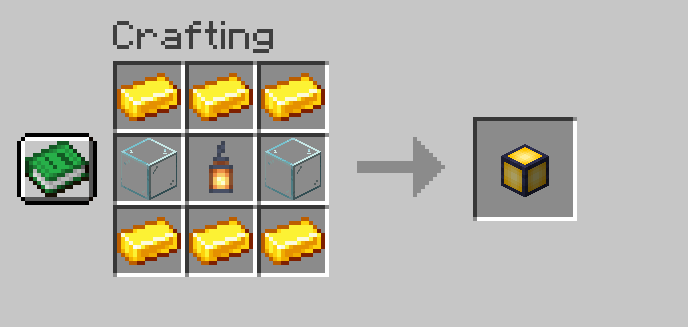
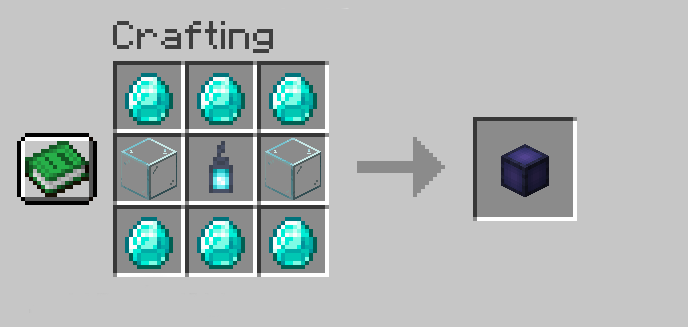

🛠️ Compatible Integrations
Lumen can leverage other tools to enhance performance and functionality:
CoreProtect – Logs light placements and removals, allowing rollbacks and audits.
FastAsyncWorldEdit (FAWE) – Optimizes light block placement through commands and the Lumen Torch, improving server performance.


These integrations are optional but recommended for better control and efficiency.
🔐 Commands & Permissions
CommandsLumen also provides a variety of aliases for each command /lumen, /lu, and /l.
/lumen light <range> <light_level> <include_skylight>– Places lights dynamically./lumen undo– Undoes previous light placements./lumen redo– Redoes removed lights./lumen remove area <range>– Removes lights in a specified area./lumen clear confirm– Clears all registered lights./lumen give <player/all> <torch_type> <quantity>– Gives torches to players./lumen reload– Reloads configuration and translations.
- OP Permissions:
lumen.light– Permission to use/lumen light.lumen.cancel– Permission to cancel active tasks.lumen.undo– Permission to undo placements.lumen.redo– Permission to redo removed lights.lumen.remove– Permission to remove lights.lumen.clear– Permission to clear all lights.lumen.give– Permission to giveLumen TorchandLumen Guard.lumen.reload– Permission to reload configuration and translations.
- PLAYER Permissions:
lumen.craft.*– Permission to craft all Lumen items.lumen.craft.torch– Permission to craft theLumen Torch.lumen.craft.guard– Permission to craft theLumen Guard.
For Administrators
- Advanced light management using commands.
- Safe light removal with
/lumen remove. - Undo and redo light placements with
/lumen undoand/lumen redo. - Clear all lights with
/lumen clear(Dangerous). - Item distribution using
/lumen give. - Full customization through
config.ymland translation files inTranslations/. - Integration with CoreProtect and FAWE for enhanced performance and control.
- Change the plugin language with
/lumen lang. - Reload configuration and translations with
/lumen reload. - Adjust performance settings in
config.yml: Control the number of lights placed per tick and the interval between torch ticks. - Control the permissions of each command and item.
📌 Installation Guide
InstallationPrerequisites
Before installing Lumen, make sure your server meets the following requirements:
- Minecraft Server: PaperMC 1.21 or higher (recommended 1.21.4, the latest stable version).
- Java: Version 21 or higher.
- Optional Dependencies:
- CoreProtect (Optional): Enables tracking and rollback of placed or removed lights. Integration can be verified in the console upon server startup.
- FastAsyncWorldEdit (Optional): Optimizes performance for placing and removing large amounts of lights.
Step 1: Download the Plugin
Download the latest version of Lumen from Modrinth and ensure you obtain a valid .jar file.
Step 2: Installation
- Upload the file
Lumen.jarto theplugins/folder of your PaperMC server. - Restart the server to automatically generate the configuration files.
- Verify installation by checking the console. If the installation was successful, you will see a message indicating that the plugin has been loaded correctly.
Step 3: Initial Configuration
- Navigate to the configuration folder:
plugins/Lumen/ - Edit
config.ymlto adjust performance settings, such as:command_lights_per_tick: Number of lights added per tick when using commands.torch_lights_per_tick: Number of lights added per tick when using torches.torch_tick_interval: Interval between torch ticks.mob_torch_radius: Protection radius of the anti-mob torch.
- If using CoreProtect, check the server console on startup. If integration is successful, you will see a message indicating that CoreProtect has been detected and is active in Lumen.
- If using FastAsyncWorldEdit, ensure it is installed and properly configured to optimize the placement and removal of lights.
Step 4: Troubleshooting
- The plugin does not load: It is recommended to use PaperMC 1.21.4, the latest stable version. Also, ensure you are using Java 21 or higher.
- CoreProtect errors: Check the console when starting the server. If integration does not activate, ensure CoreProtect is correctly installed.
- Low performance when placing lights: Adjust values in
config.ymland/or install FastAsyncWorldEdit to optimize large-scale block processing. - Only newly placed
Lumen TorchandLumen Guardwill have effects of changes in config.yml. Previously placed torches will not be affected unless removed and placed again.
💬 Support & Contact
If you have any questions or encounter issues, feel free to contact us on Discord