Logo
MINECRAFTBIBLE
Items
Items

All game items

Blocks
Blocks

Building blocks

Mobs
Mobs

Creatures & monsters

Biomes
Biomes

World biomes

Structures
Structures

Generated structures

Recipes
Recipes

Crafting guides

Advancements
Advancements

Achievements

Loot Tables
Loot Tables

Drop rates

Tags
Tags

Item groupings

All Versions
View all data →
Capes
Cape ArchiveNEW

Browse rare Minecon capes, OptiFine capes, and custom capes from players worldwide

Browse

Player Database
Player DatabasePopular

Search any player

Skin Browser
Skin Browser

Browse & download skins

Cape Gallery
Cape GalleryNEW

Minecon & OptiFine capes

Seed Vault
Seed Vault

Curated seeds

Learn

Guides
GuidesNew

Tutorials & tips

Blog
Blog

News & updates

Community

Community Hub
Community HubHub

Posts, discussions & more

All Versions
View community →
Seed Analyzer
Seed Analyzer

World seed analysis

Loot Explorer
Loot Explorer

Drop rates

Crafting Calculator
Crafting Calculator

Material planning

Enchant Calculator
Enchant Calculator

Probability math

Redstone Lab
Redstone Lab

Signal timing

Trading Profit
Trading Profit

Villager ROI

All Versions
View all tools →
Mods
Mods

Browse all mods

Plugins
Plugins

Server plugins

Resource Packs
Resource Packs

Textures & sounds

Shaders
Shaders

Visual enhancements

Datapacks
Datapacks

World logic

Scanner
Mod Intelligence

Scan & analyze any mod

All Versions
View all mods →
Loading...
IntroductionIntroductionVersion HistoryVersion HistoryGuidesGuidesBlog & NewsBlog & News
ItemsItemsBlocksBlocksMobsMobsRecipesRecipesBiomesBiomesStructuresStructuresAdvancementsAdvancementsLoot TablesLoot TablesTagsTags
ModsModsPluginsPluginsResource PacksResource PacksShadersShadersDatapacksDatapacks

MinecraftBible

The Ultimate Wiki

Logo
MINECRAFTBIBLE

The ultimate Minecraft reference. Every item, block, mob, and recipe documented with precision.

Community

  • Skin Browser
  • Cape Gallery
  • Seed Vault
  • Blog
  • Guides

Database

  • Items
  • Blocks
  • Mobs
  • Recipes
  • Biomes
  • Structures

Tools

  • Seed Analyzer
  • Mod Intelligence
  • Crafting Calculator
  • Enchant Calculator

Mods & Packs

  • Mods
  • Plugins
  • Resource Packs
  • Shaders
  • Datapacks

Site & Legal

  • About
  • Authors
  • Editorial Policy
  • Corrections
  • Contact
  • Privacy Policy
  • Terms of Service
  • DMCA
  • Sitemap

© 2026 MinecraftBible. Not affiliated with Mojang or Microsoft.

PrivacyTermsContact
LPChestShop
PluginLicenseRef-All-Rights-Reserved

LPChestShop

LPChestShop is a lightweight chest shop plugin for Paper 1.20+ with a clean GUI flow and Vault economy support.

70
Downloads
0
Followers
3 months ago
Updated
📦
3
Versions
economygame-mechanicsutilitybukkitpaperpurpurspigot
Download Latestv1.0.4View on Modrinth

📖About LPChestShop

GitHub
LPChestShop

A lightweight, user-friendly chest shop plugin for Paper 1.20+ that lets players create clean, secure in-world shops using chests + signs — with a polished GUI flow, strict item matching, and Vault economy support.

✨ Features

  • Fast shop creation
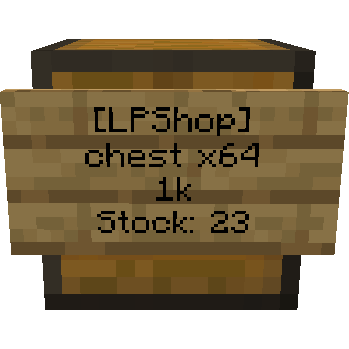
    Create a shop by looking at a chest and running a command with amount + price.

  • Vault economy support
    Works with any Vault-compatible economy plugin.

  • Clean GUI experience
    Shop UIs are designed to be simple, consistent, and hard to misuse.

  • Strict item matching
    Shops only accept the exact configured item (same meta, name, lore, enchants, etc.) to prevent scams.

  • Stock-based shops
    The chest acts as the shop’s storage. Buyers can only purchase if the item is in stock.

  • Protected shop blocks
    Shop chests can’t be broken normally. Shops are removed by breaking the sign twice with an axe (anti-mistake confirmation).

  • Info & interaction

    • Left click on the sign or click the chest to open the details view
    • Right click on the sign to buy instantly
  • Configurable UI
    Customize GUI items (material, name, lore, slots, custom model data, etc.) via config.

📦 Requirements

  • Paper 1.20+ (recommended: 1.20.4+)
  • Java 17+

🔗 Dependencies

Required (for economy features):

  • Vault
  • An economy plugin (Vault-compatible), e.g.:
    • EssentialsX Economy (recommended)

Notes:

  • LPChestShop will run without Vault, but economy-related features will be unavailable until Vault + an economy plugin are installed.

🚀 Commands

Aliases shown where applicable.

  • /lpchestshop (alias: /lpcs)
    • create <amount> <price> — Create a shop using the item in your main hand
    • info — Show info about the shop you are looking at
    • remove — Remove the shop you are looking at (requires permission)
    • reload — Reload config/messages (admin)

🔐 Permissions

  • lpchestshop.create — Create shops (default: true)
  • lpchestshop.reload — Reload plugin (default: op)
  • lpchestshop.remove.own — Remove your own shop (default: true)
  • lpchestshop.remove.any — Remove any shop (default: op)
  • lpchestshop.bypass — Bypass restrictions (default: op)

⚙️ Configuration

LPChestShop is designed to be heavily configurable:

  • GUI layout (slots)
  • GUI item materials, names, lore
  • Custom model data
  • Shop restrictions (stock visibility, creation rules, limits, etc.)

🧠 Notes

  • This plugin is intended to be simple for players but strict and safe under the hood.
  • Best used with a region protection plugin if you run public markets.

👥 Team & Contributors

LuigiLP
LuigiLPOwner

⚙️ Compatibility

Environment
🖥️ Server-side
Loaders
bukkitpaperpurpurspigot
Minecraft Versions
1.201.20.11.20.21.20.31.20.41.20.51.20.61.21+11 more

🔗 Links

Modrinth Page
