

PluginMIT
LimboManager
Virtual server manager with AFK and fallback server.
75
Downloads
0
Followers
3 months ago
Updated
📦
2
Versions
📖About LimboManager
Want to support my work? You can do so by buying the plugin from BuiltByBit
https://builtbybit.com/resources/limbomanager.105562/
LimboManager
LimboManager is a versatile, fully-featured management plugin for Velocity that leverages LimboAPI to intuitively weave proxy-side virtual dimensions into your network.
🌟 Key Features
- Virtual Limbos: You can create virtual limbo servers, great for auth plugins, like LibreLogin
- Fallback system: Prevent players from getting kicked from your server when it restarts.
- AFK fallback: Automatically detects inactive players and sends them to a dedicated AFK limbo
- LimboAPI Schema: Limbo API provided schema loading, supports schematics, worldedit schematics and structs.
- Fully customizable: You can edit nearly all strings that the plugin uses, except for console messages, for better support quality, it's left as English.
📦 Dependencies
To use LimboManager, you must install the following Velocity plugins alongside it:
⌨️ Commands & Permissions
The core command root is /limbomanager.
| Command | Permission | Description |
|---|---|---|
/limbomanager help |
None | Lists available commands. |
/limbomanager reload |
limbomanager.command.reload |
Hot-reloads all config spaces and language files. |
/limbomanager diagnostics |
limbomanager.command.diagnostics |
Dumps precise runtime diagnostics (active spaces, AFK module health, aliases) into chat. |
/limbomanager send [player] [limbo] |
limbomanager.command.send |
Forcibly pull a specific player out of their active server and plunge them into an enabled Limbo space. |
(Alias mappings defined in your configurations automatically assign proxy-level command intercepts for your users)
Configuration
config.yml
# LimboManager global configuration.
# Increment this value when schema changes require user action after updates.
config-version: 1

# Active language file name from LimboManager/language/<lang>.yml
lang: "en"
afk.yml
# Enables AFK detection and AFK limbo routing.
enabled: true

settings:
  # Idle time in seconds before a player is moved to AFK.
  idle-time: 300
  # Sweep interval in seconds used to check idle players.
  check-interval: 30
  # Players with this permission bypass AFK handling.
  exempt-permission: "limbomanager.exempt.afk"
  # Message shown when player is moved to AFK.
  message: "&7You have been moved to AFK due to inactivity."
  # If false, AFK players are not sent to AFK limbo.
  use-limbo: true
  # Enables verbose AFK debug logs.
  debug: false

world:
  # Client view distance while in AFK limbo.
  view-distance: 2
  # Server simulation distance while in AFK limbo.
  simulation-distance: 2
  # Prevents players from falling immediately after joining AFK limbo.
  disable-falling: true
  # Delay (ms) before disabling falling.
  disable-falling-delay-ms: 800
  # Limbo world dimension (NETHER, OVERWORLD, THE_END).
  dimension: "THE_END"
  # Game mode used inside AFK limbo.
  gamemode: "SPECTATOR"
  # Fixed world time shown to AFK players.
  world-time: 0
  # Whether AFK players see each other.
  others-visible: true
  # Global light level for generated chunks.
  light-level: 15
  spawn:
    # Spawn X coordinate.
    x: 0.0
    # Spawn Y coordinate.
    y: 100.0
    # Spawn Z coordinate.
    z: 0.0
    # Spawn yaw rotation.
    yaw: 0.0
    # Spawn pitch rotation.
    pitch: 0.0
  schematic:
    # Enables schematic paste into AFK limbo world.
    enabled: false
    # Built-in format type (SCHEMATIC, STRUCTURE, WORLDEDIT_SCHEM).
    type: "SCHEMATIC"
    # Relative path inside /schematics.
    path: ""
    offset:
      # Paste offset X.
      x: 0
      # Paste offset Y.
      y: 64
      # Paste offset Z.
      z: 0

display:
  on-join:
    # One-time chat message sent when player enters AFK limbo.
    chat: "&7You are now AFK."
  bossbar:
    # Enables rotating/static AFK bossbar.
    enabled: true
    # Bossbar title text (or list for animation).
    title: "&6AFK"
    # Bossbar color.
    color: "YELLOW"
    # Bossbar style.
    style: "SOLID"
    # Progress from 0.0 to 1.0 (or list for animation).
    progress: 1.0
    # Animation step interval; -1 keeps first value static.
    animation: -1
  actionbar:
    # Enables repeating AFK actionbar.
    enabled: true
    # Repeating actionbar text.
    message: "&7Move to return to your server..."
    # Animation step interval; -1 keeps first value static.
    animation: -1
  title:
    # Enables repeating AFK title.
    enabled: true
    # Title text (or list for animation).
    title: "&6AFK"
    # Subtitle text (or list for animation).
    subtitle: ""
    # Fade-in ticks for repeating title.
    fade-in: 10
    # Fade-out ticks for repeating title.
    fade-out: 20
    # Animation step interval; -1 keeps first value static.
    animation: -1

sounds:
  away:
    # Sound played when a player is moved to AFK.
    name: "entity.experience_orb.pickup"
    # Sound volume.
    volume: 1.0
    # Sound pitch.
    pitch: 1.0
  back:
    # Sound played when a player returns from AFK.
    name: "entity.player.levelup"
    # Sound volume.
    volume: 1.0
    # Sound pitch.
    pitch: 1.0
reconnect.yml
# Enables reconnect handling for kicked/disconnected players.
enabled: true

settings:
  # Regex matched against disconnect reason to trigger reconnect flow.
  trigger-message: '((?i)^(server closed|server is restarting|multiplayer\\.disconnect\\.server_shutdown))+$'
  # Delay (ms) between ping checks while waiting for target server.
  check-interval: 1000
  # Ping timeout (ms) for availability checks.
  ping-timeout: 500
  # Delay (ms) before reconnecting after server is available.
  join-delay: 2000
  # If false, reconnect runs without sending player to limbo.
  use-limbo: true
  # Enables verbose reconnect debug logs.
  debug: false

world:
  # Client view distance while in reconnect limbo.
  view-distance: 2
  # Server simulation distance while in reconnect limbo.
  simulation-distance: 2
  # Prevents players from falling immediately after joining reconnect limbo.
  disable-falling: true
  # Delay (ms) before disabling falling.
  disable-falling-delay-ms: 800
  # Limbo world dimension (NETHER, OVERWORLD, THE_END).
  dimension: "THE_END"
  # Game mode used inside reconnect limbo.
  gamemode: "SPECTATOR"
  # Fixed world time shown to players.
  world-time: 0
  # Whether reconnect-limbo players are visible to each other.
  others-visible: true
  # Global light level for generated chunks.
  light-level: 15
  spawn:
    # Spawn X coordinate.
    x: 0.0
    # Spawn Y coordinate.
    y: 100.0
    # Spawn Z coordinate.
    z: 0.0
    # Spawn yaw rotation.
    yaw: 0.0
    # Spawn pitch rotation.
    pitch: 0.0
  schematic:
    # Enables schematic paste into reconnect limbo world.
    enabled: false
    # Built-in format type (SCHEMATIC, STRUCTURE, WORLDEDIT_SCHEM).
    type: "SCHEMATIC"
    # Relative path inside /schematics.
    path: ""
    offset:
      # Paste offset X.
      x: 0
      # Paste offset Y.
      y: 64
      # Paste offset Z.
      z: 0

commands:
  # Allow-list of commands executable while reconnecting.
  - "newgen"
  - "oldgen"

display:
  on-join:
    # One-time chat message sent when player enters reconnect limbo.
    chat: "&cAll servers are offline."
  bossbar:
    # Enables rotating/static reconnect bossbar.
    enabled: true
    # Bossbar title text (or list for animation).
    title: "&cFallback Limbo"
    # Bossbar color.
    color: "RED"
    # Bossbar style.
    style: "SOLID"
    # Progress from 0.0 to 1.0 (or list for animation).
    progress: 1.0
    # Animation step interval; -1 keeps first value static.
    animation: -1
  actionbar:
    # Enables repeating reconnect actionbar.
    enabled: true
    # Repeating actionbar text
    message: "&7Reconnecting..."
    # Animation step interval; -1 keeps first value static.
    animation: -1
  title:
    # Enables repeating reconnect title.
    enabled: true
    # Title text (or list for animation).
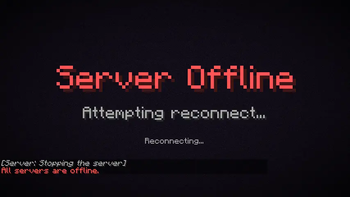
    title: "&cServer Offline"
    # Subtitle text (or list for animation).
    subtitle: "&7Attempting reconnect..."
    # Fade-in ticks for repeating title.
    fade-in: 0
    # Fade-out ticks for repeating title.
    fade-out: 0
    # Animation step interval; -1 keeps first value static.
    animation: -1

sounds:
  waiting:
    # Sound played while waiting for target server to come online.
    name: "entity.experience_orb.pickup"
    # Sound volume.
    volume: 1.0
    # Sound pitch.
    pitch: 1.0
  connecting:
    # Sound played when reconnect handoff begins.
    name: "entity.player.levelup"
    # Sound volume.
    volume: 1.0
    # Sound pitch.
    pitch: 1.0
lang.yml
common:
  no-permission: "&cYou do not have permission."

command:
  reload:
    success: "&aLimboManager reloaded."
    failed: "&cFailed to reload LimboManager. Check console."
  diagnostics:
    collecting: "&eCollecting diagnostics..."
    line: "&7{line}"
  help: |-
    &eLimboManager commands:
    &7/limbomanager reload &8- &fReload all config files
    &7/limbomanager diagnostics &8- &fShow runtime diagnostics
    &7/limbomanager send <player> <limbo> &8- &fSend a player to an enabled virtual limbo
  send:
    usage: "&cUsage: /limbomanager send <player> <limbo>"
    player-offline: "&cPlayer '&f{player}&c' is not online."
    unknown-limbo: "&cUnknown or disabled limbo '&f{limbo}&c'. Only enabled virtual limbos are allowed."
    success: "&aSent &f{player} &ato limbo &f{limbo}&a."
    target-notice: "&eYou were sent to limbo &f{limbo}&e by an administrator."
    no-enabled-limbos: "&7No enabled virtual limbo configs are loaded."
    enabled-limbos: "&7Enabled limbos: &f{limbos}"

player:
  command-blocked: "&cThis command is blocked while you are in limbo."

diagnostics:
  service-not-initialized: "LimboManager service is not initialized yet."
  info: |-
    LimboManager diagnostics:
    - virtual limbos: {virtual_count}
    - alias routes: {alias_count}
    - reconnect module: {reconnect_enabled}
    - afk module: {afk_enabled}
    - active limbo sessions: {active_count}
    - pending initial aliases: {pending_count}
    - ViaVersion: {via_status} ({via_details})
    - LibreLogin: {libre_status} ({libre_details})
    - LibreLogin: {libre_status} ({libre_details})
server.yml
# Enables or disables this virtual limbo profile.
enabled: false

settings:
  # Optional alias matched against target server names to override routing.
  alias: ""
  # Enables extra debug logging for this profile.
  debug: false

world:
  # Client view distance while in limbo.
  view-distance: 2
  # Server simulation distance while in limbo.
  simulation-distance: 2
  # Prevents players from falling immediately after joining limbo.
  disable-falling: true
  # Delay (ms) before disabling falling.
  disable-falling-delay-ms: 800
  # Limbo world dimension (NETHER, OVERWORLD, THE_END).
  dimension: "THE_END"
  # Game mode used inside limbo.
  gamemode: "SPECTATOR"
  # Fixed world time shown to players.
  world-time: 0
  # Whether other limbo players are visible.
  others-visible: true
  # Global light level for generated chunks.
  light-level: 15
  spawn:
    # Spawn X coordinate.
    x: 0.0
    # Spawn Y coordinate.
    y: 100.0
    # Spawn Z coordinate.
    z: 0.0
    # Spawn yaw rotation.
    yaw: 0.0
    # Spawn pitch rotation.
    pitch: 0.0
  schematic:
    # Enables schematic paste into limbo world.
    enabled: false
    # Built-in format type (SCHEMATIC, STRUCTURE, WORLDEDIT_SCHEM).
    type: "SCHEMATIC"
    # Relative path inside /schematics.
    path: ""
    offset:
      # Paste offset X.
      x: 0
      # Paste offset Y.
      y: 64
      # Paste offset Z.
      z: 0

# Optional allow-list of commands that remain executable in this limbo.
commands:
  - "hub"
  - "lobby"
  - "queue"

# Optional display configuration for join/bossbar/actionbar/title.
display:
  on-join:
    # One-time chat message sent when player enters limbo.
    chat: "&cAll servers are offline."
    title:
      # Enables one-time join title.
      enabled: true
      # Main join title text.
      title: "&cHey there!"
      # Join subtitle text.
      subtitle: "&7Why are you here?"
      # Title fade-in ticks.
      fade-in: 10
      # Title stay ticks.
      stay: 80
      # Title fade-out ticks.
      fade-out: 20
    actionbar:
      # Enables one-time join actionbar.
      enabled: false
      # Join actionbar text.
      message: "Something cool"
  bossbar:
    # Enables rotating/static bossbar while in limbo.
    enabled: true
    # Bossbar title text (or list for animation).
    title: "&cFallback Limbo"
    # Bossbar color (PINK, BLUE, RED, GREEN, YELLOW, PURPLE, WHITE).
    color: "RED"
    # Bossbar style (SOLID, SEGMENTED_*).
    style: "SOLID"
    # Progress from 0.0 to 1.0 (or list for animation).
    progress: 1.0
    # Animation step interval; -1 keeps first value static.
    animation: -1
  actionbar:
    # Enables repeating actionbar while in limbo.
    enabled: false
    # Repeating actionbar text
    message: "&7Reconnecting..."
    # Animation step interval; -1 keeps first value static.
    animation: -1
  title:
    # Enables repeating title while in limbo.
    enabled: false
    # Title text (or list for animation).
    title: "&cServer Offline"
    # Subtitle text (or list for animation).
    subtitle: "&7Attempting reconnect..."
    # Fade-in ticks for repeating title.
    fade-in: 0
    # Fade-out ticks for repeating title.
    fade-out: 0
    # Animation step interval; -1 keeps first value static.
    animation: -1