
MINECRAFTBIBLE
Loading...

staff utility plugin for Paper and Folia servers. LightStaff gives moderators a clean toolset for investigations
A modern staff utility plugin for Paper and Folia servers. LightStaff gives moderators a clean staff mode toolset for investigations: hotbar tools, vanish, freeze, inspection, teleporting, recovery, audit logging, and flexible storage.
Built against Paper 1.19.4 with Java 17, while keeping the runtime path ready for newer Paper builds.
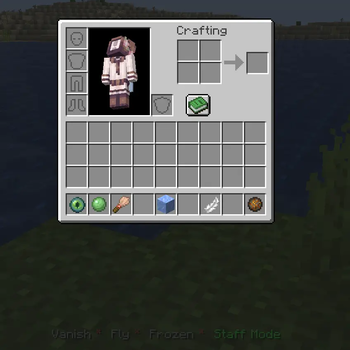
The default setup gives staff a compact investigation hotbar with clear names, lore, and actionbar state.
Staff entering Staff Mode receives a configurable hotbar:
| Slot | Tool | Purpose |
|---|---|---|
0 |
Vanish | Hide from regular players while staying visible to staff with permission. |
1 |
Push | Move players away for quick spacing or control. |
2 |
Inspector | Open a read-only inventory view with armor and offhand. |
4 |
Freeze | Stop movement, chat, commands, damage bypasses, and inventory actions. |
6 |
Flight | Toggle flight while investigating. |
8 |
Exit | Leave Staff Mode and restore the saved player state. |
Every tool is configured in tools.yml: enabled state, slot, permission, material fallback list, cooldown, display name, lore, sound, volume, and pitch.
Pick the backend that fits the server:
sqlite for simple local production usejson for readable local filesmysql for networked setupsmariadb for MariaDB deploymentsLightStaff can block players from entering Staff Mode while combat tagged. The check is configurable and supports:
1.19.4+plugins folder.plugins/LightStaff/./lightstaff reload or restart the server.LightStaff separates configuration into three files:
| File | Purpose |
|---|---|
config.yml |
Plugin behavior, storage, combat checks, freeze behavior, whitelist mode, audit logging |
tools.yml |
Staff tool setup, slots, permissions, materials, names, lore, sounds |
messages.yml |
Prefix, command messages, plugin messages, actionbar labels |
Default:
storage:
  type: "sqlite"
Available values:
storage:
  type: "sqlite" # sqlite, json, mysql, mariadb
JSON storage writes to:
plugins/LightStaff/data/sessions.jsonplugins/LightStaff/data/moderation_states.jsoncombat:
block_lightstaff_entry: true
bypass_permission: "lightstaff.combat.bypass"
metadata_keys:
- "combatlogx_in_combat"
- "in_combat"
- "combatTagged"
placeholderapi:
enabled: true
placeholders:
- "%combatlogx_in_combat%"
- "%pvpmanager_in_combat%"
combat_values:
- "yes"
- "true"
- "1"
- "tagged"
Players with the configured bypass permission can enter Staff Mode even while tagged.
Single line:
freeze_ban_message: "You disconnected while frozen."
Multiple lines:
freeze_ban_message:
  - "You disconnected while frozen."
  - "Open a ticket if this was a mistake."
| Command | Description |
|---|---|
/lightstaff, /ls, /staffmode, /sm |
Toggle Staff Mode |
/lightstaff reload |
Reload config, tools, and messages |
/lightstaff status [player] |
Show staff/vanish/freeze/session status |
/lightstaff recover <player> |
Recover a saved Staff Mode session |
/vanish [player] |
Toggle vanish for yourself or another player |
/freeze <player> [reason] |
Toggle freeze |
/freeze on <player> [reason] |
Freeze a player |
/freeze off <player> |
Unfreeze a player |
/unfreeze <player> |
Unfreeze a player |
/stafftp <player> |
Teleport to an online player |
/staffwhitelist |
Toggle staff whitelist bypass mode |
| Permission | Description |
|---|---|
lightstaff.use |
Use Staff Mode |
lightstaff.reload |
Reload configuration |
lightstaff.recover |
Recover stuck sessions |
lightstaff.status |
View status |
lightstaff.vanish |
Use vanish |
lightstaff.vanish.others |
Vanish other players |
lightstaff.freeze |
Freeze players |
lightstaff.freeze.staff |
Freeze staff users |
lightstaff.inspect |
Inspect inventories |
lightstaff.inspect.staff |
Inspect staff users |
lightstaff.fly |
Use flight tool |
lightstaff.push |
Use push tool |
lightstaff.stafftp |
Use staff teleport |
lightstaff.whitelist.toggle |
Toggle staff whitelist mode |
lightstaff.whitelist.bypass |
Bypass staff whitelist mode |
lightstaff.combat.bypass |
Enter Staff Mode while combat tagged |
lightstaff.creative |
Use creative-mode behavior in Staff Mode |
lightstaff.see |
See vanished staff |
lightstaff.alerts |
Receive staff join/leave alerts |
lightstaff.admin |
Admin wildcard handled by LightStaff |
lightstaff.* |
Full LightStaff access |