
Logo
MINECRAFTBIBLE
Items
Items

All game items

Blocks
Blocks

Building blocks

Mobs
Mobs

Creatures & monsters

Biomes
Biomes

World biomes

Structures
Structures

Generated structures

Recipes
Recipes

Crafting guides

Advancements
Advancements

Achievements

Loot Tables
Loot Tables

Drop rates

Tags
Tags

Item groupings

All Versions
View all data →
Capes
Cape ArchiveNEW

Browse rare Minecon capes, OptiFine capes, and custom capes from players worldwide

Browse

Player Database
Player DatabasePopular

Search any player

Skin Browser
Skin Browser

Browse & download skins

Cape Gallery
Cape GalleryNEW

Minecon & OptiFine capes

Seed Vault
Seed Vault

Curated seeds

Learn

Guides
GuidesNew

Tutorials & tips

Blog
Blog

News & updates

Community

Community Hub
Community HubHub

Posts, discussions & more

All Versions
View community →
Seed Analyzer
Seed Analyzer

World seed analysis

Loot Explorer
Loot Explorer

Drop rates

Crafting Calculator
Crafting Calculator

Material planning

Enchant Calculator
Enchant Calculator

Probability math

Redstone Lab
Redstone Lab

Signal timing

Trading Profit
Trading Profit

Villager ROI

All Versions
View all tools →
Mods
Mods

Browse all mods

Plugins
Plugins

Server plugins

Resource Packs
Resource Packs

Textures & sounds

Shaders
Shaders

Visual enhancements

Datapacks
Datapacks

World logic

Scanner
Mod Intelligence

Scan & analyze any mod

All Versions
View all mods →
Loading...
IntroductionIntroductionVersion HistoryVersion HistoryGuidesGuidesBlog & NewsBlog & News
ItemsItemsBlocksBlocksMobsMobsRecipesRecipesBiomesBiomesStructuresStructuresAdvancementsAdvancementsLoot TablesLoot TablesTagsTags
ModsModsPluginsPluginsResource PacksResource PacksShadersShadersDatapacksDatapacks

MinecraftBible

The Ultimate Wiki

Logo
MINECRAFTBIBLE

The ultimate Minecraft reference. Every item, block, mob, and recipe documented with precision.

Community

  • Skin Browser
  • Cape Gallery
  • Seed Vault
  • Blog
  • Guides

Database

  • Items
  • Blocks
  • Mobs
  • Recipes
  • Biomes
  • Structures

Tools

  • Seed Analyzer
  • Mod Intelligence
  • Crafting Calculator
  • Enchant Calculator

Mods & Packs

  • Mods
  • Plugins
  • Resource Packs
  • Shaders
  • Datapacks

Site & Legal

  • About
  • Authors
  • Editorial Policy
  • Corrections
  • Contact
  • Privacy Policy
  • Terms of Service
  • DMCA
  • Sitemap

© 2026 MinecraftBible. Not affiliated with Mojang or Microsoft.

PrivacyTermsContact
LightPlus
PluginApache-2.0

LightPlus

A Simple Plugin that Adds Functions to Light Blocks in Survival

80
Downloads
1
Followers
3 months ago
Updated
📦
4
Versions
game-mechanicsbukkitpaperpurpurspigot
Download Latestv1.1.2View on Modrinth

📖About LightPlus

Light Plus


A Simple Plugin that Adds Functions to Light Blocks in Survival

Functions

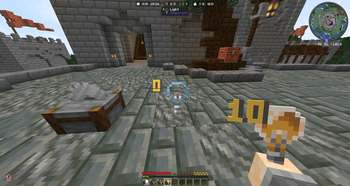
  • Use light blocks in survival/adventure (not just creative).
  • Place leveled light blocks from light items.
  • Break light blocks in survival/adventure and get them back as items.
  • Preserve and carry light level (0-15) in the dropped/held light item.
  • Rotate light level on placed light blocks:
  • Right-click: +1 (wraps 15 -> 0).
  • Shift-right-click a light block to place another light block next to it (same level).
  • Left-click targeting logic to break looked-at invisible light blocks reliably.
  • Show action-bar feedback when level is set/changed (Set to %level% Level, configurable).
  • Show marker particles around nearby light blocks while holding a light item.
  • Stonecutter conversion recipes for all 16 light levels.
  • Stonecutter output always matches selected target level.
  • Recipe permission enforcement for stonecutter usage.
  • Auto-discover stonecutter recipes on join (configurable).
  • Auto-discover recipes for online players on plugin enable/reload.
  • Crafting reset recipe: craft a light item to reset it to level 15.
  • Permission-based control for all features.

Config

grant_recipes_on_login: true
messages:
  action_bar_level_set: "<green>Set to <yellow>%level%</yellow> level"
  command_usage: "<red>Usage: /lightplus reload"
  command_no_permission: "<red>You do not have permission to use this command."
  command_reloaded: "<green>LightPlus config reloaded."

Commands

Command Description Usuage Permission
/lightplus reload LightPlus management command. /lightplus reload lightplus.reload

Permissions

Permission Description Default
lightplus.use Base permission for LightPlus features. true
lightplus.place Allows placing Light blocks with stored levels. op
lightplus.break Allows breaking Light blocks in survival/adventure and dropping items. true
lightplus.adjust Allows adjusting placed Light block levels in survival/adventure. true
lightplus.recipe Allows using and being auto-granted LightPlus stonecutter recipes. op
lightplus.reload Allows reloading LightPlus config. op

👥 Team & Contributors

HippoDev
HippoDevOwner
NaLuWorld
NaLuWorld
Member

⚙️ Compatibility

Environment
🖥️ Server-side
Loaders
bukkitpaperpurpurspigot
Minecraft Versions
1.211.21.11.21.21.21.31.21.41.21.51.21.61.21.7+5 more

🔗 Links

Modrinth Page