
MINECRAFTBIBLE
Loading...


A very simple Lifesteal Smp plugin, Custom recipe's and Easy configuration!
LifeWars is my own Minecraft plugin that introduces the porpular lifesteal mechanic to your server or gameplay.
With 25+ Configuration Options.
I made lifewars because i think that people need a plugin that I could've used for some time, especially since one of the communities I'm in could use one.
(Only a small part of the plugin)
|-Heart Recipe: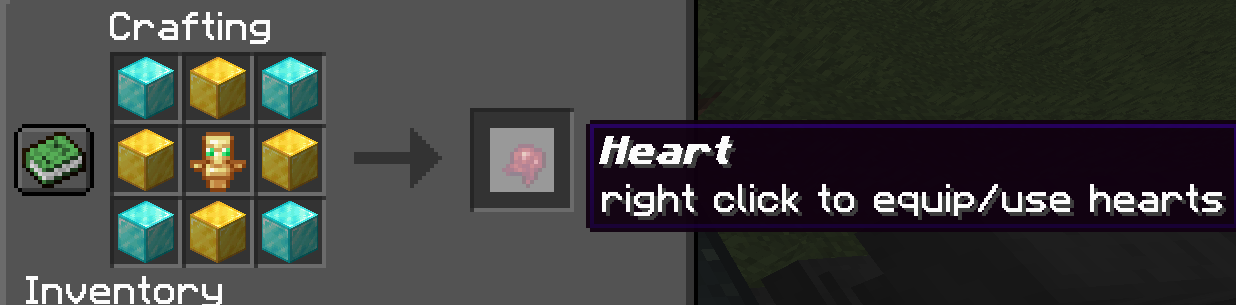
|-Revive Recipe:
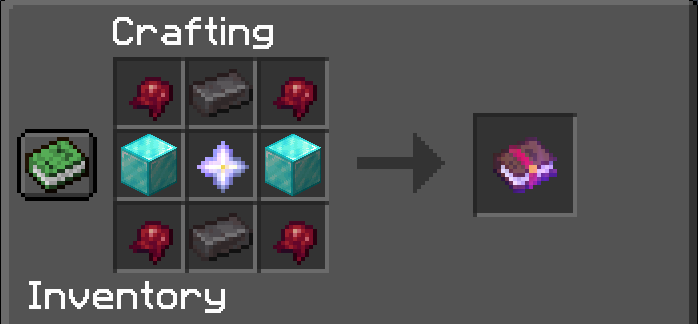
These are the commands i made, it isnt much but it is enough!
(Most of them is admin related commands)
Command(s)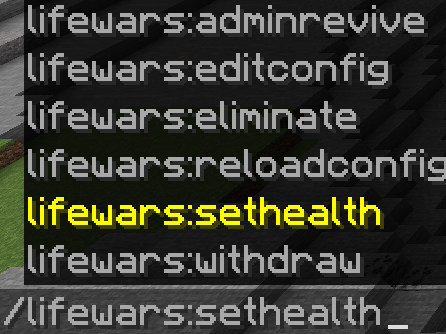
|- ReviveItem:
| Step 1: Craft the revive Item, it will maybe not show up in the crafting recipe book because it thinks you dont have a fermented spider eye called "Heart" or what you called it in the configuration!
| Step 2: Rename the Revive Item to the name of the player who is banned.
From this:
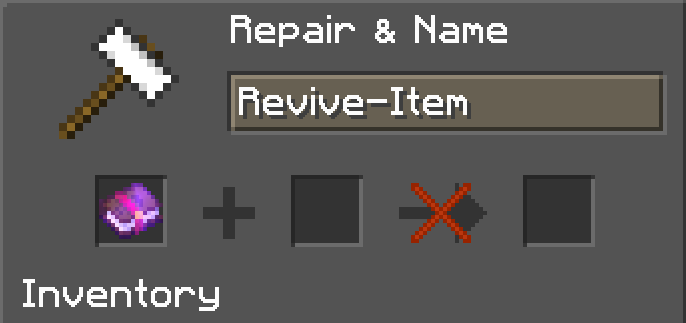
Renaming Item to the player(s) name:
Renamed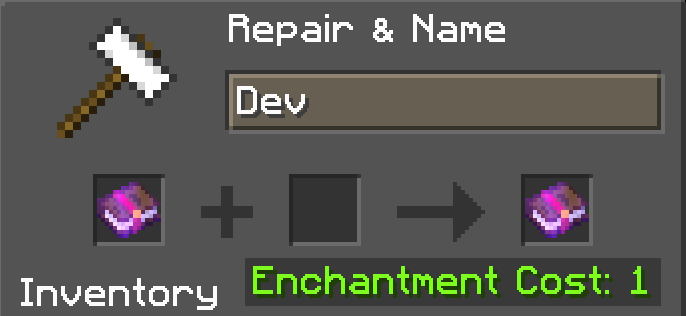
| Step 3: Right-click with the renamed Revive Item, and if the player is banned:
Revived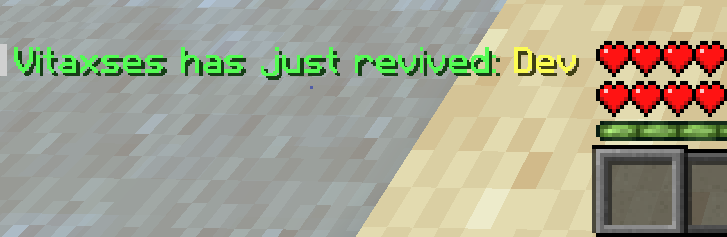
|- HeartItem:
| Step 1: Craft the Heart
HeartRecipe-Picture
| Step 2: Done
Use the Heart to give another player, equip/use (Rightclick) or use it in the Revive recipe.
In the server go into your plugin(s) folder and go in to the folder named "LifeWars"
press on the config.yml, if the server is hosted on a computer that you own you can select to open with notepad or other text editor software(s).
if not then the server host probably has a file manager, that you can go in and and edit the Config.
Follow normal Java language!
IF you know how Configuration files work, you will be fine,
if not i made some comments in the Configuration as how you navigate and edit the Configuration.
# If you are new to configuration im here to help you :)

# - 'true' means enabled, 'false' means disabled.
# - Keep the ':' before your statement.
# - Use single quotes ('') for message strings.

Enabled: true

# ==Easy-Configuration==

Revive: true
# "Revive" is when a player uses the reviveItem

WithdrawCm: true
# Withdraw can be used as hearts to give other players and crafting recipe's!

MaxHealthPoints: 40 # Maximum health points for players
# MaxHealthPoints determines the maximum health a player can have on your server.

# HealthPoints:
# 1 heart is equivalent to 2 health points, so with a value of 40, players
# have a maximum of 20 hearts. The same with ReviveHealth.

ReviveHealth: 10 # Health granted upon Revive (5 normal hearts!).

Use/EquipHearts: true # Enable or disable the use and equipping of hearts

# ==Lore&Names==
HeartLore: right click to equip/use hearts
HeartName: Heart

# Revive item Name is the name of the item!
ReviveItemName: Revive-Item
# Revive Item Lore is the lore of the item, if you don't know what lore is, it's the message under the Name and is often purple
ReviveItemLore: Rename this book with the player(s) name you want to Revive

# ==Message(s)==

YouDontHaveEnoughHearts: You dont have enough Hearts to withdraw

DisabledInConfigMsg: This is disabled in the config!

SuccessWithDraw: 'Successfully withdrew '

CantUseBannedItem: ' ' # Nothing

ReviveAnnouncement: ' has just revived: '

EliminatedBanMsg: Eliminated
EliminatedBanMsgAfter1: Ran out of lives.

# YouCantGoOverMaxHearts is when you try to use the Hearts, but is at maximum hearts.
YouCantGoOverMaxHearts: 'Hey, you cant go over '
YouCantGoOverMaxHearts2: ' Hearts'

# ==Recipe(s)==
CustomRecipes: true # Enables the crafting recipes.

HeartRecipe: true # Enable crafting of hearts (DO NOT enabled if the CustomRecipes is false).
ReviveRecipe: true # Enable crafting of revival item (DO NOT enabled if the CustomRecipes is false).

# ==BanItem(s)==

TNTminecart: true # Allow the use of TNT mine-carts.
EndCrystal: true # Allow the use of End Crystals.
RespawnAnchors: true # Allow the use of Respawn Anchors.
Over32GoldenApples: true # Allow players to have more than 32 golden apples.
Trident: true # Allow the use/pickup of tridents.
Netherite: true # Allow the use of Netherite items.
Totems: false # Allow Totem of Undying.
NoThornsEnchantMent: false # Disable the Thorns enchantment.

# ==Should-Not-Be-Edited==
CoreLifestealMechanic: true
I want to update this plugin to all minecraft version's possible.
I really want to see this being supported to many versions.
If you are interested im also gonna work on some other projects on my profile