Logo
MINECRAFTBIBLE
Items
Items

All game items

Blocks
Blocks

Building blocks

Mobs
Mobs

Creatures & monsters

Biomes
Biomes

World biomes

Structures
Structures

Generated structures

Recipes
Recipes

Crafting guides

Advancements
Advancements

Achievements

Loot Tables
Loot Tables

Drop rates

Tags
Tags

Item groupings

All Versions
View all data →
Capes
Cape ArchiveNEW

Browse rare Minecon capes, OptiFine capes, and custom capes from players worldwide

Browse

Player Database
Player DatabasePopular

Search any player

Skin Browser
Skin Browser

Browse & download skins

Cape Gallery
Cape GalleryNEW

Minecon & OptiFine capes

Seed Vault
Seed Vault

Curated seeds

Learn

Guides
GuidesNew

Tutorials & tips

Blog
Blog

News & updates

Community

Community Hub
Community HubHub

Posts, discussions & more

All Versions
View community →
Seed Analyzer
Seed Analyzer

World seed analysis

Loot Explorer
Loot Explorer

Drop rates

Crafting Calculator
Crafting Calculator

Material planning

Enchant Calculator
Enchant Calculator

Probability math

Redstone Lab
Redstone Lab

Signal timing

Trading Profit
Trading Profit

Villager ROI

All Versions
View all tools →
Mods
Mods

Browse all mods

Plugins
Plugins

Server plugins

Resource Packs
Resource Packs

Textures & sounds

Shaders
Shaders

Visual enhancements

Datapacks
Datapacks

World logic

Scanner
Mod Intelligence

Scan & analyze any mod

All Versions
View all mods →
Loading...
IntroductionIntroductionVersion HistoryVersion HistoryGuidesGuidesBlog & NewsBlog & News
ItemsItemsBlocksBlocksMobsMobsRecipesRecipesBiomesBiomesStructuresStructuresAdvancementsAdvancementsLoot TablesLoot TablesTagsTags
ModsModsPluginsPluginsResource PacksResource PacksShadersShadersDatapacksDatapacks

MinecraftBible

The Ultimate Wiki

Logo
MINECRAFTBIBLE

The ultimate Minecraft reference. Every item, block, mob, and recipe documented with precision.

Community

  • Skin Browser
  • Cape Gallery
  • Seed Vault
  • Blog
  • Guides

Database

  • Items
  • Blocks
  • Mobs
  • Recipes
  • Biomes
  • Structures

Tools

  • Seed Analyzer
  • Mod Intelligence
  • Crafting Calculator
  • Enchant Calculator

Mods & Packs

  • Mods
  • Plugins
  • Resource Packs
  • Shaders
  • Datapacks

Site & Legal

  • About
  • Authors
  • Editorial Policy
  • Corrections
  • Contact
  • Privacy Policy
  • Terms of Service
  • DMCA
  • Sitemap

© 2026 MinecraftBible. Not affiliated with Mojang or Microsoft.

PrivacyTermsContact
Lifesaver
PluginApache-2.0

Lifesaver

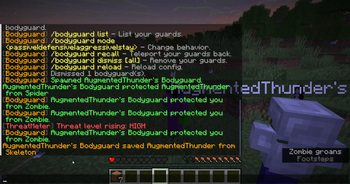
Lifesaver adds simple, readable combat announcements for moments where players step in for each other.

19
Downloads
0
Followers
2 months ago
Updated
📦
1
Versions
game-mechanicssocialpaper
Download Latestv0.1.0View on Modrinth

📖About Lifesaver

Lifesaver adds server chat announcements for moments where players protect or save each other in combat.

When a player is hurt by another player, a hostile mob, an optional neutral mob, a projectile, TNT, an area effect cloud, or another Bukkit-supported entity damage source, Lifesaver tracks the responsible attacker for a short time. If another player finishes that attacker off or has valid recent kill credit, the plugin can announce it as a protection. If the victim was left on low health, it can announce it as a stronger save.

Features

  • Announces when a player protects someone from a recent attacker
  • Announces stronger save messages when the victim was close to death
  • Tracks player attackers, hostile mobs, and optional neutral mobs
  • Resolves projectiles, TNT, evoker fangs, area effect clouds, and similar Bukkit-exposed sources back to the responsible entity where Bukkit supports it
  • Can credit tamed mob damage or kills to the online owner
  • Supports grouped victim messages or one recent save-focused message
  • Configurable save health threshold, absorption handling, tracking time, victim history size, and kill credit timing
  • Per-player cooldowns for protectors and victims to stop repeated message spam
  • World blacklist or whitelist support
  • Ignores creative, spectator, dead, vanished, and NPC players
  • Ignores Totem of Undying and similar self-resurrection saves
  • Custom message text, colours, delivery mode, and console logging
  • Optional protection and save rewards with separate commands, messages, and cooldowns
  • Optional Bukkit event for integrations such as Alignments
  • External announcement API for integrations such as Bodyguard

Commands

/lifesaver shows the plugin version and how many attackers are currently being tracked.

/lifesaver reload reloads the configuration.

Permissions

lifesaver.use allows use of the main command.

lifesaver.reload allows reloading the config.

Notes

Lifesaver does not change combat damage, revive players, or give gameplay advantages by itself. It only watches combat events and gives players credit when they help someone survive.

👥 Team & Contributors

thundernotfound
thundernotfoundOwner

⚙️ Compatibility

Environment
🖥️ Server-side
Loaders
paper
Minecraft Versions
26.1.2

🔗 Links

Modrinth Page