Logo
MINECRAFTBIBLE
Items
Items

All game items

Blocks
Blocks

Building blocks

Mobs
Mobs

Creatures & monsters

Biomes
Biomes

World biomes

Structures
Structures

Generated structures

Recipes
Recipes

Crafting guides

Advancements
Advancements

Achievements

Loot Tables
Loot Tables

Drop rates

Tags
Tags

Item groupings

All Versions
View all data →
Capes
Cape ArchiveNEW

Browse rare Minecon capes, OptiFine capes, and custom capes from players worldwide

Browse

Player Database
Player DatabasePopular

Search any player

Skin Browser
Skin Browser

Browse & download skins

Cape Gallery
Cape GalleryNEW

Minecon & OptiFine capes

Seed Vault
Seed Vault

Curated seeds

Learn

Guides
GuidesNew

Tutorials & tips

Blog
Blog

News & updates

Community

Community Hub
Community HubHub

Posts, discussions & more

All Versions
View community →
Seed Analyzer
Seed Analyzer

World seed analysis

Loot Explorer
Loot Explorer

Drop rates

Crafting Calculator
Crafting Calculator

Material planning

Enchant Calculator
Enchant Calculator

Probability math

Redstone Lab
Redstone Lab

Signal timing

Trading Profit
Trading Profit

Villager ROI

All Versions
View all tools →
Mods
Mods

Browse all mods

Plugins
Plugins

Server plugins

Resource Packs
Resource Packs

Textures & sounds

Shaders
Shaders

Visual enhancements

Datapacks
Datapacks

World logic

Scanner
Mod Intelligence

Scan & analyze any mod

All Versions
View all mods →
Loading...
IntroductionIntroductionVersion HistoryVersion HistoryGuidesGuidesBlog & NewsBlog & News
ItemsItemsBlocksBlocksMobsMobsRecipesRecipesBiomesBiomesStructuresStructuresAdvancementsAdvancementsLoot TablesLoot TablesTagsTags
ModsModsPluginsPluginsResource PacksResource PacksShadersShadersDatapacksDatapacks

MinecraftBible

The Ultimate Wiki

Logo
MINECRAFTBIBLE

The ultimate Minecraft reference. Every item, block, mob, and recipe documented with precision.

Community

  • Skin Browser
  • Cape Gallery
  • Seed Vault
  • Blog
  • Guides

Database

  • Items
  • Blocks
  • Mobs
  • Recipes
  • Biomes
  • Structures

Tools

  • Seed Analyzer
  • Mod Intelligence
  • Crafting Calculator
  • Enchant Calculator

Mods & Packs

  • Mods
  • Plugins
  • Resource Packs
  • Shaders
  • Datapacks

Site & Legal

  • About
  • Authors
  • Editorial Policy
  • Corrections
  • Contact
  • Privacy Policy
  • Terms of Service
  • DMCA
  • Sitemap

© 2026 MinecraftBible. Not affiliated with Mojang or Microsoft.

PrivacyTermsContact
LavaGolem
PluginMIT

LavaGolem

Automated Copper Golems that fetch lava from cauldrons and deliver it to chests. Fully configurable, survives restarts.

16
Downloads
0
Followers
2 months ago
Updated
📦
1
Versions
game-mechanicsmanagementutilitypaper
Download Latestv1.0.0View on Modrinth

📖About LavaGolem

LavaGolem

Automated Copper Golems that fetch lava from cauldrons and deposit it into chests on your Paper server. Set up the infrastructure once, and the golems will keep your lava storage topped up forever.

Features

  • Craftable Lava Golem — recipe based on copper, redstone and a lava bucket.
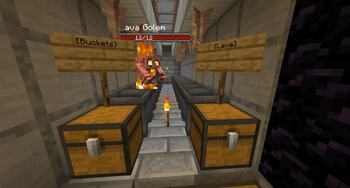
  • Automated lava transport — golems pick empty buckets from a marked chest, fill them at lava cauldrons, and deposit lava buckets into a destination chest.
  • Sign-based routing — mark chests with [Buckets] or [Lava] signs on any of the 6 sides; golems find them automatically.
  • Per-golem statistics — right-click a golem with empty hand to see how much lava it has delivered and how long it has been working.
  • Server-wide stats command — /golemstats.
  • Survives restarts and chunk reloads — golems are reinitialised automatically when their chunk loads.
  • Configurable — search radius, sign texts, tick rate, locale (en/ru).
  • No vanilla mob interference — only modifies golems spawned via the custom recipe; vanilla copper golems work normally.

Recipe

  • C R C
  • R L R
  • C R C

C = Copper Ingot, R = Redstone Dust, L = Lava Bucket.
Result: a Copper Golem Spawn Egg labeled "Golem Heart".

Setup

  1. Place a chest with empty buckets, mark it with a sign reading [Buckets] on any side.
  2. Place a lava cauldron nearby.
  3. Place an output chest, mark it with [Lava].
  4. Right-click the Golem Heart on the floor where you want the golem to start.

The golem will:

  1. Walk to the [Buckets] chest, take one empty bucket.
  2. Walk to a lava cauldron, fill the bucket.
  3. Walk to the [Lava] chest, deposit the lava bucket.
  4. Repeat.

Disassembling

Sneak + right-click an empty hand on the golem. The Golem Heart drops back; any held bucket is also returned.

Commands

Command Permission Description
/golemstats lavagolem.admin Show server-wide statistics
/removegolems lavagolem.admin Remove all custom golems

Configuration

plugins/LavaGolem/config.yml:

search-radius: 8
reach-distance: 2.2
search-cooldown-ticks: 40
tick-period: 10
bucket-sign-text: "[Buckets]"
lava-sign-text: "[Lava]"
locale: en               # en or ru
bstats: true

👥 Team & Contributors

Pushkin-desu
Pushkin-desuOwner

⚙️ Compatibility

Environment
🖥️ Server-side
Loaders
paper
Minecraft Versions
1.21.91.21.101.21.11

🔗 Links

Modrinth Page