

PluginMIT
L-settings
A highly customizable GUI-based settings manager for Paper and Folia servers.
69
Downloads
0
Followers
2 months ago
Updated
📦
1
Versions
📖About L-settings
L-settings
Version: 1.0.0
Supported Versions: Paper 1.19.x+ (Folia support included)
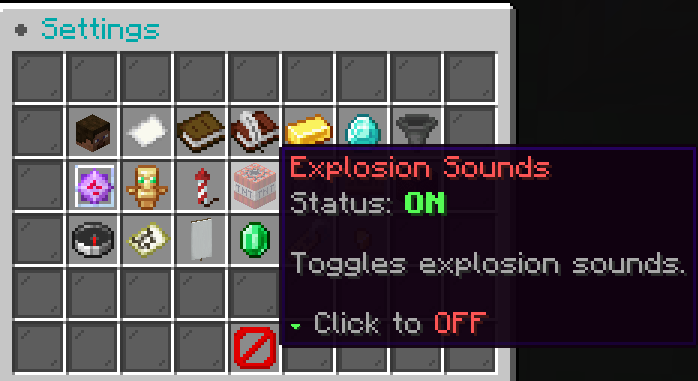
A Paper/Folia plugin that lets players manage their gameplay settings through a GUI menu opened with /settings.
Features
- 54-slot GUI menu with 20 different settings
- Turkish and English language support (configurable via
config.yml) - Paper 1.19.x+ and Folia full compatibility
- Each toggle's enable/disable commands are configurable from config
- Player settings are persisted in
data.yml /settings reloadfor runtime configuration reload%player%placeholder for personalized commands
Commands
| Command | Description | Permission |
|---|---|---|
/settings |
Opens the settings menu | lsettings.use (default: true) |
/settings reload |
Reloads config & messages | lsettings.admin (default: op) |
Installation
- Download the latest JAR from [Releases]
- Place the JAR in your server's
plugins/folder - Restart the server
- Edit
plugins/L-settings/config.ymlto configure settings
Configuration
Language Setting
language: tr # tr = Turkish, en = English
GUI Settings
gui:
  title:
    tr: '&8● &3Ayarlar'
    en: '&8● &3Settings'
  close-item:
    material: BARRIER
    name:
      tr: '&c&lKapat'
      en: '&c&lClose'
  border-item:
    material: BLACK_STAINED_GLASS_PANE
Setting Structure
Each setting can be customized with the following fields:
toggle-<setting-name>:
  slot: <GUI slot number>
  material: <Item material>
  name:
    tr: '<Turkish name>'
    en: '<English name>'
  lore:
    tr:
      - '<Turkish lore line>'
    en:
      - '<English lore line>'
  commands:
    enable: '<enable command>'
    disable: '<disable command>'
%player%— replaced with the player's name%status%— replaced with the status text (AÇIK/KAPALI or ON/OFF)commands.enable/disable— leave empty to run no command
Command Examples
toggle-chat:
  commands:
    enable: 'lp user %player% permission set essentials.chat true'
    disable: 'lp user %player% permission set essentials.chat false'

toggle-pm:
  commands:
    enable: 'player %player% chat on'
    disable: 'player %player% chat off'
Settings List
| # | Setting | Default Material |
|---|---|---|
| 1 | Global Chat | PLAYER_HEAD |
| 2 | Private Messages | PAPER |
| 3 | Server Messages | BOOK |
| 4 | Hotbar Messages | WRITABLE_BOOK |
| 5 | Payment Notifications | GOLD_INGOT |
| 6 | Bounty Messages | DIAMOND |
| 7 | Auction Notifications | HOPPER |
| 8 | Fast Crystal Place | END_CRYSTAL |
| 9 | Totem Particles | TOTEM_OF_UNDYING |
| 10 | Explosion Particles | FIREWORK_ROCKET |
| 11 | Explosion Sounds | TNT |
| 12 | Hide Players | GRAY_DYE |
| 13 | Scoreboard | OAK_SIGN |
| 14 | Notification Sound | NOTE_BLOCK |
| 15 | TPA Requests | COMPASS |
| 16 | TPA Here Requests | FILLED_MAP |
| 17 | Team Invite | WHITE_BANNER |
| 18 | Receive Payments | EMERALD |
| 19 | Team Chat | NAME_TAG |
| 20 | Item Worth Display | GOLD_NUGGET |
Support
Discord: squezsaz