Logo
MINECRAFTBIBLE
Items
Items

All game items

Blocks
Blocks

Building blocks

Mobs
Mobs

Creatures & monsters

Biomes
Biomes

World biomes

Structures
Structures

Generated structures

Recipes
Recipes

Crafting guides

Advancements
Advancements

Achievements

Loot Tables
Loot Tables

Drop rates

Tags
Tags

Item groupings

All Versions
View all data →
Capes
Cape ArchiveNEW

Browse rare Minecon capes, OptiFine capes, and custom capes from players worldwide

Browse

Player Database
Player DatabasePopular

Search any player

Skin Browser
Skin Browser

Browse & download skins

Cape Gallery
Cape GalleryNEW

Minecon & OptiFine capes

Seed Vault
Seed Vault

Curated seeds

Learn

Guides
GuidesNew

Tutorials & tips

Blog
Blog

News & updates

Community

Community Hub
Community HubHub

Posts, discussions & more

All Versions
View community →
Seed Analyzer
Seed Analyzer

World seed analysis

Loot Explorer
Loot Explorer

Drop rates

Crafting Calculator
Crafting Calculator

Material planning

Enchant Calculator
Enchant Calculator

Probability math

Redstone Lab
Redstone Lab

Signal timing

Trading Profit
Trading Profit

Villager ROI

All Versions
View all tools →
Mods
Mods

Browse all mods

Plugins
Plugins

Server plugins

Resource Packs
Resource Packs

Textures & sounds

Shaders
Shaders

Visual enhancements

Datapacks
Datapacks

World logic

Scanner
Mod Intelligence

Scan & analyze any mod

All Versions
View all mods →
Loading...
IntroductionIntroductionVersion HistoryVersion HistoryGuidesGuidesBlog & NewsBlog & News
ItemsItemsBlocksBlocksMobsMobsRecipesRecipesBiomesBiomesStructuresStructuresAdvancementsAdvancementsLoot TablesLoot TablesTagsTags
ModsModsPluginsPluginsResource PacksResource PacksShadersShadersDatapacksDatapacks

MinecraftBible

The Ultimate Wiki

Logo
MINECRAFTBIBLE

The ultimate Minecraft reference. Every item, block, mob, and recipe documented with precision.

Community

  • Player Database
  • Skin Browser
  • Cape Gallery
  • Community Hub
  • Seed Vault

Database

  • Items
  • Blocks
  • Mobs
  • Recipes
  • Biomes
  • Structures

Tools

  • Seed Analyzer
  • Mod Intelligence
  • Crafting Calculator
  • Enchant Calculator

Mods & Packs

  • Mods
  • Plugins
  • Resource Packs
  • Shaders
  • Datapacks

© 2026 MinecraftBible. Not affiliated with Mojang or Microsoft.

PrivacyTermsContact
KillMessages
PluginMIT

KillMessages

Customize, Block & Control Kill Messages & Death Messages

102
Downloads
0
Followers
11 months ago
Updated
📦
1
Versions
game-mechanicssocialutilitybukkitpaperspigot
Download Latestv6.0View on Modrinth

📖About KillMessages

killmsg

Discord link : https://discord.gg/vja8sSVA6q

Description:

This plugin is designed to control kill and death messages using permissions. Each player will receive custom kill and death messages based on their permissions.

You can add permissions to players via LuckPerms.

Click here to download LuckPerms

Click here for a guide on adding LuckPerms


Supported Versions:

  • I have tested this plugin on versions like 1.19.4, 1.20.4, and 1.21.

Settings:

  • Block-Minecraft-Messages: true
    If set to true, all default Minecraft kill and death messages will be removed.
    For example:
    Player was slain by Player2

Explanation of the "count" setting you’ll often see in config.yml:

If count = 0, it means that the kill messages for this list will not be activated.

If count = 2, it will load two kill or death messages, and when a kill or death happens, one will be sent randomly.


Placeholders:

These placeholders work without the famous PlaceHolderAPI plugin.

  • %victim% – The name of the victim
  • %killer% – The name of the killer
  • %killer_health% – The health of the killer (number like 20.0)
  • %item% - The Killer Weapon's name
  • %item_displayname% - The Killer Weapon's Display name

Permissions & Commands :

If a player doesn’t have the required permissions, nothing will be sent to them.

  • KillMessages.Admin - Access to /killmessages reload.
  • KillMessages.NormalPlayers: Receive kill and death messages for normal players.
  • KillMessages.AdvancedPlayers: Receive kill and death messages for advanced players.
  • KillMessages.ProPlayers: Receive kill and death messages for pro players.
  • KillMessages.MasterPlayers: Receive kill and death messages for master players.

Important:

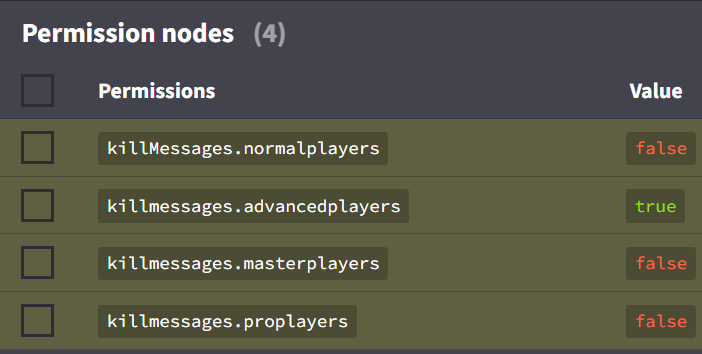
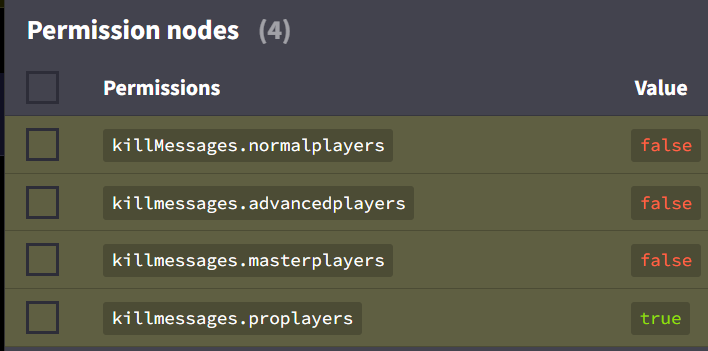
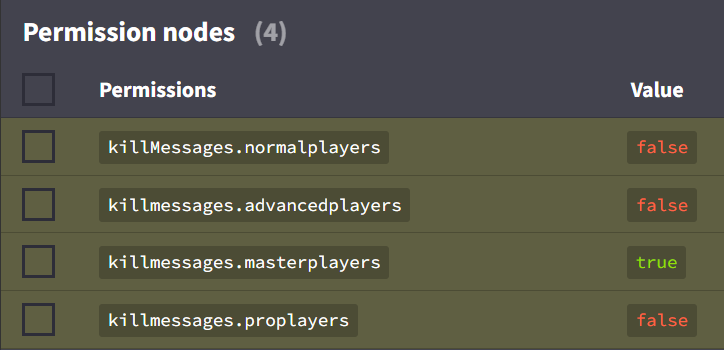
Read the images for more detailed explanations.
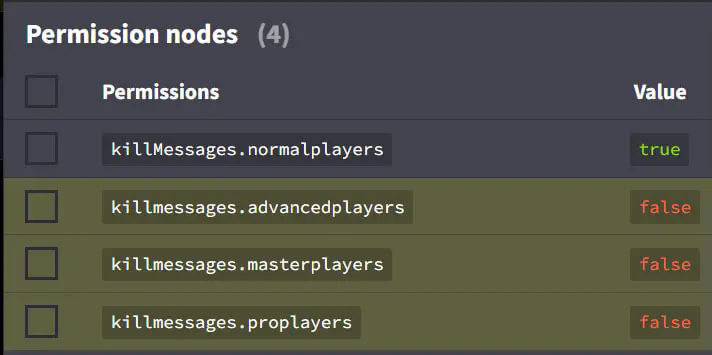
Normal

Advanced

Pro

Master

You should set the permissions in this way, where the first image is for Normal Players, the second is for Advanced Players, the third is for Pro Players, and the fourth is for Master Players.

👥 Team & Contributors

xNessus
xNessusOwner
O
oumai
Member

⚙️ Compatibility

Environment
🖥️ Server-side
Loaders
bukkitpaperspigot
Minecraft Versions
1.211.21.11.21.21.21.31.21.41.21.5

🔗 Links

Modrinth Page