

Join and Quit Messages
Join and Quit Messages is a plugin that gives you the opportunity to customize the messages when a player joins or leaves your server.
📖About Join and Quit Messages

Join and Quit Messages is a plugin that gives you the opportunity to customize the messages when a player joins or leaves your server. It is really easy to use and gives a personal touch to your Minecraft server. You can customize your own join and quit messages easily by changing the information within the config.
Personalization on 1.16+ servers
For servers that run on 1.16 or a newer version, it is possible to use hex colors or standard Minecraft colors. You can pick your own hex colors here. You can completely customize your own messages. However, the hex colors need to be like this: <(color)>. This is also shown in the config below.

The result of this config is the following:

Random Messages
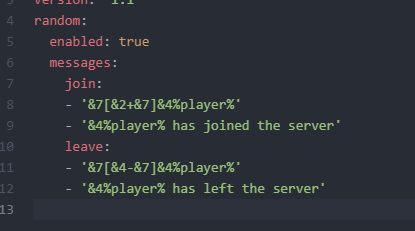
It is possible to show arbitrary join and quit messages and you can edit the list.
In the config.yml there are 2 lists for the messages , which can be edited for other random messages.
Personalization on 1.15- servers
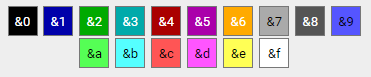
If your server is below 1.16, then you can also use this plugin with the standard Minecraft colors. You can choose from the following colors:
Your config will then look like the following:

Then this will be the result of this config.

Permission based Messages
permission_messages:
  enabled: true
  join:
    "myserver.vip": "&7[&6VIP+&7] &6%player% &7joined with style!"
    "myserver.premium": "&7[&5PREMIUM+&7] &5%player% &7entered the server!"
  leave:
    "myserver.vip": "&7[&6VIP-&7] &6%player% &7left the server"
    "myserver.premium": "&7[&5PREMIUM-&7] &5%player% &7departed"
🎯 Commands
| Command | Description | Permission |
|---|---|---|
/jqm test |
Test configured join message | joinandquitmessages.test |
/jqm test <message> |
Test custom message | joinandquitmessages.test |
/jqm reload |
Reload configuration | joinandquitmessages.reload |
🔐 Permissions
| Permission | Description | Default |
|---|---|---|
joinandquitmessages.use |
Access to main command | true |
joinandquitmessages.test |
Test message formatting | true |
joinandquitmessages.reload |
Reload configuration | op |
Placeholders
- %player% : Player name
- %world% : World name where the player leaves/joins
- %playercount_online% : Current amount of players
- %playercount_max% : Maximum amount of players
Placeholder API
Within the join and quit messages you can also use the placeholder API. This lets you customize the messages even more. More information about what you can use can be found here.