Logo
MINECRAFTBIBLE
Items
Items

All game items

Blocks
Blocks

Building blocks

Mobs
Mobs

Creatures & monsters

Biomes
Biomes

World biomes

Structures
Structures

Generated structures

Recipes
Recipes

Crafting guides

Advancements
Advancements

Achievements

Loot Tables
Loot Tables

Drop rates

Tags
Tags

Item groupings

All Versions
View all data →
Capes
Cape ArchiveNEW

Browse rare Minecon capes, OptiFine capes, and custom capes from players worldwide

Browse

Player Database
Player DatabasePopular

Search any player

Skin Browser
Skin Browser

Browse & download skins

Cape Gallery
Cape GalleryNEW

Minecon & OptiFine capes

Seed Vault
Seed Vault

Curated seeds

Learn

Guides
GuidesNew

Tutorials & tips

Blog
Blog

News & updates

Community

Community Hub
Community HubHub

Posts, discussions & more

All Versions
View community →
Seed Analyzer
Seed Analyzer

World seed analysis

Loot Explorer
Loot Explorer

Drop rates

Crafting Calculator
Crafting Calculator

Material planning

Enchant Calculator
Enchant Calculator

Probability math

Redstone Lab
Redstone Lab

Signal timing

Trading Profit
Trading Profit

Villager ROI

All Versions
View all tools →
Mods
Mods

Browse all mods

Plugins
Plugins

Server plugins

Resource Packs
Resource Packs

Textures & sounds

Shaders
Shaders

Visual enhancements

Datapacks
Datapacks

World logic

Scanner
Mod Intelligence

Scan & analyze any mod

All Versions
View all mods →
Loading...
IntroductionIntroductionVersion HistoryVersion HistoryGuidesGuidesBlog & NewsBlog & News
ItemsItemsBlocksBlocksMobsMobsRecipesRecipesBiomesBiomesStructuresStructuresAdvancementsAdvancementsLoot TablesLoot TablesTagsTags
ModsModsPluginsPluginsResource PacksResource PacksShadersShadersDatapacksDatapacks

MinecraftBible

The Ultimate Wiki

Logo
MINECRAFTBIBLE

The ultimate Minecraft reference. Every item, block, mob, and recipe documented with precision.

Community

  • Skin Browser
  • Cape Gallery
  • Seed Vault
  • Blog
  • Guides

Database

  • Items
  • Blocks
  • Mobs
  • Recipes
  • Biomes
  • Structures

Tools

  • Seed Analyzer
  • Mod Intelligence
  • Crafting Calculator
  • Enchant Calculator

Mods & Packs

  • Mods
  • Plugins
  • Resource Packs
  • Shaders
  • Datapacks

Site & Legal

  • About
  • Authors
  • Editorial Policy
  • Corrections
  • Contact
  • Privacy Policy
  • Terms of Service
  • DMCA
  • Sitemap

© 2026 MinecraftBible. Not affiliated with Mojang or Microsoft.

PrivacyTermsContact
JapsuGrid
PluginGPL-3.0-only

JapsuGrid

World generation plugin for "RaysGrid" -style grid-world generation!

239
Downloads
4
Followers
3 years ago
Updated
📦
2
Versions
worldgenbukkitpaperpurpurspigot
Download Latestv1.1.0View on Modrinth

📖About JapsuGrid

JapsuGrid

Overworld image of JapsuGrid world

Info

Meet the "RaysGrid" experience: A normal minecraft world, but with 99% of its blocks removed.

A modified version of the oh-so-popular Sky-Grid, but unlike Sky-Grid, the blocks generated are the same as those in a typical Minecraft world.

Everything that's possible in a normal Minecraft world, is also possible here!

Features

  • Structures & decorations can either be generated normally, or "gridified" like all other terrain.
  • Bedrock generation can be turned off.
  • Ability to skip the removal of specific blocks (end portal frames, chests, what ever you like)!
  • No liquid spilling when a chunk is loaded: water/lava stays hovering.
  • Very reasonable performance: we either intercept the chunk generation process, or do post-processing with BlockPopulators.

Setup

  1. Download and move the plugin to your "Plugins" -folder.
  2. Assign JapsuGrid as your world generator in Bukkit.yml:
worlds:
  world:
    generator: JapsuGrid
  world_nether:
    generator: JapsuGrid
  world_the_end:
    generator: JapsuGrid

Note: If the lines above are missing from your Bukkit.yml, just add them!

Standard config

# When to generate the grid.
# BEFORE_DECORATIONS: Faster, but leaves all decorations (structures, trees, etc) intact.
# AFTER_DECORATIONS: Slower, but decimates everything except blocks defined in "NonReplaceableBlocks" (below).
GenerationMode: AFTER_DECORATIONS

# Amount of empty space between each block.
# Valid range [1, 7].
BlockSpacing: 3

# Whether to skip all bedrock generation.
RemoveAllBedrock: true

# Whether to TEMPORARILY disable water flow and block gravity in newly generated chunks.
# Reduces lag by not allowing liquids to flow when the chunk is loaded.
DisableEventsInNewChunks: true

# Blocks that never get removed by the generator.
NonReplaceableBlocks:
  - END_PORTAL_FRAME
# - SPAWNER
# - CHEST

Usage statistics
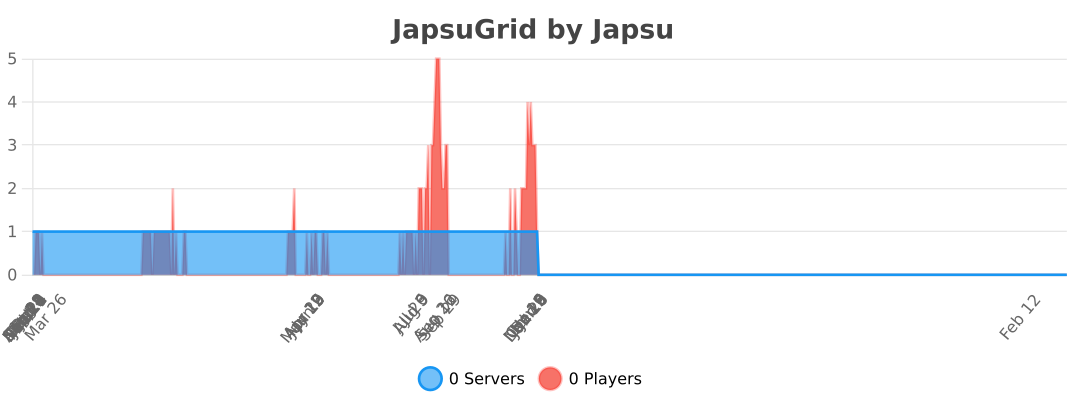
Usage statistics

Gallery


Stronghold generation

With AFTER_DECORATIONS config value.

With BEFORE_DECORATIONS config value.


End island generation

With AFTER_DECORATIONS config value.

With BEFORE_DECORATIONS config value.


Contributing

Feel free to submit any PRs :)

👥 Team & Contributors

japsuu
japsuuOwner

⚙️ Compatibility

Environment
🖥️ Server-side
Loaders
bukkitpaperpurpurspigot
Minecraft Versions
1.191.19.11.19.21.19.31.19.4

🔗 Links

Modrinth Page