


PluginGPL-3.0-only
CustomDrops
Manages Drops and EXP for Blocks, Entities, Fishing and PiglinBartering.
94
Downloads
0
Followers
3 months ago
Updated
📦
1
Versions
📖About CustomDrops

Introduction
CustomDrops is a plugin that manages Drops and EXP for Blocks, Entities, Fishing and PiglinBartering.
Features
- 1.8 - Newer Versions Support.
- Fully Customizable.
- HEX Color Codes Support.
- PlaceholderAPI Support (use placeholders for Custom Conditions and Custom Actions).
- MythicMobs Support (enter the name of the custom entity in the "entities.yml" file).
- Add Custom Drops for Blocks, Entities, Fishing and PiglinBartering.
- Drop keeps everything (Display Name, Lore, Material, Enchantments..)
- Customizable GUI to Add/Remove Custom Drops.
- Possibility to Enable/Disable Vanilla Drops with Custom Conditions.
- Possibility to Enable/Disable AutoPickup.
- Possibility to Enable/Disable Vanilla EXP with Custom Conditions.
- Add Custom Conditions.
- Set Drop Chances.
- Possibility to Enable/Disable Custom Drops for player-placed or naturally generated blocks.
- Possibility to Enable/Disable Custom Drops for naturally generated entities, from spawners, from spawn eggs or custom.
- Fortune Multiplier, Looting Multiplier and Luck Multiplier for Chance and EXP(can be Enabled/Disabled, also the percentage per level can be customizable).
- Support for SilkTouch Enchantment.
- Possibility to drop just one item or multiple items at once.
- Add Custom Actions that will be executed when the item(s) drops.
- Set Custom EXP.
Requirements
- Spigot
- CustomDrops
- PlaceholderAPI (Optional)
- MythicMobs (Optional)
How To Install
- Download CustomDrops.jar from this page.
- Download PlaceholderAPI (Optional).
- Download MythicMobs (Optional).
- Put CustomDrops, PlaceholderAPI and MythicMobs inside your plugins folder.
- Start your server.
Commands
/customdrops edit <block name/entity name/fishing/piglinbartering> <drop number> - Opens the Custom Drop Editor GUI.
/customdrops help - Sends a message with all commands and permissions.
/customdrops reload | rl - Reloads the configuration file and the Custom Drops file.
Permissions
customdrops.* - Allows to execute all commands.
customdrops.editor - Allows to open the Custom Drop Editor GUI.
customdrops.help - Allows to see all commands and permissions.
customdrops.reload- Allows to reload the configuration file and the Custom Drops files.
Files
config.ymlupdateCheck: false
messages:
prefix: "&eCustomDrops &7>>"
general:
noPlayer: "%prefix% &cYou're not a Player!"
noPermission: "%prefix% &cYou don't have that permission!"
configReloaded: "%prefix% &2Config Reloaded!"
wrongArguments: "%prefix% &cWrong Arguments!"
updateCheck:
latestVersion: "%prefix% &aThis is the latest version(%current_version%) of the plugin."
newVersionAvailable:
- "%prefix% &eThere is a new version(%new_version%) available."
gui:
firstPage: "%prefix% &cYou're already on the first page!"
lastPage: "%prefix% &cYou're on the last page!"
alreadyExist: "%prefix% &cTo add another Item, you must first delete the existing one."
inventory:
full: "%prefix% &cYour inventory is full!"
gui:
general:
items:
previousPage:
name: "&e<-- Previous Page"
lore:
- ""
- "&7Opens the previous page."
material: STONE_BUTTON
close:
name: "&cClose"
lore:
- ""
- "&7Closes the GUI."
material: BARRIER
nextPage:
name: "&eNext Page -->"
lore:
- ""
- "&7Opens the next page."
material: STONE_BUTTON
customDropEditing:
title: "&eCustomDrops &7>> &eCustom Drop Editing"
items:
type:
name: "&7Drop Type(&e%customdrop_type%&7)"
lore:
- ""
- "&7Changes the Drop Type."
material: NAME_TAG
add:
name: "&eAdd &eCustom Drop"
lore:
- ""
- "&7Opens a GUI where you will have to select"
- "&7an item from your inventory, in order"
- "&7to Add a Custom Drop."
material: EMERALD
itemSelection:
title: "&eCustomDrops &7>> &eSelect Item"
customDropsSettings:
silkTouch:
enabled: true
worlds:
- "world"
customDrops:
  blocks:
    STONE:
      enabled: true
      vanillaDrops:
        disabled: false
        conditions:
         - ''
        enableAutoPickup: false
      vanillaEXP:
        disabled: false
        conditions:
         - ''
      drops:
        '0':
          conditions:
           - '%player_world% equalsIgnoreCase world'
          chance: 0.02
          disableForNatural: false
          disableForPlaced: false
          fortuneMultiplier:
            disabled: false
            percentagePerLevel:
              chance: 0.1
              exp: 0.1
          enableAutoPickup: false
          drop:
            type: ITEM
            item:
              ==: org.bukkit.inventory.ItemStack
              type: DIAMOND
            actions:
             - '[TITLE] &7You found a &9Diamond&7!;&7You are very lucky;1;2;1'
          exp: 1
customDrops:
  entities:
    ZOMBIE:
      enabled: true
      vanillaDrops:
        disabled: false
        conditions:
         - ''
        enableAutoPickup: false
      vanillaEXP:
        disabled: false
        conditions:
         - ''
      drops:
        '0':
          conditions:
           - '%player_world% equalsIgnoreCase world'
          chance: 0.02
          disableForNatural: false
          disableForSpawner: false
          disableForSpawnerEgg: false
          disableForCustom: false
          lootingMultiplier:
            disabled: false
            percentagePerLevel:
              chance: 0.1
              exp: 0.1
          enableAutoPickup: false
          drop:
            type: ITEMS
            items:
              '0':
                ==: org.bukkit.inventory.ItemStack
                type: REDSTONE
                amount: 2
              '1':
                ==: org.bukkit.inventory.ItemStack
                type: REDSTONE_BLOCK
            actions:
             - '[TITLE] &cDo you like Redstone?;&7;1;2;1'
          exp: 1
customDrops:
  fishing:
    enabled: true
    vanillaDrops:
      disabled: false
      conditions:
       - ''
      enableAutoPickup: false
    vanillaEXP:
      disabled: false
      conditions:
       - ''
    drops:
      '0':
        conditions:
         - '%player_world% equalsIgnoreCase world'
        chance: 0.02
        luckMultiplier:
          disabled: false
          percentagePerLevel:
            chance: 0.1
            exp: 0.1
        enableAutoPickup: false
        drop:
          type: ITEM
          item:
            ==: org.bukkit.inventory.ItemStack
            type: APPLE
          actions:
           - ''
        exp: 1
customDrops:
  piglinBartering:
    enabled: true
    vanillaDrops:
      disabled: false
      conditions:
       - ''
      enableAutoPickup: false
    drops:
      '0':
        conditions:
         - '%player_world% equalsIgnoreCase world'
        chance: 0.02
        enableAutoPickup: false
        drop:
          type: ITEM
          item:
            ==: org.bukkit.inventory.ItemStack
            type: APPLE
          actions:
           - ''
        exp: 0
Built In Placeholders
%prefix% - Returns the prefix.
%current_version% - Returns the number of the current version(Only for UpdateCheck Messages).
%new_version% - Returns the number of the new version(Only for UpdateCheck Messages).
Actions
[SOUND] Sound;Volume;Pitch - Sends a sound to the player.
[MESSAGE] Message - Sends a message to the player.
[JSON_MESSAGE] Message - Sends a jsonmessage to the player.
The JSONMessage must be written between ' '.
[TITLE] Title;SubTitle;FadeIn;Stay;FadeOut - Sends a title to the player.
[ACTIONBAR] String - Sends an actionbar to the player.
[COMMAND_CONSOLE] Command - Executes a command as console.
[COMMAND_PLAYER] Command - Executes a command as player.
To execute the command the "/" is not needed.
[WAIT] Seconds - Waits a certain amount of time before performing another Action.
Gifs
Gifs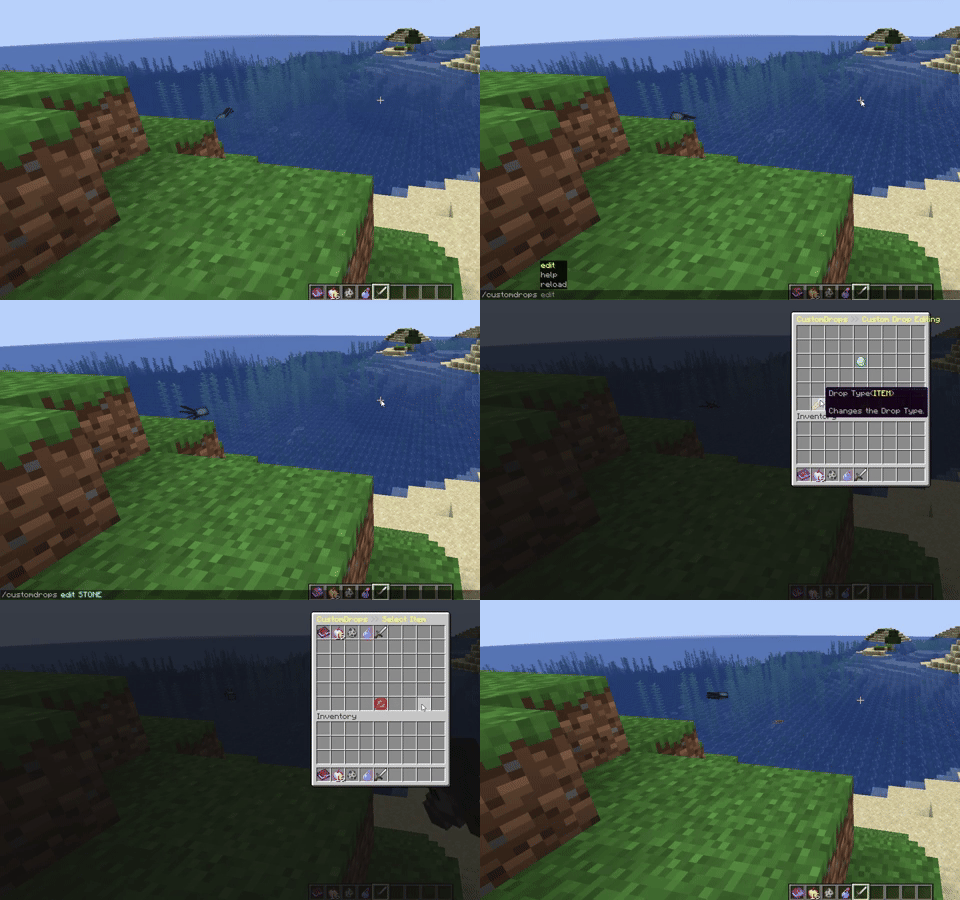
Donation Link: https://www.paypal.me/IVEHydra
If you want, you can donate to me. This would help me a lot to continue work on updates.
Thank you!
Terms of Service
By downloading this plugin you agree the following terms:
- You are not allowed to sell or redistribute this plugin.
- You are not allowed to claim this plugin as your own.
- You are only allowed to use this plugin for your own servers/networks.
- I can update this terms of service at any time, without notification.
If you have any problems or bugs with this plugin, contact me.