

ItemVault
ItemVault is a virtual storage plugin for Minecraft that allows players to store their items in a database and retrieve them when needed.
📖About ItemVault
ItemVault
ItemVault is a virtual item storage plugin for Minecraft that allows players to store their items in a database and withdraw them whenever they need them.
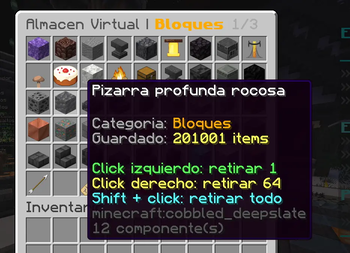
The system displays stored items in a category-based GUI. Each item appears with its original icon and shows the amount currently stored. It is ideal for survival, economy, RPG, SkyBlock, BoxPvP, and resource-heavy servers.
Features
- Per-player virtual item storage.
- Category-based GUI.
- Item search system.
- Support for vanilla and custom items.
- Stores items with names, lore, enchantments, and metadata.
- Auto-save item system.
- Ignored slot system.
- Console administrative commands.
- Safe withdrawal: if the player inventory is full, remaining items are not lost.
- PlaceholderAPI support.
- SQLite database.
- Support for Paper, Purpur, and compatible forks.
Compatibility
ItemVault is designed for Paper/Purpur servers.
Supported versions:
- Minecraft 1.20.1
- Minecraft 1.21.x
- Java 21
- Paper / Purpur
Optional dependency:
- PlaceholderAPI
Main Commands
/itemvault
Opens the virtual storage.
/itemvault guardar
Stores the item currently in your hand.
/itemvault guardar
Stores all possible items from your inventory.
/itemvault retirar <material> <amount>
Withdraws a specific amount of a material.
/itemvault buscar <text>
Searches stored items by name, material, or text.
/itemvault ignorar
Toggles the selected hotbar slot as ignored. Items in that slot will not be stored with /itemvault guardarall.
/itemvault autoguardar
Toggles auto-save for the selected item.
/itemvault mensajes
Toggles auto-save messages.
Spanish Commands
The plugin also includes Spanish command aliases:
/almacen
/almacen guardar
/almacen guardarall
/almacen retirar <material> <cantidad>
/almacen buscar <texto>
/almacen ignorar
/almacen autoguardar
/almacen mensajes
Administrative Commands
/itemvault admin give <player> <material> <amount>
/itemvault admin take <player> <material> <amount>
/itemvault admin set <player> <material> <amount>
These commands can be executed from the console and allow administrators to add, remove, or set item amounts in a player's virtual storage.
Aliases
/itemvault
/almacen
PlaceholderAPI
ItemVault includes PlaceholderAPI support.
%itemvault_item_<MATERIAL>%
Shows the stored amount of a material.
Examples:
%itemvault_item_DIAMOND%
%itemvault_item_IRON_INGOT%
%itemvault_item_TORCH%
%itemvault_item_COBBLED_DEEPSLATE%
Other placeholders:
%itemvault_total_items%
%itemvault_total_types%
%itemvault_is_empty%
%itemvault_has_<MATERIAL>%
Scoreboard example:
- '&bDiamonds: &f%itemvault_item_DIAMOND%'
- '&7Torches: &f%itemvault_item_TORCH%'
- '&aTotal stored: &f%itemvault_total_items%'
GUI Categories
The menu is organized into categories to make item management easier:
- All
- Minerals
- Blocks
- Wood
- Food
- Tools and weapons
- Armor
- Farming
- Redstone
- Mob drops
- Decoration
- Potions
- Others
Item Search
The search system allows players to find stored items easily.
Examples:
/itemvault search diamond
/itemvault search iron
/itemvault search torch
/itemvault search pickaxe
/itemvault search sword
/itemvault search food
Spanish searches are also supported:
/almacen buscar diamante
/almacen buscar hierro
/almacen buscar antorcha
/almacen buscar pico
/almacen buscar espada
The search system also ignores accents, for example:
carbon
carbón
pocion
poción
Safe Withdrawal
If a player tries to withdraw more items than their inventory can hold, ItemVault will only give the amount that fits. The remaining items will stay safely stored in the virtual storage.
This prevents accidental item loss.
Auto-Save
Players can enable auto-save for a selected item using:
/itemvault autoguardar
When the player picks up that item from the ground, it will be automatically sent to their virtual storage.
Ignored Slots
Players can protect a selected hotbar slot using:
/itemvault ignorar
Anything placed in that slot will not be stored automatically with /storage saveall.
This is useful for protecting tools, weapons, food, totems, or other important items.
Dependencies
Optional dependency:
PlaceholderAPI
Database
ItemVault uses SQLite automatically.
The database is saved in:
plugins/ItemVault/itemvault.db
Ideal For
- Survival servers
- Economy servers
- RPG servers
- Java + Bedrock servers
- Resource-heavy servers
- Reward systems
- Scoreboards and holograms with PlaceholderAPI
- Events where items need to be deducted from a player through console commands