

PluginGPL-3.0-only
invrewind
Highly configurable inventory backup and restore plugin for Paper, Purpur, and Folia.
64
Downloads
1
Followers
1 months ago
Updated
📦
6
Versions
📖About invrewind
InvRewind
Highly configurable inventory backup and restore plugin for Paper, Purpur, and Folia.
For server owners and admins who want to backup player inventories and restore them when players lose items.
Why Use This Plugin?
Protect Your Players' Progress
- Never lose items due to bugs, glitches, or accidents
- Restore inventories after server crashes or rollbacks
- Recover from duplication exploits or inventory wipes
Flexible & Powerful
- Multiple database options (YAML, SQLite, MySQL)
- Export and import backups between formats
- Automatic fallback if database fails
- Works on Paper, Purpur, and Folia servers
Easy to Use
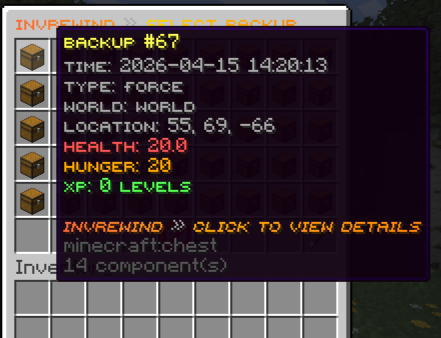
- Intuitive GUI for browsing and restoring backups
- Selective restore - choose exactly what to restore
- Async operations - no server lag
- Console and in-game command support
Actively Maintained
- Frequent updates with new features
- Bug fixes as they're discovered
- Community-driven improvements
- Open source on GitHub
Features
Core Functionality
- Automatic Backups - Capture player inventories on death, world change, join, quit, and scheduled intervals
- Force Backups - Create manual backups on demand via command
- GUI-Based Restoration - Intuitive interface for browsing and restoring backups
- Selective Restore - Restore specific items: inventory, armor, offhand, ender chest, XP, or location
- Database Migration - Export and import backups between YAML, SQLite, and MySQL formats
Technical Features
- Folia Compatible - Full support for Folia's region-based threading
- Multi-Database Support - Choose between YAML, SQLite, or MySQL
- Database Fallback - Automatic fallback to YAML if database connection fails
- Async Operations - All database operations run asynchronously to prevent lag
- Backup Limits - Automatic cleanup of old backups per type
- Pagination - Handle large player counts and backup lists efficiently
- Duplicate Detection - Skip duplicate backups on import
Backup Types
- Death - Automatic backup when player dies
- World Change - Backup when switching worlds (including custom dimensions)
- Join - Backup when player joins the server
- Quit - Backup when player leaves the server
- Scheduled - Automatic backups at regular intervals
- Force - Manual backups created by admins
Commands
| Command | Description | Permission |
|---|---|---|
/invrewind or /ir |
Open player selection GUI | invrewind.admin |
/invrewind reload |
Reload configuration | invrewind.admin |
/invrewindforce <player|all> |
Force backup for player(s) | invrewind.admin |
/invrewind export [yaml|sqlite|mysql] |
Export backups to specified format | invrewind.export |
/invrewind import <type> <filename> |
Import backups from file | invrewind.import |
Configuration
Database Options
database:
  type: yaml  # yaml, sqlite, or mysql
- YAML - File-based, easy to backup, good for small servers
- SQLite - File-based database, better performance for medium servers
- MySQL - External database, best for large/multi-server setups
Auto-Backup Settings
auto-backup:
  on-death: true
  on-world-change: true
  on-join: true
  on-quit: true

  scheduled:
    enabled: false
    interval: 30  # minutes
    require-movement: true
    min-items: 1
Backup Limits
auto-backup:
  limits:
    enabled: true
    max-per-type:
      death: 50
      world-change: 30
      join: 20
      quit: 20
      scheduled: 40
      force: 100
Features
features:
  save-inventory: true
  save-armor: true
  save-offhand: true
  save-enderchest: true
  save-health: true
  save-hunger: true
  save-xp: true
  save-location: true
Migration Settings
migration:
  # Delete source file/folder after successful import
  delete-source-after-import: false
GUI Sounds
gui:
  sounds-enabled: true  # Enable/disable all GUI sounds
Database Migration
Export Backups
Export your current database to any format:
/invrewind export          # Export to current database type
/invrewind export yaml     # Export to YAML folder structure
/invrewind export sqlite   # Export to SQLite .db file
/invrewind export mysql    # Export to MySQL .sql dump
Export locations:
- YAML:
plugins/InvRewind/exports/yaml/export_TIMESTAMP/ - SQLite:
plugins/InvRewind/exports/sqlite/export_TIMESTAMP.db - MySQL:
plugins/InvRewind/exports/mysql/export_TIMESTAMP.sql
Import Backups
Import backups from any format:
/invrewind import yaml <foldername>    # Import from YAML folder
/invrewind import sqlite <filename>    # Import from SQLite .db file
/invrewind import mysql <filename>     # Import from MySQL .sql file
Import locations:
- YAML: Place folders in
plugins/InvRewind/imports/yaml/ - SQLite: Place .db files in
plugins/InvRewind/imports/sqlite/ - MySQL: Place .sql files in
plugins/InvRewind/imports/mysql/
Features:
- Async processing to prevent server lag
- Progress logging every 100 backups
- Automatic duplicate detection and skipping
- Tab completion for available import files
- Works from console and in-game
Permissions
| Permission | Description | Default |
|---|---|---|
invrewind.admin |
Full admin access to all features | OP |
invrewind.use |
Access to restore own inventory | OP |
invrewind.restore.others |
Restore other players' inventories | OP |
invrewind.forcebackup |
Create force backups | OP |
invrewind.export |
Export backups to different formats | OP |
invrewind.import |
Import backups from different formats | OP |
Support & Development
This plugin is actively maintained with frequent updates, new features, and bug fixes as they're discovered. More features are planned for future releases.
- Discord: Join our Discord
- Issues: GitHub Issues
- Source Code: GitHub Repository
- Feature Requests: Open an issue on GitHub
License
This project is licensed under the GNU General Public License v3.0.