Logo
MINECRAFTBIBLE
Items
Items

All game items

Blocks
Blocks

Building blocks

Mobs
Mobs

Creatures & monsters

Biomes
Biomes

World biomes

Structures
Structures

Generated structures

Recipes
Recipes

Crafting guides

Advancements
Advancements

Achievements

Loot Tables
Loot Tables

Drop rates

Tags
Tags

Item groupings

All Versions
View all data →
Capes
Cape ArchiveNEW

Browse rare Minecon capes, OptiFine capes, and custom capes from players worldwide

Browse

Player Database
Player DatabasePopular

Search any player

Skin Browser
Skin Browser

Browse & download skins

Cape Gallery
Cape GalleryNEW

Minecon & OptiFine capes

Seed Vault
Seed Vault

Curated seeds

Learn

Guides
GuidesNew

Tutorials & tips

Blog
Blog

News & updates

Community

Community Hub
Community HubHub

Posts, discussions & more

All Versions
View community →
Seed Analyzer
Seed Analyzer

World seed analysis

Loot Explorer
Loot Explorer

Drop rates

Crafting Calculator
Crafting Calculator

Material planning

Enchant Calculator
Enchant Calculator

Probability math

Redstone Lab
Redstone Lab

Signal timing

Trading Profit
Trading Profit

Villager ROI

All Versions
View all tools →
Mods
Mods

Browse all mods

Plugins
Plugins

Server plugins

Resource Packs
Resource Packs

Textures & sounds

Shaders
Shaders

Visual enhancements

Datapacks
Datapacks

World logic

Scanner
Mod Intelligence

Scan & analyze any mod

All Versions
View all mods →
Loading...
IntroductionIntroductionVersion HistoryVersion HistoryGuidesGuidesBlog & NewsBlog & News
ItemsItemsBlocksBlocksMobsMobsRecipesRecipesBiomesBiomesStructuresStructuresAdvancementsAdvancementsLoot TablesLoot TablesTagsTags
ModsModsPluginsPluginsResource PacksResource PacksShadersShadersDatapacksDatapacks

MinecraftBible

The Ultimate Wiki

Logo
MINECRAFTBIBLE

The ultimate Minecraft reference. Every item, block, mob, and recipe documented with precision.

Community

  • Skin Browser
  • Cape Gallery
  • Seed Vault
  • Blog
  • Guides

Database

  • Items
  • Blocks
  • Mobs
  • Recipes
  • Biomes
  • Structures

Tools

  • Seed Analyzer
  • Mod Intelligence
  • Crafting Calculator
  • Enchant Calculator

Mods & Packs

  • Mods
  • Plugins
  • Resource Packs
  • Shaders
  • Datapacks

Site & Legal

  • About
  • Authors
  • Editorial Policy
  • Corrections
  • Contact
  • Privacy Policy
  • Terms of Service
  • DMCA
  • Sitemap

© 2026 MinecraftBible. Not affiliated with Mojang or Microsoft.

PrivacyTermsContact
Invisible Item Frames
PluginMPL-2.0

Invisible Item Frames

Adds craftable invisible item frames with seamless, native vanilla integration.

2.0K
Downloads
12
Followers
8 months ago
Updated
📦
8
Versions
decorationgame-mechanicsutilitypaperspigot
Download Latestv3.1.1View on Modrinth

📖About Invisible Item Frames

InvisibleItemFramesLite

Forked from InvisibleItemFrames by Tiffany Bennett (Tiffnix).

A fast, minimal Paper plugin that adds craftable invisible item frames to your server; no configuration required, no commands or permissions, just drop it in and go.

See a video demo, and the gallery.

Item Frame Demo Crafting Recipe
This crafting recipe is configurable!

Why This Version?

InvisibleItemFramesLite is the fastest, most performant invisible item frame plugin available.

  • Lightweight performance; it's tiny, fast, and focused
  • Works right out of the box; no additional configuration is needed
  • Compatibility with newer Paper versions (1.21+)
  • Plenty of bug fixes

Features

  • Adds invisible item frames you can craft and place like normal
  • Frames are visible when empty, and automatically turn invisible once an item is added
  • Allows for container pass-through (you an still sneak to rotate items)
  • Perfect for clean builds, displays, or shops without visual clutter

No command trees. No permission spaghetti. Just craftable invisible item frames that feel like they could've been shipped natively with vanilla.

Migrating from v2 to v3

Server admins are expected to update their configuration to replace any legacy chat formatting with Adventure's MiniMessage formatting: https://docs.advntr.dev/minimessage/format. Alternatively, if you wish, you may simply delete the config file and a fresh one will automatically be generated on the next server restart.

bStats Metrics
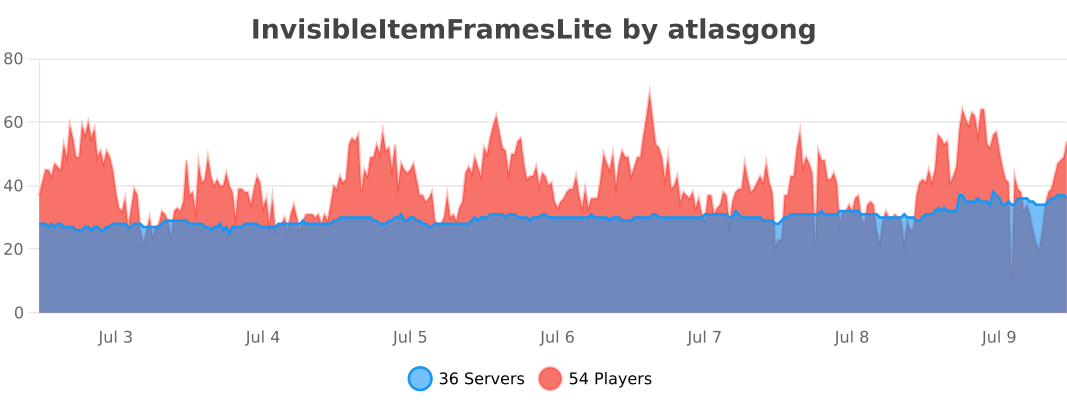
bStats Metrics

👥 Team & Contributors

T
treapsOwner

⚙️ Compatibility

Environment
🖥️ Server-side
Loaders
paperspigot
Minecraft Versions
1.21.81.21.91.21.101.21.11

🔗 Links

Modrinth Page