Logo
MINECRAFTBIBLE
Items
Items

All game items

Blocks
Blocks

Building blocks

Mobs
Mobs

Creatures & monsters

Biomes
Biomes

World biomes

Structures
Structures

Generated structures

Recipes
Recipes

Crafting guides

Advancements
Advancements

Achievements

Loot Tables
Loot Tables

Drop rates

Tags
Tags

Item groupings

All Versions
View all data →
Capes
Cape ArchiveNEW

Browse rare Minecon capes, OptiFine capes, and custom capes from players worldwide

Browse

Player Database
Player DatabasePopular

Search any player

Skin Browser
Skin Browser

Browse & download skins

Cape Gallery
Cape GalleryNEW

Minecon & OptiFine capes

Seed Vault
Seed Vault

Curated seeds

Learn

Guides
GuidesNew

Tutorials & tips

Blog
Blog

News & updates

Community

Community Hub
Community HubHub

Posts, discussions & more

All Versions
View community →
Seed Analyzer
Seed Analyzer

World seed analysis

Loot Explorer
Loot Explorer

Drop rates

Crafting Calculator
Crafting Calculator

Material planning

Enchant Calculator
Enchant Calculator

Probability math

Redstone Lab
Redstone Lab

Signal timing

Trading Profit
Trading Profit

Villager ROI

All Versions
View all tools →
Mods
Mods

Browse all mods

Plugins
Plugins

Server plugins

Resource Packs
Resource Packs

Textures & sounds

Shaders
Shaders

Visual enhancements

Datapacks
Datapacks

World logic

Scanner
Mod Intelligence

Scan & analyze any mod

All Versions
View all mods →
Loading...
IntroductionIntroductionVersion HistoryVersion HistoryGuidesGuidesBlog & NewsBlog & News
ItemsItemsBlocksBlocksMobsMobsRecipesRecipesBiomesBiomesStructuresStructuresAdvancementsAdvancementsLoot TablesLoot TablesTagsTags
ModsModsPluginsPluginsResource PacksResource PacksShadersShadersDatapacksDatapacks

MinecraftBible

The Ultimate Wiki

Logo
MINECRAFTBIBLE

The ultimate Minecraft reference. Every item, block, mob, and recipe documented with precision.

Community

  • Skin Browser
  • Cape Gallery
  • Seed Vault
  • Blog
  • Guides

Database

  • Items
  • Blocks
  • Mobs
  • Recipes
  • Biomes
  • Structures

Tools

  • Seed Analyzer
  • Mod Intelligence
  • Crafting Calculator
  • Enchant Calculator

Mods & Packs

  • Mods
  • Plugins
  • Resource Packs
  • Shaders
  • Datapacks

Site & Legal

  • About
  • Authors
  • Editorial Policy
  • Corrections
  • Contact
  • Privacy Policy
  • Terms of Service
  • DMCA
  • Sitemap

© 2026 MinecraftBible. Not affiliated with Mojang or Microsoft.

PrivacyTermsContact
InteractionVisualizer
PluginGPL-3.0-only

InteractionVisualizer

Visualize Crafting Tables, Furnaces, Enchantment Tables and more with animations through packets!

31.7K
Downloads
226
Followers
4 months ago
Updated
📦
17
Versions
decorationfoliapaperpurpurspigot
Download Latestv1.18.19View on Modrinth

📖About InteractionVisualizer

About

So in Minecraft, you click that crafting table and put things in, no one else knows what you are doing.. Aren't we supposed to be able to see that items pop up on the table logically?
With this plugin, you can! See items placed on the crafting table literally as players put them in in their GUI! And much more!

Features

1. Visualization!

Here are all the blocks and entities that have been visualized by InteractionVisualizer so far!


See the Gallery for all the GIFs of (almost) every block!


Want to watch videos instead browsing the Gallery?

Here is an awesome walkthrough by MusicTechnician! (English)

Here is another one by ServerMiner! (English)

Yet another one by The BelgiumGames (Dutch)

2. Client-Side!

  • None of the blocks and items actually exists on the server!
  • They can't be killed or removed by kill commands!
  • They won't affect the world in any way!

3. Customization

  • Each block display can be disabled in the config!
  • Players can toggle a few options for themselves as well!
  • Player toggle data can be saved in SQLite (default) or MYSQL
  • Certain hologram text automatically uses each player's own client language!
  • Many languages from the community! Just take a look! Click me!

Dependencies

  • ProtocolLib [1.12.2 or below only] (Please install the latest version that is compatible with your server version)
  • LightAPI Fork [1.16.5 or below only] (Not to be mistaken with the original LightAPI)

Supported Plugins

  • OpenInv (With silent chest on, chest animations are disabled)
  • SuperVanish & PremiumVanish (All animations are disabled while in vanish)
  • CMI (All animations are disabled while in vanish)
  • Essentials (All animations are disabled while in vanish)

Installation

  1. Put InteractionVisualizer.jar and all required dependencies into the plugins folder
  2. Start the server
  3. Edit the config
  4. Restart the server

Development Builds

Jenkins

Showcase Server

Want to give the plugin a try?

IP: mc.loohpjames.com

Q&A

How does /iv toggle works?

There are three modes in /iv toggle, they enable or disable certain mechanics used for the displays.
"itemstand" stands for any visual items that are created with armorstands (the ones that lay flat on the blocks and don't float like normal dropped items) and itemframes (i.e. the CartographyTable map)
"itemdrop" stands for any visual items that is a dropped item
"hologram" stands for all the floating text (e.g. furnace progress bar)
The player data used for /ic toggle is saved in the database.

I got an error saying that there are some problems while saving blockdata.json, what do I do?

This is most likely caused by the server not shutting down properly. But regardless of what is the cause of the problem, you can always go to the InteractionVisualizer plugin folder and replace the blockdata.json with one of the backups in the backup folder.

Placeholders

With the plugin PlaceholderAPI installed, you can get the toggle status of a player using placeholders, they are:

%interactionvisualizer_itemstand_<entry>%
%interactionvisualizer_itemdrop_<entry>%
%interactionvisualizer_hologram_<entry>%

If a player has enabled, for example, the itemstand module for the Crafting Table, %interactionvisualizer_itemstand_crafting_table% will return enabled, if it is disabled, it will return disabled

API

InteractionVisualizer does provide an API for developers to create add-ons!
Check out the wiki page: https://github.com/LOOHP/InteractionVisualizer/wiki/Developer-API

Commands

/interactionvisualizer reload - Reloads the plugin

/interactionvisualizer refresh - Refresh all item displays for the player executing the command

/interactionvisualizer update - Check for updates

/interactionvisualizer toggle - Toggles display options

(/iv in short)

Permissions

interactionvisualizer.reload - Allows you to reload the plugin [default: op]
interactionvisualizer.refresh - Allows you to refresh displays [default: true]
interactionvisualizer.toggle - Allows you to toggle modules [default: true]
interactionvisualizer.toggle.others - Allows you to toggle modules for others [default: op]
interactionvisualizer.update - Allows you receive update messages [default: op]

Default Config

Latest Config with descriptions

Community Translated Configs

Check out the Repository!

Limitations

  • The plugin might not work on Minecraft version 1.10.2 or below

Data usage

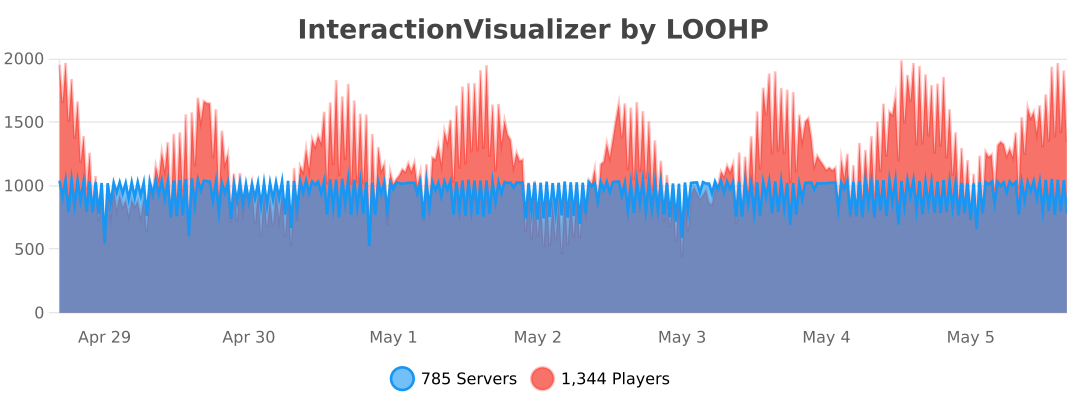
Usage statistics at https://bstats.org/plugin/bukkit/InteractiveChat will be visible to the public with your server included in the statistics. No private information of your server is sent.

Update checking is also done via https://api.loohpjames.com to notify you whenever a new version is released. No private information of your server is sent.
👥 Team & Contributors

LOOHP
LOOHPOwner

⚙️ Compatibility

Environment
🖥️ Server-side
Loaders
foliapaperpurpurspigot
Minecraft Versions
1.131.13.11.13.21.141.14.11.14.21.14.31.14.4+38 more

🔗 Links

Modrinth Page