Logo
MINECRAFTBIBLE
Items
Items

All game items

Blocks
Blocks

Building blocks

Mobs
Mobs

Creatures & monsters

Biomes
Biomes

World biomes

Structures
Structures

Generated structures

Recipes
Recipes

Crafting guides

Advancements
Advancements

Achievements

Loot Tables
Loot Tables

Drop rates

Tags
Tags

Item groupings

All Versions
View all data →
Capes
Cape ArchiveNEW

Browse rare Minecon capes, OptiFine capes, and custom capes from players worldwide

Browse

Player Database
Player DatabasePopular

Search any player

Skin Browser
Skin Browser

Browse & download skins

Cape Gallery
Cape GalleryNEW

Minecon & OptiFine capes

Seed Vault
Seed Vault

Curated seeds

Learn

Guides
GuidesNew

Tutorials & tips

Blog
Blog

News & updates

Community

Community Hub
Community HubHub

Posts, discussions & more

All Versions
View community →
Seed Analyzer
Seed Analyzer

World seed analysis

Loot Explorer
Loot Explorer

Drop rates

Crafting Calculator
Crafting Calculator

Material planning

Enchant Calculator
Enchant Calculator

Probability math

Redstone Lab
Redstone Lab

Signal timing

Trading Profit
Trading Profit

Villager ROI

All Versions
View all tools →
Mods
Mods

Browse all mods

Plugins
Plugins

Server plugins

Resource Packs
Resource Packs

Textures & sounds

Shaders
Shaders

Visual enhancements

Datapacks
Datapacks

World logic

Scanner
Mod Intelligence

Scan & analyze any mod

All Versions
View all mods →
Loading...
IntroductionIntroductionVersion HistoryVersion HistoryGuidesGuidesBlog & NewsBlog & News
ItemsItemsBlocksBlocksMobsMobsRecipesRecipesBiomesBiomesStructuresStructuresAdvancementsAdvancementsLoot TablesLoot TablesTagsTags
ModsModsPluginsPluginsResource PacksResource PacksShadersShadersDatapacksDatapacks

MinecraftBible

The Ultimate Wiki

Logo
MINECRAFTBIBLE

The ultimate Minecraft reference. Every item, block, mob, and recipe documented with precision.

Community

  • Skin Browser
  • Cape Gallery
  • Seed Vault
  • Blog
  • Guides

Database

  • Items
  • Blocks
  • Mobs
  • Recipes
  • Biomes
  • Structures

Tools

  • Seed Analyzer
  • Mod Intelligence
  • Crafting Calculator
  • Enchant Calculator

Mods & Packs

  • Mods
  • Plugins
  • Resource Packs
  • Shaders
  • Datapacks

Site & Legal

  • About
  • Authors
  • Editorial Policy
  • Corrections
  • Contact
  • Privacy Policy
  • Terms of Service
  • DMCA
  • Sitemap

© 2026 MinecraftBible. Not affiliated with Mojang or Microsoft.

PrivacyTermsContact
InfoHeads
PluginMIT

InfoHeads

A refined block to command plugin

18
Downloads
1
Followers
3 months ago
Updated
📦
1
Versions
managementutilitypaperspigot
Download Latestv2.5.3View on Modrinth

📖About InfoHeads

infoheads logo
InfoHeads is a plugin which allows you to assign commands / messages to be executed upon right click of a block. A truly great block to event solution!

preview

Main Features

  • Click a block to display:
    • Messages! Send quick text to a user
    • Console Commands! Execute commands from the console.
    • Player Commands! Force players to execute a command.
    • Temporary Permissions! Don't give them op!
    • Cooldowns! Useful for daily rewards, quests and more!
    • Delay! Enable pauses between elements.
    • One-time Use! Restrict interactions to one per person.
  • Click to teleport! Forgotten where the head has gone? Click to tp to its location.
  • Threaded! This plugin uses asynchronous tasks, keeping your server TPS largely unaffected.
  • Lightweight! Minimal impact on server performance.
  • Placeholders Embed the interacting player name in commands and messages.
  • Translatable!

Permissions

Infoheads.use: Allows usage for right-clicking head
Infoheads.admin: Allows usage for the setup wizard

Commands:

/Infoheads wizard: Starts up wizard
/Infoheads reload: Reloads config file.
/Infoheads remove: Delete info head you're looking at.
/Infoheads edit: Edit the infohead you're looking at.
/Infoheads list: List the current infoheads that exist.
/Infoheads help: Displays the help menu.

dependencies
None required

This is a standalone plugin. This means the plugin works without any other plugin needing to be installed. However, you can install extra plugins for optional add-ons.

extras
Optional Installations

More Placeholders! Install PlaceholderAPI. Then use their available placeholders.

Support

General Help: Please send me a direct message or leave a comment.

Plugin usage by server and players:
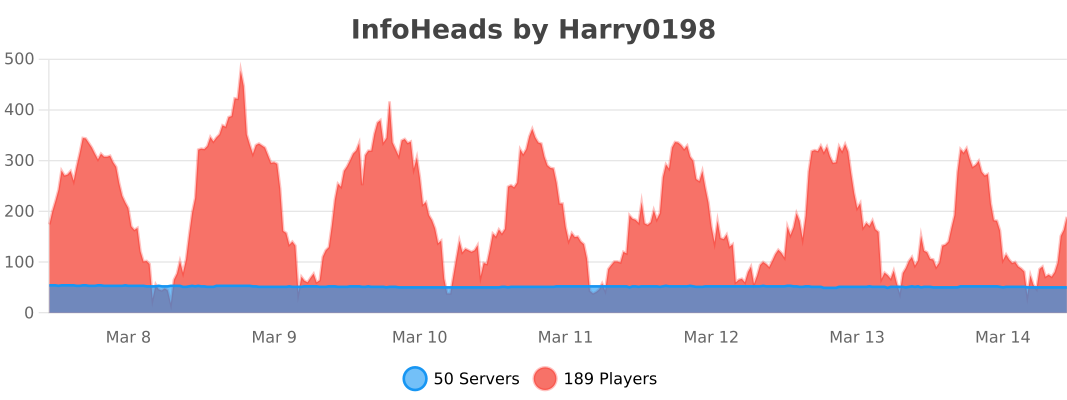
usage stats

👥 Team & Contributors

harry0198
harry0198Owner

⚙️ Compatibility

Environment
🖥️ Server-side
Loaders
paperspigot
Minecraft Versions
1.211.21.11.21.21.21.31.21.41.21.51.21.61.21.7+4 more

🔗 Links

Modrinth Page