Infernal Forge
Adds an exclusive infernal blast furnace with custom fuel and speed for survival servers.
📖About Infernal Forge
InfernalForge
InfernalForge is a survival-focused Minecraft plugin that introduces a powerful, exclusive infernal blast furnace with its own mechanics, fuel system, and progression.
Unlike vanilla furnaces or simple speed modifiers, InfernalForge adds a separate endgame furnace that does not modify any vanilla blocks or mechanics.
It is designed for servers that want meaningful progression, controlled power scaling, and a furnace that truly feels special.
InfernalForge is ideal for survival and semi-hardcore servers looking for an endgame smelting solution with balanced performance and clear gameplay rules.
🔥 Core Features
- Custom infernal blast furnace (no vanilla blocks modified)
- Faster smelting than a vanilla blast furnace (configurable)
- Exclusive custom fuel: Infernal Fuel
- Infernal Fuel drop chance affected by Looting I–III
- Configurable fuel drop chance with safety cap
- Configurable Infernal Fuel stack size
- Exact fuel balancing (fixed items per fuel, independent of speed)
- Custom crafting recipe
- Recipe unlocks naturally through gameplay (no spoilers)
- ActionBar feedback when invalid fuel is used
- Visual particle and sound effects while smelting
- Fully configurable via
config.yml - English and German language support
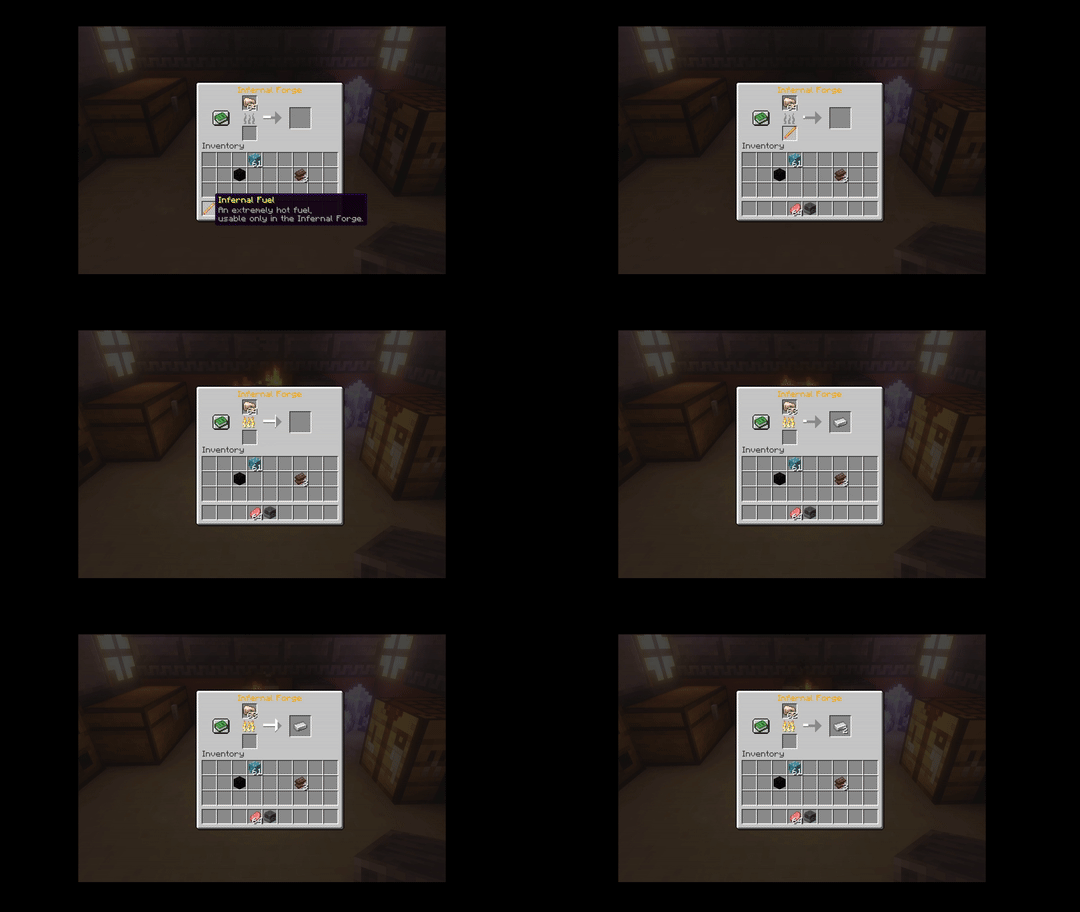
Recipe (for players who prefer not to be surprised in-game)
Spoiler


⚙️ Gameplay & Progression
The Infernal Forge can only be powered by Infernal Fuel.
Infernal Fuel drops from Blazes with a configurable chance.
Once a player obtains Infernal Fuel for the first time, the crafting recipe for the Infernal Forge is unlocked automatically.
This ensures a natural progression flow without spoilers, guides, or forced tutorials.
📜 Commands
| Command | Description | Permission |
|---|---|---|
/infernalforge give <player> [amount] |
Give an Infernal Forge item | infernalforge.give |
/infernalforge fuel <player> [amount] |
Give Infernal Fuel | infernalforge.fuelgive |
/infernalforge reload |
Reload configuration and messages | infernalforge.reload |
Aliases: /iforge
🔐 Permissions
infernalforge.use
Allows using the Infernal Forge.
(Granted by default to all players)infernalforge.admin
Grants access to all administrative commands.
⚙️ Configuration
InfernalForge provides a clean and flexible configuration system:
- Furnace speed multiplier
- Infernal Fuel drop chance
- Looting bonus and maximum drop chance cap
- Infernal Fuel stack size
- Items smelted per fuel
- Visual particle and sound effects
- Language selection (EN / DE)
All configuration files are generated automatically on first startup.
🧩 Compatibility
- Minecraft: 1.21.11
- Platforms: Paper, Spigot and Paper-based forks
Check Out my other Plugins
InfernalForge — Configuration.
# InfernalForge configuration
# Reload with: /infernalforge reload

# Plugin language ("en" or "de")
language: "en"

forge:
  # Speed multiplier (1.0 = vanilla Blast Furnace)
  speed-multiplier: 2.0

fuel:
  # Blaze drop chance for Infernal Fuel (0.0 - 1.0)
  blaze-drop-chance: 0.15

  # Bonus drop chance per Looting level (e.g. Looting III = 3 × bonus)
  looting-bonus: 0.05

  # Maximum total drop chance (safety cap, 0.0 - 1.0)
  max-drop-chance: 0.35

  # How many items one Infernal Fuel can smelt (independent of speed)
  items-per-fuel: 140

  # Max stack size for Infernal Fuel
  max-stack-size: 5

effects:
  # Enable particles & sounds for active Infernal Forges
  enabled: true

  particles:
    # Particle interval (ticks) | 20 ticks = 1 second
    interval-ticks: 5
    flame-count: 3
    smoke-count: 1

  sound:
    # Sound interval (ticks)
    interval-ticks: 40
    volume: 0.6
    pitch: 1.0
Note
- Looting increases the drop chance, not the drop amount
- Infernal Fuel stack size is fully configurable
- Existing Infernal Fuel items keep their old stack size