Logo
MINECRAFTBIBLE
Items
Items

All game items

Blocks
Blocks

Building blocks

Mobs
Mobs

Creatures & monsters

Biomes
Biomes

World biomes

Structures
Structures

Generated structures

Recipes
Recipes

Crafting guides

Advancements
Advancements

Achievements

Loot Tables
Loot Tables

Drop rates

Tags
Tags

Item groupings

All Versions
View all data →
Capes
Cape ArchiveNEW

Browse rare Minecon capes, OptiFine capes, and custom capes from players worldwide

Browse

Player Database
Player DatabasePopular

Search any player

Skin Browser
Skin Browser

Browse & download skins

Cape Gallery
Cape GalleryNEW

Minecon & OptiFine capes

Seed Vault
Seed Vault

Curated seeds

Learn

Guides
GuidesNew

Tutorials & tips

Blog
Blog

News & updates

Community

Community Hub
Community HubHub

Posts, discussions & more

All Versions
View community →
Seed Analyzer
Seed Analyzer

World seed analysis

Loot Explorer
Loot Explorer

Drop rates

Crafting Calculator
Crafting Calculator

Material planning

Enchant Calculator
Enchant Calculator

Probability math

Redstone Lab
Redstone Lab

Signal timing

Trading Profit
Trading Profit

Villager ROI

All Versions
View all tools →
Mods
Mods

Browse all mods

Plugins
Plugins

Server plugins

Resource Packs
Resource Packs

Textures & sounds

Shaders
Shaders

Visual enhancements

Datapacks
Datapacks

World logic

Scanner
Mod Intelligence

Scan & analyze any mod

All Versions
View all mods →
Loading...
IntroductionIntroductionVersion HistoryVersion HistoryGuidesGuidesBlog & NewsBlog & News
ItemsItemsBlocksBlocksMobsMobsRecipesRecipesBiomesBiomesStructuresStructuresAdvancementsAdvancementsLoot TablesLoot TablesTagsTags
ModsModsPluginsPluginsResource PacksResource PacksShadersShadersDatapacksDatapacks

MinecraftBible

The Ultimate Wiki

Logo
MINECRAFTBIBLE

The ultimate Minecraft reference. Every item, block, mob, and recipe documented with precision.

Community

  • Skin Browser
  • Cape Gallery
  • Seed Vault
  • Blog
  • Guides

Database

  • Items
  • Blocks
  • Mobs
  • Recipes
  • Biomes
  • Structures

Tools

  • Seed Analyzer
  • Mod Intelligence
  • Crafting Calculator
  • Enchant Calculator

Mods & Packs

  • Mods
  • Plugins
  • Resource Packs
  • Shaders
  • Datapacks

Site & Legal

  • About
  • Authors
  • Editorial Policy
  • Corrections
  • Contact
  • Privacy Policy
  • Terms of Service
  • DMCA
  • Sitemap

© 2026 MinecraftBible. Not affiliated with Mojang or Microsoft.

PrivacyTermsContact
HrdaGetDown
PluginMIT

HrdaGetDown

Minigame plugin inspired by famous minigame on Czech & German servers

9
Downloads
1
Followers
1 months ago
Updated
📦
1
Versions
game-mechanicsminigameutilitybukkitpaperpurpurspigot
Download Latestv1.0View on Modrinth

📖About HrdaGetDown

logo

A high-performance, Multi-Arena Get Down minigame plugin designed for Minecraft servers. Experience the classic falling minigame with automated map generation, an interactive shop phase, and an intense PvP finale.
Need Hosting? Use PROMO CODE!

neyhost promo(https://www.neyhost.com/?ref=HRDA)


🚀 Features

  • Automated Game Phases: Seamless transitions between the Lobby, Falling Phase, Shop Phase, and the final PvP Deathmatch.
  • Dynamic Map Generation: Automatically clears and generates random blocks inside your defined arena. Players must land on special blocks to gain an advantage:
    • Diamond Block: High coin reward.
    • Emerald Block: Medium coin reward.
    • Lapis Block: Grants extra XP levels.
    • Redstone Block: Risk it! It will either heal you or deal damage.
  • Interactive NPC Shop: Built-in interactive ArmorStand shop phase where players use their collected coins to buy armor, weapons, and utility items before the final fight.
  • Stat Tracking & PAPI Support: Tracks player stats (wins, kills, deaths, games played) in a local database. Includes native PlaceholderAPI support.
  • Smart Localization: Fully customizable language system with automatic file updating for missing translation keys.

🗺️ Arena Setup Guide

1. Create Arena

  • Command: /gd create <arena_name>

2. Define Lobbies
Set up the places where players will wait and shop.

  • Main Lobby (post-game): /gd setmainlobby <arena_name>
  • Waiting Lobby (pre-game): /gd setwaitinglobby <arena_name>
  • Shop Lobby: /gd setshop <arena_name>

3. Configure the Falling Map
Define the area where the randomized map will generate.

  • Top spawn point: /gd setmapspawn <arena_name>
  • Select map bounds: /gd setmapcorner1 <arena_name> and /gd setmapcorner2 <arena_name>
  • Set the lowest Y-level to trigger the finish line: /gd setmapfloor <arena_name>

4. Setup Spawns & NPCs

  • Add NPCs to your Shop Lobby (stand where you want them and run): /gd addshopnpc <arena_name>
  • Add multiple spawn points for the final PvP arena: /gd addpvpspawn <arena_name>

🎮 Commands & Permissions

Click to view all commands
Command Description Permission
/gd join <arena> Join a waiting arena if the game hasn't started yet. None
/gd leave Leave the current arena and return to the main lobby. None
/gd create <id> Create a brand new arena instance. getdown.admin
/gd delete <id> Completely delete an arena and its configuration. getdown.admin
/gd start <id> Force start the arena countdown immediately. getdown.admin
/gd stop <id> Emergency stop a running game and safely eject players. getdown.admin
/gd setminplayers <id> <num> Set minimum players required to trigger the countdown. getdown.admin
/gd setmaxplayers <id> <num> Set maximum player capacity for the arena. getdown.admin
/gd setmainlobby <id> Set your current location as the post-game main lobby. getdown.admin
/gd setwaitinglobby <id> Set your current location as the pre-game waiting lobby. getdown.admin
/gd setshop <id> Set your current location as the shopping phase lobby. getdown.admin
/gd setmapspawn <id> Set the spawn point at the top of the falling shaft. getdown.admin
/gd setmapcorner1 <id> Set the first corner boundary of the falling map area. getdown.admin
/gd setmapcorner2 <id> Set the second corner boundary of the falling map area. getdown.admin
/gd setmapfloor <id> Set your current Y coordinate as the falling finish line. getdown.admin
/gd addshopnpc <id> Spawn a shop merchant ArmorStand NPC at your position. getdown.admin
/gd addpvpspawn <id> Add a new spawn point location for the final PvP Deathmatch. getdown.admin
/gd generate <id> Admin test tool to manually generate blocks in the falling map. getdown.admin
/gd clear <id> Admin test tool to manually clear the falling map space. getdown.admin

(Note: All administrative and setup commands require the getdown.admin permission node).


📊 PlaceholderAPI Support

You can use these placeholders in your server's scoreboards or holograms:

  • %getdown_wins%
  • %getdown_kills%
  • %getdown_deaths%
  • %getdown_played%

⚙️ Configuration

The plugin automatically generates arenas.yml where all locations and setups are stored automatically. No manual editing of coordinates is required. You can fully customize messages and scoreboards in the lang/ configuration files.

Now it has language support for English (default), Czech & German!
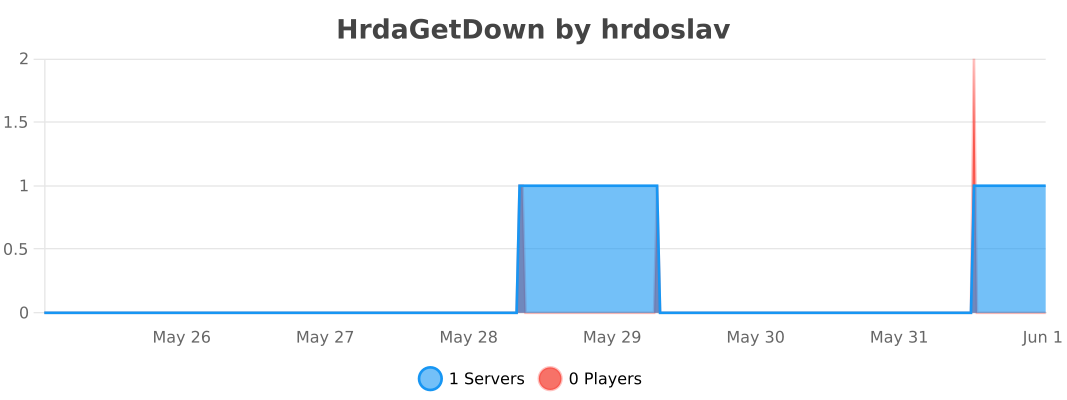

bStats Servers

If you have any problems with the plugin, just message me on my Discord server: https://dsc.gg/hrda-plugins
Thanks for downloading!

👥 Team & Contributors

Hrda
HrdaOwner

⚙️ Compatibility

Environment
🖥️ Server-side
Loaders
bukkitpaperpurpurspigot
Minecraft Versions
1.201.20.11.20.21.20.31.20.41.20.51.20.61.21+15 more

🔗 Links

Modrinth Page