
MINECRAFTBIBLE
Loading...
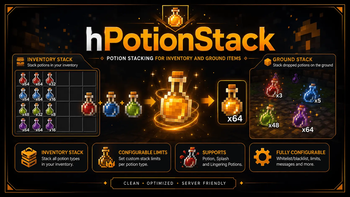

Potion stacking for inventories and dropped items with separate limits for regular, splash and lingering potions, configurable delays, allowed inventory types and permissions.
hPotionStack is a lightweight plugin that allows potions to stack in inventories and as dropped items on the ground.
The plugin supports regular potions, splash potions and lingering potions. Each potion type can have separate settings for inventory stacking and ground item stacking, including custom stack limits and spawn delays.
POTIONSPLASH_POTIONLINGERING_POTIONhPotionStack works with three potion item types:
POTION
SPLASH_POTION
LINGERING_POTION
When inventory stacking is enabled, the plugin checks potion clicks inside allowed inventory types and combines similar potions up to the configured limit.
When ground stacking is enabled, the plugin checks spawned potion items after a configurable delay and merges similar nearby potion items up to the configured limit.
Inventory stacking can be enabled globally and separately for every potion type.
Players need this permission to stack potions inside inventories:
hpotionstack.stack
If the player does not have permission, the plugin can run actions from:
actions.noPermsInventory
Default allowed inventory types:
CRAFTING
ENDER_CHEST
BARREL
SHULKER_BOX
CHEST
Ground item stacking can be enabled globally and separately for every potion type.
When a potion item spawns on the ground, the plugin waits for the configured delay and then tries to merge it with similar nearby potion items.
The ground stacking behavior is controlled through:
settings.enable.itemSpawn
settings.stackSettings.<type>.itemSpawn.enable
settings.stackSettings.<type>.itemSpawn.maxStack
settings.stackSettings.<type>.itemSpawn.delay
Default configuration example:
settings:
  prefix: "&7[#FDBE00Server&7]"
  debug: true
  enable:
    inventory: true
    itemSpawn: true
  stackSettings:
    potion:
      inventory:
        enable: true
        maxStack: 3
      itemSpawn:
        enable: true
        maxStack: 5
        delay: 4
    splashPotion:
      inventory:
        enable: true
        maxStack: 64
      itemSpawn:
        enable: true
        maxStack: 64
        delay: 4
    lingeringPotion:
      inventory:
        enable: true
        maxStack: 48
      itemSpawn:
        enable: true
        maxStack: 48
        delay: 4
  inventories:
    - "CRAFTING"
    - "ENDER_CHEST"
    - "BARREL"
    - "SHULKER_BOX"
    - "CHEST"
The plugin includes action sections for inventory stacking feedback.
actions:
  noPermsInventory:
    - "[Message] {prefix} You do not have permission to stack potions in inventories!"
  onStackInventory:
    - "[Sound] ENTITY_VILLAGER_YES"
    - "[Message] {prefix} Potions have been stacked!"
| Command | Description |
|---|---|
/hpotionstack |
Shows the help message |
/hpotionstack reload |
Reloads the configuration |
/hpotionstack inventory <player> |
Shows the open inventory type of a player |
The inventory command is useful when configuring the allowed inventory type list.
| Permission | Description |
|---|---|
hpotionstack.admin |
Access to administrative commands |
hpotionstack.stack |
Allows potion stacking inside inventories |
Ground item stacking works automatically according to the configuration.
Optional soft dependencies:
hPotionStack.jar into your server's plugins folder.hpotionstack.stack if they should be able to stack potions in inventories./hpotionstack reload after editing the configuration.Configuration file:
plugins/hPotionStack/config.yml
hpotionstack.stack./hpotionstack inventory <player> to check the type of the inventory a player currently has open.