

Playtime
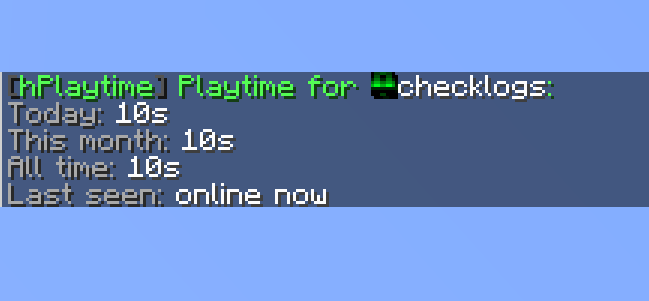
Standalone Paper playtime tracking with daily, monthly, all-time, and event based playtime support.
📖About Playtime

Playtime
A lightweight Paper plugin that tracks player playtime without needing Essentials, Minecraft statistics, or another playtime plugin.
What does it track?
It tracks several types of playtime separately:
| Type | Description |
|---|---|
| Today | Playtime earned during the current day |
| This Month | Playtime earned during the current month |
| All-Time | Total playtime tracked by hPlaytime |
| Events | Temporary playtime contests with their own logs |
This plugin starts tracking from the moment it is installed. It does not import Essentials data or use Minecraft statistics.
Commands
User
| Command | Permission | Description |
|---|---|---|
/playtime |
hplaytime.use |
Shows your own playtime |
/pt |
hplaytime.use |
Alias for /playtime |
/playtime <player> |
hplaytime.others |
Shows another player's playtime |
/playtime top |
hplaytime.use |
Shows the top 10 all-time playtime leaderboard |
/playtime topday |
hplaytime.use |
Shows the top 10 daily playtime leaderboard |
/playtime topmonth |
hplaytime.use |
Shows the top 10 monthly playtime leaderboard |
Admin
| Command | Permission | Description |
|---|---|---|
/hplaytime reload |
hplaytime.reload |
Reloads config, language, storage settings, AFK settings, and formats |
/hplaytime reset <player> |
hplaytime.reset |
Resets one player' main playtime |
/hplaytime resetall |
hplaytime.resetall |
Resets all players' main playtime |
Events
| Command | Permission | Description |
|---|---|---|
/playtime event create <name> <duration> |
hplaytime.event.create |
Creates a playtime event |
/playtime start <name> |
hplaytime.event.start |
Starts an event fresh |
/playtime event end <name> |
hplaytime.event.end |
Ends an event and writes a log |
/playtime event delete <name> |
hplaytime.event.delete |
Deletes active event tracking files |
/event list |
hplaytime.event.list |
Lists events |
Example:
/playtime event create weekend 24h
/playtime start weekend
Supported duration examples:
24h
7d
1h30m
45m
| Permission | Default | Description |
|---|---|---|
hplaytime.use |
Everyone | Use /playtime |
hplaytime.others |
OP | Check another player's playtime |
hplaytime.reload |
OP | Reload hPlaytime |
hplaytime.reset |
OP | Reset one player's main playtime |
hplaytime.resetall |
OP | Reset all main playtime |
hplaytime.event.create |
OP | Create playtime events |
hplaytime.event.start |
OP | Start playtime events |
hplaytime.event.end |
OP | End playtime events |
hplaytime.event.delete |
OP | Delete event tracking files |
hplaytime.event.list |
OP | List events |
Features
- Standalone playtime tracking
- Daily, monthly, and all-time totals
- Temporary playtime events
- Local YAML storage by default
- Optional MySQL storage
- Built-in AFK protection
- AFK worlds where playtime does not count
- Optional last-seen display
- Configurable date, timezone, and time formatting
- Fully editable
lang.yml - Player and global reset commands
- Event winner broadcasts
- Permanent event result logs
- Simple text commands, no GUI required
Requirements
| Requirement | Version |
|---|---|
| Server Software | Paper 1.21.10+ |
| Java | Java 21+ |
MySQL is optional. hPlaytime uses local YAML storage by default.
Installation
- Download the latest jar.
- Place it inside your server’s
pluginsfolder. - Restart your server.
- Edit the generated files in
plugins/hPlaytime/. - Run
/hplaytime reloadafter making changes.
Plugin Files
hPlaytime creates its own folder inside your server’s plugins directory.
| Path | Purpose |
|---|---|
config.yml |
Storage, formatting, AFK, AFK worlds, and save settings |
lang.yml |
Editable plugin messages |
data/ |
Local player playtime files |
events/ |
Active event tracking files |
event-logs/ |
Saved event result logs |
hPlaytime supports local YAML storage and MySQL.
Local storage is enabled by default:
storage:
  type: local
Local player data is saved here:
plugins/hPlaytime/data/<uuid>.yml
This is the simplest option and is recommended for single-server setups.
To use MySQL:
storage:
  type: mysql

  mysql:
    host: localhost
    port: 3306
    database: minecraft
    username: root
    password: ""
    use-ssl: false
    table-prefix: hplaytime_
hPlaytime creates the required MySQL tables automatically.
Main playtime can use MySQL, but event tracking is currently local-file based.
AFK ProtectionhPlaytime includes its own AFK system. It does not rely on Essentials AFK.
afk:
  enabled: true
  timeout-seconds: 300

  worlds:
    - afk
When a player is inactive, new playtime stops counting until they move, interact, or run a command.
Players in configured AFK worlds do not gain:
- Main playtime
- Event playtime
Date keys and timezone are configurable in config.yml.
date-format:
  timezone: system
  daily-pattern: yyyy-MM-dd
  monthly-pattern: yyyy-MM
Use timezone: system for the server machine timezone, or use a Java timezone ID:
timezone: America/Chicago
Time output can also be customized:
time-format:
  style: compact
  show-seconds: true
  zero: 0s
Compact output example:
1d 4h 22m
Long output example:
1 day 4 hours 22 minutes
Last-seen output can be enabled, disabled, or reformatted:
last-seen:
  enabled: true
  pattern: yyyy-MM-dd HH:mm:ss z
All messages are editable in:
plugins/hPlaytime/lang.yml
Messages support & color codes.
Common placeholders:
| Placeholder | Description |
|---|---|
%prefix% |
Configured prefix from lang.yml |
%player% |
Player name |
%today% |
Today's playtime |
%month% |
This month's playtime |
%alltime% |
All-time playtime |
%lastseen% |
Last-seen status |
%event% |
Event name |
%duration% |
Event duration |
%time% |
Formatted time |
%events% |
Event list |
After editing lang.yml, run:
/hplaytime reload
Important Notes
- hPlaytime starts tracking after it is installed.
- It does not import Essentials playtime.
- It does not use Minecraft statistics for all-time totals.
- Reset commands affect main playtime only.
- Reset commands do not delete event logs.
- AFK timeout applies to main playtime and event playtime.
- AFK worlds apply to main playtime and event playtime.
- Event logs are kept even after an event is deleted.
- Event tracking is currently local-file based, even when MySQL is enabled.
Support
If you find a bug or have a suggestion, please open an issue on GitHub with your server version, plugin version, and any relevant console errors.
The plugin is actively maintained, but new features are added carefully to keep it lightweight.
Authors
- HBOJ
Sponsored By
- AsteroidMC
License
- ARR License