HereEngy
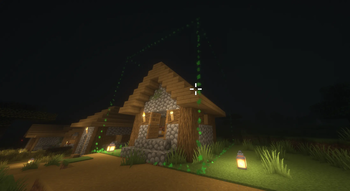
A premium Paper Minecraft plugin for automated building, schematic recording, and construction animation — capture structural blueprints using a Compass selection tool, view material lists, dynamically preview building footprints using local client particle outlines, and watch structures construct block-by-block with sound and particle effects!
Features
- Compass Selection Tool — Left-click a block with a standard Compass to set Point A (Anchor/relative origin), and Right-click to set Point B (opposite corner). Receives structural size and volume summaries instantly in chat.
- Global Blueprint Sharing — Blueprints are saved to a shared global directory (
plugins/HereEngy/blueprints/<name>.json). Any player can load, view, and construct any blueprint on the server.
- Shopping Lists (
/he info) — Detailed blueprint viewer displaying dimensions, block count, creator, and a compiled material list indicating the exact blocks and quantities required for construction.
- Visual Bounding Box Previews (
/he preview) — Project a glowing bounding box particle outline around the target footprint before building. Alignment updates dynamically as you adjust your line of sight.
- Gradual Build Tasks — Constructs blueprints layer-by-layer (sorted Y-ascending, from the foundation up) at a safe rate of 10 blocks per tick. Minimizes server lag, avoids anti-cheat blocks, and creates a satisfying building animation with sound effects and block particles.
- Double-Block Optimization — Intelligently detects and manages multi-block items (doors, beds, double tall plants) so they only count and consume one inventory item instead of two.
- HereRolePlay Integration — Integrates with the HereRolePlay plugin, granting players Crafting/Engineering Experience upon completing blueprint constructions.
- Security Protection — Only the original creator of a blueprint or a server Operator (
/op) can delete saved blueprints from the server.
Commands
All commands can be prefixed with /hereengy, /he, or /engy.
| Command |
Description |
Permission |
/he select |
Start a real-time visual selection box session targeting the block in sight. |
hereengy.use |
/he save <name> |
Save current selection area as a blueprint. |
hereengy.use |
/he load <name> |
Load blueprint as the player's active build template. |
hereengy.use |
/he rotate <left|right|mirror|flip> |
Rotate or mirror the loaded blueprint in memory (supports /he blueprint rotate <op>). |
hereengy.use |
/he list |
List all saved blueprints and their creators. |
hereengy.use |
/he info [name] |
View blueprint details and required item quantities. |
hereengy.use |
/he preview |
Toggle dynamic visual particle bounding box of loaded blueprint. |
hereengy.use |
/he cancel |
Stop the player's running active building task. |
hereengy.use |
/he delete <name> |
Delete a blueprint (Creator or Operator only). |
hereengy.use |
How to Use (Step-by-Step HOWTO)
1. Selecting and Saving a Building
- Stand near the building you want to capture.
- Look at the base/ground block directly below the starting corner of your building, and run
/he select.
- A green particle bounding box will instantly render around the target block.
- An interactive selection session starts in your chat (with a 60-second inactivity timeout).
- Adjust the Selection Box: Type sizing commands in chat to wrap your building:
- Multi-axis assignment: Type
x 10 y 15 z 12 to instantly resize.
- Negative / Inverted Selection: You can select underground or backwards by typing negative numbers! For example,
x 20 y -10 z -20 to select down into the ground.
- Quick Adjustments: Type
x or x+ to expand the X-axis by 1 block, x- to shrink it by 1 block (works for y and z too).
- Compass Adjustment: You can also hold a Compass in your main hand and click blocks:
- Left-click a block to update/re-center the starting anchor point.
- Filters & Conversions: When saving, HereEngy automatically:
- Ignores water, lava, grass, and non-placeable clutter blocks (like portal gates or frogspawn) so they aren't written to the blueprint.
- Converts farmland (
FARMLAND) and grass/dirt paths (DIRT_PATH) into normal DIRT blocks.
- Save: Once the green particle outline perfectly wraps your building, type a single word in chat (e.g.
stone_tower or cozy_cabin). This automatically verifies the box has blocks, saves the blueprint to disk, and ends selection mode. (You can also type cancel at any time to abort).
2. Loading and Orienting the Blueprint
- Load your saved blueprint using
/he load <name>.
- Rotate or Mirror: You can dynamically rotate or flip the building before placing it:
/he rotate right (or /he blueprint rotate right) — Rotates the structure 90 degrees clockwise (swaps width/depth)./he rotate left (or /he blueprint rotate left) — Rotates the structure 90 degrees counter-clockwise./he rotate mirror — Mirrors the structure along the X-axis./he rotate flip — Flips the structure along the Z-axis.- Note: This rotation is applied in-memory for your session (not on disk). Directional blocks (stairs, chests, doors, etc.) automatically rotate their block states.
3. Previewing and Placing
- Look at the ground block where you want to construct the building and run
/he preview.
- A red particle outline will appear showing exactly where the blueprint will build.
- Notice: The outline automatically sits +1 block above the ground block you target, so the building sits nicely on top of the soil instead of sinking.
- Walk to your desired placement spot.
- Make sure you have the required materials in your inventory (check
/he info). If you are in Creative Mode, materials are not consumed.
- Hold a Compass in your main hand, sneak, and Shift+Right-click the ground block.
- The building will construct block-by-block, sitting perfectly on top of the ground block you clicked! You can cancel the construction task at any time using
/he cancel.