
MINECRAFTBIBLE
Loading...
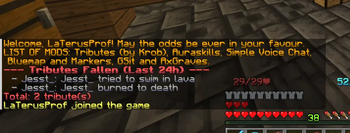

A Paper Minecraft plugin that tracks player deaths as tributes and announces them Hunger-Games-style with cannon sounds. Also handles deaths to place graves or enforce soft-hardcore style deaths.
A feature-rich Paper Minecraft plugin that tracks player deaths as tributes, broadcasts Hunger Games-style announcements with custom sounds, and provides powerful, configurable death modes with an interactive Admin GUI.
NORMAL (Vanilla behavior): Standard vanilla death where items and levels drop on the ground.TOMBSTONE: Saves all inventory, armor, and offhand items into a grave chest block at the death location.tombstone.lock-to-owner in config.yml) to prevent other players from looting graves.INFINITE: Keep inventory and level upon death with no penalties.HARDCORE: Automatic, instant resurrection but clears the inventory and resets levels to 1.motd.txt) and broadcasts a list of all tributes that have fallen in the last 24 hours to joining players.deaths.json (auto-pruned after 24 hours) and active graves to tombstones.yml so they persist through server reboots.HereDed-*.jar from the releases page.plugins/ directory.plugins/HereDed/config.yml and plugins/HereDed/motd.txt as needed.| Command | Alias | Description | Permission |
|---|---|---|---|
/hereded gui |
/hd gui |
Opens the Admin GUI to change the death mode. | hereded.admin |
/hereded admin |
/hd admin |
Opens the Admin GUI to change the death mode. | hereded.admin |
/hereded status |
/hd status |
Checks the active death mode, count of active graves, and recent deaths. | hereded.use |
/hereded reload |
/hd reload |
Reloads the configuration, motd.txt, and active tombstones. |
hereded.admin |
hereded.use (Default: true) — Allows basic command usage (/hereded status).hereded.admin (Default: op) — Allows opening the Admin GUI and reloading the plugin configuration.All configuration files are located in the plugins/HereDed/ folder:
| File | Description |
|---|---|
config.yml |
Main configuration file. Set the default death mode (death-mode: NORMAL) and toggle grave ownership lock (tombstone.lock-to-owner: false). |
motd.txt |
Custom welcome message shown to players on join. Supports the {player} placeholder. |
deaths.json |
Auto-generated file containing recent death records. Pruned automatically every 24 hours. Do not edit manually. |
tombstones.yml |
Auto-generated registry of active tombstones. Do not edit manually. |
To compile the plugin yourself:
./gradlew build
The compiled JAR will be located in the build/libs/ directory.
This project is licensed under the GNU General Public License v3.0.