Logo
MINECRAFTBIBLE
Items
Items

All game items

Blocks
Blocks

Building blocks

Mobs
Mobs

Creatures & monsters

Biomes
Biomes

World biomes

Structures
Structures

Generated structures

Recipes
Recipes

Crafting guides

Advancements
Advancements

Achievements

Loot Tables
Loot Tables

Drop rates

Tags
Tags

Item groupings

All Versions
View all data →
Capes
Cape ArchiveNEW

Browse rare Minecon capes, OptiFine capes, and custom capes from players worldwide

Browse

Player Database
Player DatabasePopular

Search any player

Skin Browser
Skin Browser

Browse & download skins

Cape Gallery
Cape GalleryNEW

Minecon & OptiFine capes

Seed Vault
Seed Vault

Curated seeds

Learn

Guides
GuidesNew

Tutorials & tips

Blog
Blog

News & updates

Community

Community Hub
Community HubHub

Posts, discussions & more

All Versions
View community →
Seed Analyzer
Seed Analyzer

World seed analysis

Loot Explorer
Loot Explorer

Drop rates

Crafting Calculator
Crafting Calculator

Material planning

Enchant Calculator
Enchant Calculator

Probability math

Redstone Lab
Redstone Lab

Signal timing

Trading Profit
Trading Profit

Villager ROI

All Versions
View all tools →
Mods
Mods

Browse all mods

Plugins
Plugins

Server plugins

Resource Packs
Resource Packs

Textures & sounds

Shaders
Shaders

Visual enhancements

Datapacks
Datapacks

World logic

Scanner
Mod Intelligence

Scan & analyze any mod

All Versions
View all mods →
Loading...
IntroductionIntroductionVersion HistoryVersion HistoryGuidesGuidesBlog & NewsBlog & News
ItemsItemsBlocksBlocksMobsMobsRecipesRecipesBiomesBiomesStructuresStructuresAdvancementsAdvancementsLoot TablesLoot TablesTagsTags
ModsModsPluginsPluginsResource PacksResource PacksShadersShadersDatapacksDatapacks

MinecraftBible

The Ultimate Wiki

Logo
MINECRAFTBIBLE

The ultimate Minecraft reference. Every item, block, mob, and recipe documented with precision.

Community

  • Skin Browser
  • Cape Gallery
  • Seed Vault
  • Blog
  • Guides

Database

  • Items
  • Blocks
  • Mobs
  • Recipes
  • Biomes
  • Structures

Tools

  • Seed Analyzer
  • Mod Intelligence
  • Crafting Calculator
  • Enchant Calculator

Mods & Packs

  • Mods
  • Plugins
  • Resource Packs
  • Shaders
  • Datapacks

Site & Legal

  • About
  • Authors
  • Editorial Policy
  • Corrections
  • Contact
  • Privacy Policy
  • Terms of Service
  • DMCA
  • Sitemap

© 2026 MinecraftBible. Not affiliated with Mojang or Microsoft.

PrivacyTermsContact
hEndermanFix
PluginLicenseRef-All-Rights-Reserved

hEndermanFix

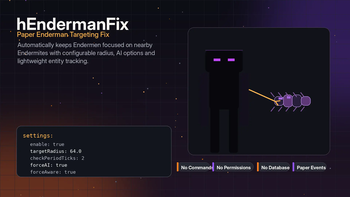
Automatic Enderman targeting fix for Paper servers that keeps Endermen focused on nearby Endermites with configurable radius, AI options and lightweight tracking.

21
Downloads
0
Followers
2 months ago
Updated
📦
1
Versions
game-mechanicsmobsbukkitpaperpurpurspigot
Download Latestvv1.0View on Modrinth

📖About hEndermanFix

hEndermanFix

hEndermanFix is a lightweight Paper/Purpur plugin that fixes Enderman targeting behavior around Endermites.

The plugin automatically tracks Endermen and Endermites, finds the nearest valid Endermite within a configured radius, and keeps Endermen targeting it. It works automatically after startup and does not require commands, permissions, databases or external plugin dependencies.


Overview

hEndermanFix has one focused job: keeping Endermen properly locked on nearby Endermites.

When an Endermite appears, the plugin registers it and checks nearby Endermen. When an Enderman appears, the plugin registers it and searches for the closest valid Endermite in the same world. If a valid Endermite is found, the plugin sets it as the Enderman target.

The plugin also scans already loaded entities on startup, so existing Endermen and Endermites can be handled after a server restart.


Features

  • Automatic Enderman target fixing
  • Endermite tracking
  • Enderman tracking
  • Startup entity loading
  • Nearest Endermite selection
  • Configurable target radius
  • Configurable check interval
  • Configurable missed-check limit
  • Optional Endermite player-spawned marking
  • Optional AI forcing for Endermen
  • Optional aware-state forcing for Endermen
  • Automatic cleanup of invalid entities
  • No commands required
  • No permissions required
  • No database required
  • No external plugin dependencies

Targeting

The plugin keeps a lightweight runtime list of tracked Endermen and Endermites.

During each check cycle, hEndermanFix:

  1. Verifies that the Enderman is still valid.
  2. Searches for the nearest valid Endermite.
  3. Checks that the Endermite is in the same world.
  4. Checks the configured target radius.
  5. Forces AI and aware state if enabled.
  6. Sets the Endermite as the Enderman target.
  7. Removes the Enderman from tracking after too many missed checks.

The repeating task stops automatically when there are no tracked Endermen left.


Config

Default configuration:

settings:
  enable: true
  targetRadius: 64.0
  checkPeriodTicks: 2
  maxMissedChecks: 50
  markEndermitePlayerSpawned: true
  forceAI: true
  forceAware: true

Options

Option Description
settings.enable Enables or disables the plugin logic
settings.targetRadius Maximum search radius for nearby Endermites
settings.checkPeriodTicks How often tracked Endermen are checked
settings.maxMissedChecks How many missed checks are allowed before an Enderman is removed from tracking
settings.markEndermitePlayerSpawned Marks tracked Endermites as player-spawned
settings.forceAI Forces Enderman AI to enabled before targeting
settings.forceAware Forces Enderman aware state to enabled before targeting

Commands

hEndermanFix has no commands.

The plugin works automatically through entity tracking and configuration.


Permissions

hEndermanFix has no permissions.

No player or administrator permissions are required.


Requirements

Requirement Status
Paper or a compatible Paper fork Required
Minecraft 1.16 or newer Required
PlaceholderAPI Not required
Vault Not required
Database Not required

Paper or a compatible Paper fork is required because the plugin uses Paper entity add and remove events.

The plugin is compiled for Java 8 bytecode. Use the Java version required by your Minecraft server version.


Install

  1. Place hEndermanFix.jar into the plugins folder.
  2. Restart the server.
  3. Open the plugin folder:
plugins/hEndermanFix/
  1. Edit config.yml if needed.
  2. Restart the server after changing the configuration.

Notes

  • The plugin starts automatically when the server enables it.
  • There is no reload command.
  • A server restart is recommended after editing the configuration.
  • Lower checkPeriodTicks values make checks run more often.
  • Higher targetRadius values increase the search area.
  • The plugin does not change mob drops, mob caps, spawning rules or world generation.

👥 Team & Contributors

He3HaukaX
He3HaukaXOwner

⚙️ Compatibility

Environment
🖥️ Server-side
Loaders
bukkitpaperpurpurspigot
Minecraft Versions
1.161.16.11.16.21.16.31.16.41.16.51.171.17.1+30 more

🔗 Links

Modrinth Page