

HardRevive
A configurable Hardcore revival system with craftable revive items, GUI support, and permanent death management.
📖About HardRevive
HardRevive
Revive fallen players with custom craftable items, intuitive GUIs, and fully configurable death management.
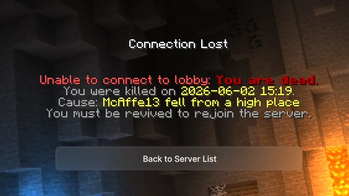
HardRevive turns death into a reversible event on your server. When a player dies they are automatically banned until another player crafts a Revival Totem and brings them back through an intuitive GUI. Every aspect — items, recipes, GUIs, sounds, particles, messages — is configurable.
Works on Hardcore and normal Survival servers.
Features
- Revival Totem — fully configurable item (material, name, lore, glint, CustomModelData, ItemFlags)
- Configurable crafting recipe — change any ingredient or the entire shape
- Recipe hologram —
/recipespawns a floating 3-D display of the crafting grid; permanent for admins, 60-second / move / sneak for regular players - Automatic ban on death — dead players cannot rejoin until revived; ban lifted automatically on revival
- Paginated revive GUI — browse dead players by skull, name, death time, cause, and time-since-death
- Search — filter dead players by partial name via chat input
- Confirmation screen — prevents accidental revives
- Hardcore & Normal mode — works on both server types
- Broadcasts — configurable death/ban/revive announcements
- Full language support — 8 languages bundled; add your own
messages_xx.yml - Sounds & particles — every event has its own configurable sound and particle effect
- bStats — optional anonymous analytics with custom charts
- Update checker — async Modrinth version check on startup; notifies admins on join
Commands
| Command | Description |
|---|---|
/revive help |
Show help |
/revive reload |
Reload config |
/revive give <player> [amount] |
Give Revival Totems |
/revive list |
List dead players + open GUI |
/revive info <player> |
Show death details |
/recipe |
Show crafting recipe hologram |
Aliases: /hr · /crafting
Permissions
| Permission | Description | Default |
|---|---|---|
hardrevive.admin |
Inherits all permissions | OP |
hardrevive.reload |
Reload the plugin | OP |
hardrevive.give |
Give revival items | OP |
hardrevive.list |
View dead players | OP |
hardrevive.info |
View death info | OP |
hardrevive.update.notify |
Receive update alerts | OP |
hardrevive.recipe |
Show recipe hologram (temporary) | Everyone |
hardrevive.recipe.admin |
Show recipe hologram (permanent toggle) | OP |
Installation
- Drop
HardRevive-*.jarintoplugins/ - Restart the server
- Edit
plugins/HardRevive/config.yml - Run
/revive reload
Configuration Overview
# config.yml
language: en           # en, de, or your custom code
death-system:
  mode: NORMAL         # NORMAL or HARDCORE
broadcasts:
  player-death: true
  player-revive: true
  player-banned: true
update-checker:
  enabled: true
bstats:
  enabled: true
# recipes.yml — fully customizable
recipe:
  enabled: true
  shape:
    - "DED"
    - "ETE"
    - "DED"
  ingredients:
    D: DIAMOND_BLOCK
    E: ECHO_SHARD
    T: TOTEM_OF_UNDYING
FAQ
Does this work with Hardcore worlds?
Yes. Set death-system.mode: HARDCORE in config.yml.
Can a player be revived more than once?
Yes, unlimited times. Each revival consumes one Revival Totem.
Can I change the Revival Totem to any item?
Yes, any valid Minecraft material set in items.yml.
Is data saved across restarts?
Yes, all death records are written to plugins/HardRevive/data.yml on every change.
Can I add my own language?
Yes. Copy messages_en.yml → messages_xx.yml, translate, set language: xx.
License
Mozilla Public License 2.0 — open source, fork-friendly.
Links
Made with ❤ for Hardcore community servers.