Logo
MINECRAFTBIBLE
Items
Items

All game items

Blocks
Blocks

Building blocks

Mobs
Mobs

Creatures & monsters

Biomes
Biomes

World biomes

Structures
Structures

Generated structures

Recipes
Recipes

Crafting guides

Advancements
Advancements

Achievements

Loot Tables
Loot Tables

Drop rates

Tags
Tags

Item groupings

All Versions
View all data →
Capes
Cape ArchiveNEW

Browse rare Minecon capes, OptiFine capes, and custom capes from players worldwide

Browse

Player Database
Player DatabasePopular

Search any player

Skin Browser
Skin Browser

Browse & download skins

Cape Gallery
Cape GalleryNEW

Minecon & OptiFine capes

Seed Vault
Seed Vault

Curated seeds

Learn

Guides
GuidesNew

Tutorials & tips

Blog
Blog

News & updates

Community

Community Hub
Community HubHub

Posts, discussions & more

All Versions
View community →
Seed Analyzer
Seed Analyzer

World seed analysis

Loot Explorer
Loot Explorer

Drop rates

Crafting Calculator
Crafting Calculator

Material planning

Enchant Calculator
Enchant Calculator

Probability math

Redstone Lab
Redstone Lab

Signal timing

Trading Profit
Trading Profit

Villager ROI

All Versions
View all tools →
Mods
Mods

Browse all mods

Plugins
Plugins

Server plugins

Resource Packs
Resource Packs

Textures & sounds

Shaders
Shaders

Visual enhancements

Datapacks
Datapacks

World logic

Scanner
Mod Intelligence

Scan & analyze any mod

All Versions
View all mods →
Loading...
IntroductionIntroductionVersion HistoryVersion HistoryGuidesGuidesBlog & NewsBlog & News
ItemsItemsBlocksBlocksMobsMobsRecipesRecipesBiomesBiomesStructuresStructuresAdvancementsAdvancementsLoot TablesLoot TablesTagsTags
ModsModsPluginsPluginsResource PacksResource PacksShadersShadersDatapacksDatapacks

MinecraftBible

The Ultimate Wiki

Logo
MINECRAFTBIBLE

The ultimate Minecraft reference. Every item, block, mob, and recipe documented with precision.

Community

  • Skin Browser
  • Cape Gallery
  • Seed Vault
  • Blog
  • Guides

Database

  • Items
  • Blocks
  • Mobs
  • Recipes
  • Biomes
  • Structures

Tools

  • Seed Analyzer
  • Mod Intelligence
  • Crafting Calculator
  • Enchant Calculator

Mods & Packs

  • Mods
  • Plugins
  • Resource Packs
  • Shaders
  • Datapacks

Site & Legal

  • About
  • Authors
  • Editorial Policy
  • Corrections
  • Contact
  • Privacy Policy
  • Terms of Service
  • DMCA
  • Sitemap

© 2026 MinecraftBible. Not affiliated with Mojang or Microsoft.

PrivacyTermsContact
HardcoreSoulShrines
PluginLicenseRef-All-Rights-Reserved

HardcoreSoulShrines

HardcoreSoulShrines is a plugin designed for Hardcore servers where death is meant to be meaningful but not necessarily final. Buy back your fallen friend from a special shrine.

31
Downloads
0
Followers
3 months ago
Updated
📦
1
Versions
game-mechanicsmagicsocialpaperpurpur
Download Latestv1.0-SNAPSHOTView on Modrinth

📖About HardcoreSoulShrines

HardcoreSoulShrines

gif

HardcoreSoulShrines brings permanent death back into Hardcore Minecraft by letting alive players revive fallen friends at magical shrines using diamonds or another materials.

About

HardcoreSoulShrines is a plugin designed for Hardcore servers where death is meant to be meaningful but not necessarily final.

Admins can easily place shrines anywhere on the map, while players use them to bring back their fallen friends. The plugin keeps the hardcore spirit alive with increasing revival costs based on death count and full control over what happens after revival.

Perfect for Hardcore SMPs, roleplay servers, and any community that wants high-stakes gameplay with a fair chance at redemption.

Features

  • Admins can create shrines using /shrine create [name] (placed on a configurable block type such as beacon)
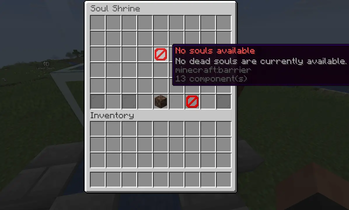
  • Right-clicking a shrine opens a GUI showing all currently dead hardcore players
  • Each soul entry displays the player’s name, total death count, and current revival cost
  • Revival cost automatically increases with each death
  • Living players can pay the cost in diamons or any configured materials to instantly revive the chosen player
  • Revived players respawn at the shrine location with optional item restoration.
  • Completely dead players are saved in the graveyard tab as a memory.

Commands

commands:
  shrine:
    description: Main command for HardcoreSoulShrines.
    usage: /shrine <create [name...]|remove|list|check|force-revive|reload>
    permission: hardcoresoulshrines.admin
  shrinereload:
    description: Reload HardcoreSoulShrines configuration.
    usage: /shrinereload
    permission: hardcoresoulshrines.admin

Permissions

permissions:
  hardcoresoulshrines.admin:
    description: Allows managing shrines and reloading the plugin.
    default: op

Support

If you find a bug, have an idea, or need help - join the Discord server.

👥 Team & Contributors

leonidussaks
leonidussaksOwner

⚙️ Compatibility

Environment
🖥️ Server-side
Loaders
paperpurpur
Minecraft Versions
1.211.21.11.21.21.21.31.21.41.21.51.21.61.21.7+4 more

🔗 Links

Modrinth Page