Logo
MINECRAFTBIBLE
Items
Items

All game items

Blocks
Blocks

Building blocks

Mobs
Mobs

Creatures & monsters

Biomes
Biomes

World biomes

Structures
Structures

Generated structures

Recipes
Recipes

Crafting guides

Advancements
Advancements

Achievements

Loot Tables
Loot Tables

Drop rates

Tags
Tags

Item groupings

All Versions
View all data →
Capes
Cape ArchiveNEW

Browse rare Minecon capes, OptiFine capes, and custom capes from players worldwide

Browse

Player Database
Player DatabasePopular

Search any player

Skin Browser
Skin Browser

Browse & download skins

Cape Gallery
Cape GalleryNEW

Minecon & OptiFine capes

Seed Vault
Seed Vault

Curated seeds

Learn

Guides
GuidesNew

Tutorials & tips

Blog
Blog

News & updates

Community

Community Hub
Community HubHub

Posts, discussions & more

All Versions
View community →
Seed Analyzer
Seed Analyzer

World seed analysis

Loot Explorer
Loot Explorer

Drop rates

Crafting Calculator
Crafting Calculator

Material planning

Enchant Calculator
Enchant Calculator

Probability math

Redstone Lab
Redstone Lab

Signal timing

Trading Profit
Trading Profit

Villager ROI

All Versions
View all tools →
Mods
Mods

Browse all mods

Plugins
Plugins

Server plugins

Resource Packs
Resource Packs

Textures & sounds

Shaders
Shaders

Visual enhancements

Datapacks
Datapacks

World logic

Scanner
Mod Intelligence

Scan & analyze any mod

All Versions
View all mods →
Loading...
IntroductionIntroductionVersion HistoryVersion HistoryGuidesGuidesBlog & NewsBlog & News
ItemsItemsBlocksBlocksMobsMobsRecipesRecipesBiomesBiomesStructuresStructuresAdvancementsAdvancementsLoot TablesLoot TablesTagsTags
ModsModsPluginsPluginsResource PacksResource PacksShadersShadersDatapacksDatapacks

MinecraftBible

The Ultimate Wiki

Logo
MINECRAFTBIBLE

The ultimate Minecraft reference. Every item, block, mob, and recipe documented with precision.

Community

  • Player Database
  • Skin Browser
  • Cape Gallery
  • Community Hub
  • Seed Vault

Database

  • Items
  • Blocks
  • Mobs
  • Recipes
  • Biomes
  • Structures

Tools

  • Seed Analyzer
  • Mod Intelligence
  • Crafting Calculator
  • Enchant Calculator

Mods & Packs

  • Mods
  • Plugins
  • Resource Packs
  • Shaders
  • Datapacks

© 2026 MinecraftBible. Not affiliated with Mojang or Microsoft.

PrivacyTermsContact
Hardcore Revive Mode
PluginCC-BY-NC-ND-4.0

Hardcore Revive Mode

Enhances the hardcore, survival experience for servers!
5.0K
Downloads
20
Followers
8 months ago
Updated
📦
15
Versions
adventuregame-mechanicssocialbukkitfabricpaperpurpurspigot
Download LatestvV1.1-BETA-pluginView on Modrinth

📖About Hardcore Revive Mode

JakeCCz' Revive Hardcore Players Mod!

Logo/Icon

Have you ever wanted to play minecraft hardcore with friends but they're really bad at the game and keep on dying? Well luckily for you, I've created this Minecraft Mod to fix this very problem and make Hardcore Mode alot more fun for multiplayer, smps ect..

So then...

What have you changed?

Don't worry, it's not much... I am a personal fan of minecraft mods "that respect the source material". This means that this mod will fit perfectly into the vanilla experience without any major differences. Kind of like; "Why hasn't this already been added to the game???"

Features

  • Fully Dead Players can now be revived back into your minecraft world

    Alive Players must adventure out into the world in search of the Dead Player's player head, located at death position, and construct an ultimate summoning ritual in order to revive the Dead Player, add this player back into the world.

  • Players now drop their respective player head upon death

    Whenever a player in a hardcore world dies, they will drop their player head at the position they died. This gives the other players in the world the opportunity to find it and revive this player. NOTE: The player head item is extremely tangible and is easily lost by natural world events such as, burning in lava or a tnt explosion.

  • A new craftable player head that allows any Alive Player to get any Dead Player's player head

    Incase ever lost somehow.
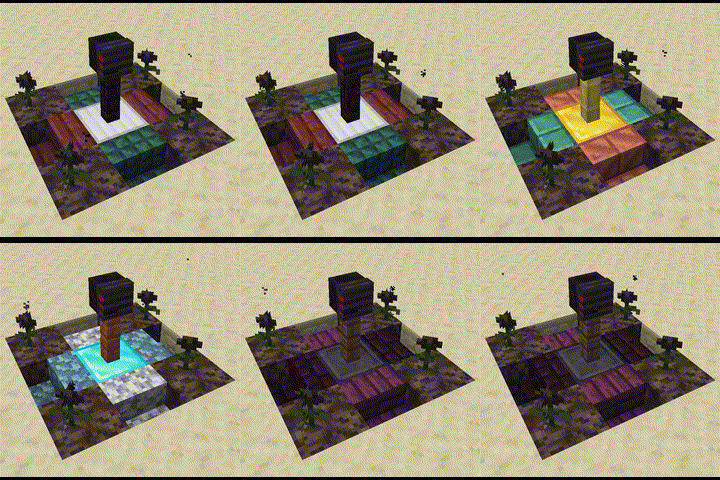
Reviving Players

Ritual Showcase

How to build the Revival Structure

To build this structure you will need: 4 Blocks of Soul Sand, 4 Wither Roses, 4 Stair Blocks of any type, 1 Fence Block of any type, 1 Ore Block and the head dropped by the player. The dimension of the entire structure is 3x3x3 blocks in any direction.

Firstly, You must place your 4 blocks of soul sand on the four corners of the structure. Place your 4 wither roses on top of each soul sand block. Next, place your 4 stair blocks into the spaces between the soul sand blocks recently place. Then, place your Ore Block in the middle of the current structure, whether it be diamond, iron, gold or emerald once it is able to activate a beacon it will work, and place your desired fence block on top of it. Lastly, place your friend's player head onto the fence and they will be revived!
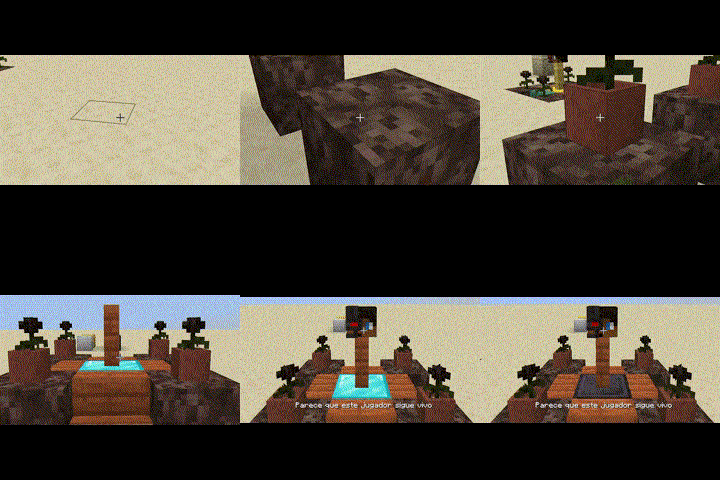
How to Build

Structure Feature

Once successful, lightning will strike the structure and your friend will appear back into existence. They will receive a small buff for 5 seconds.
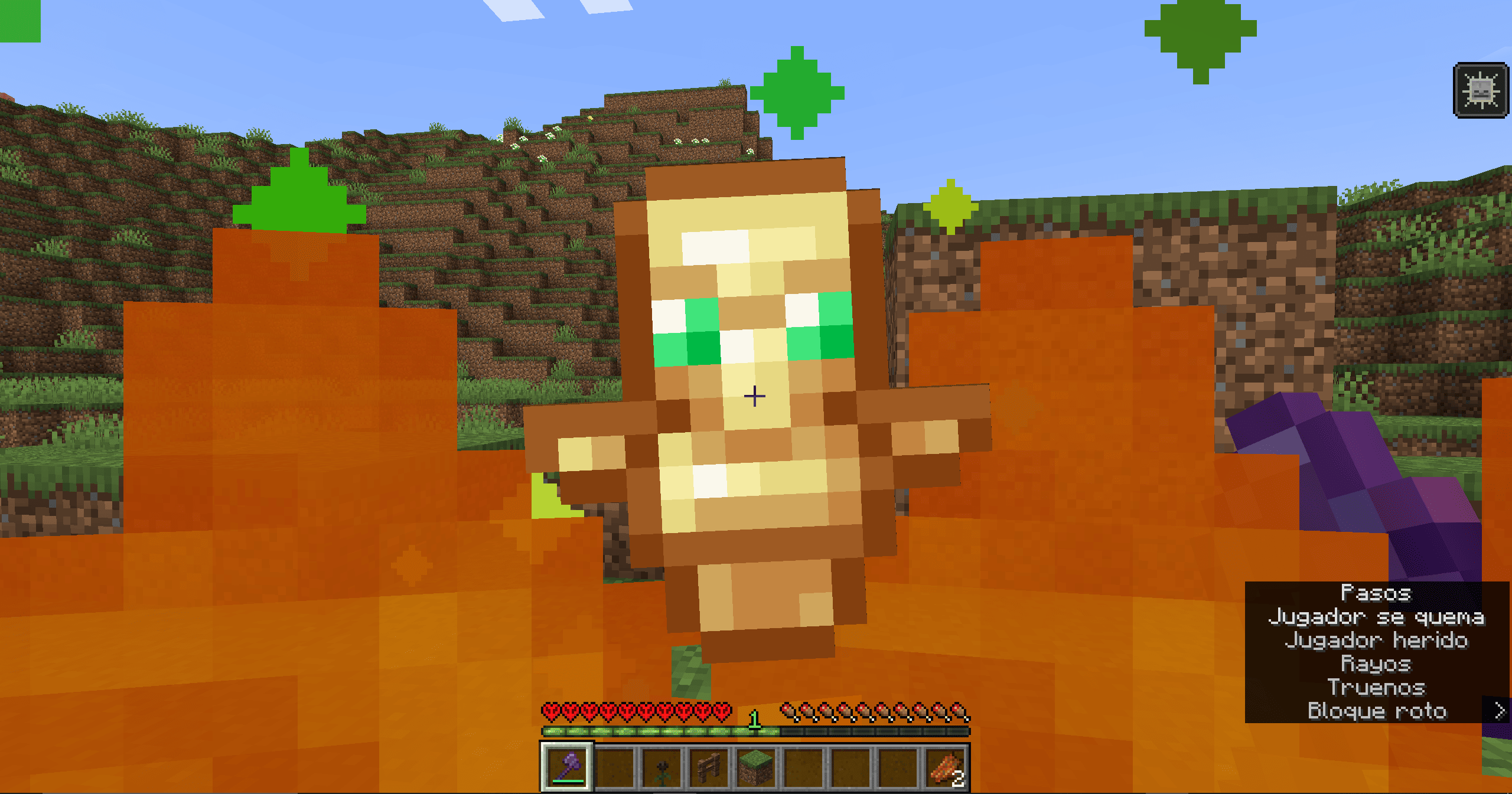
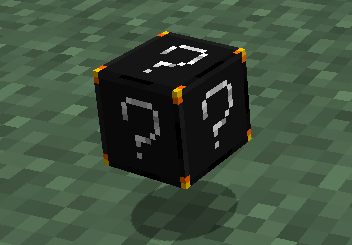
Successful Revival of the player.

Craftable Head Item

Craftable Head Item

Crafting The Item

This item can be crafted using 4 obsidian, 2 ghast tears, 2 totems of undying and any skull item as the centre piece.
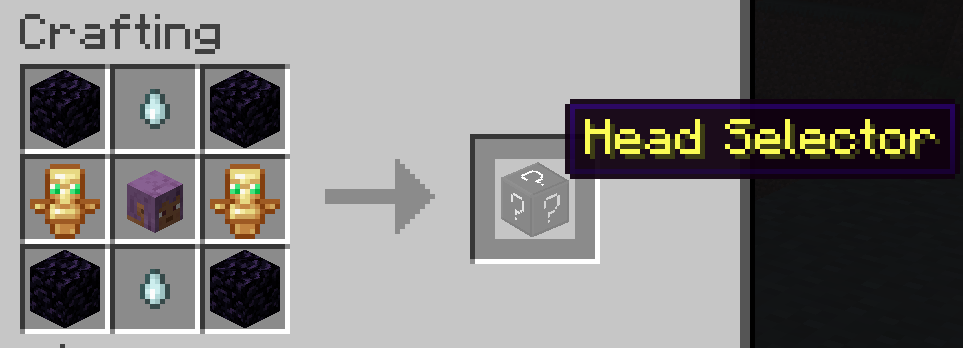
Crafting Recipe

Item Feature

A custom menu opens upon item interaction. The menu displays a list of every player in the server with helpful statuses shown beside the players name. When a menu item is selected, you receive that respective player's head item. Only when the player is dead you can select an option.
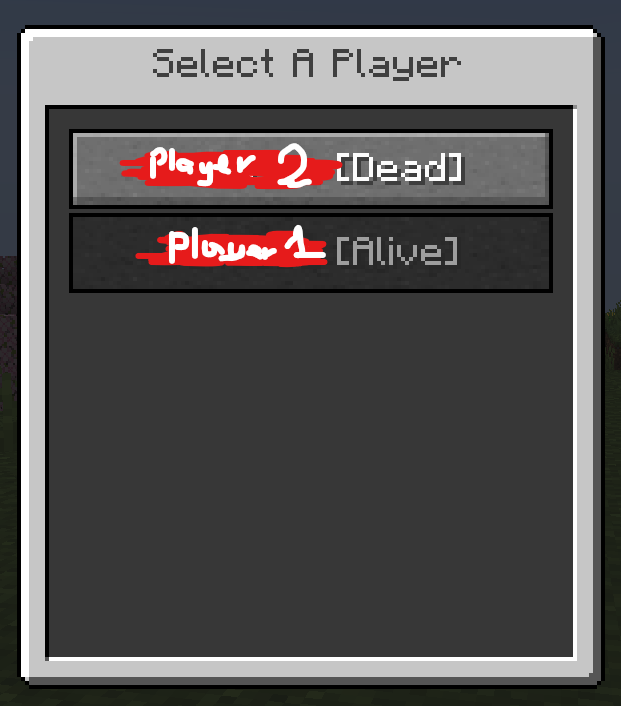
Custom Menu

Extra Features

Access Mod Config via command;
/hardcoreconfig < MODIFY:SET > < STRUCTURE:GAMERULE >

Wearing a Dead Player's Player Head grants your player;
Health Boost V (An extra row of hearts),
Resistance I,
Slowness I,
Nausea I (for 10 seconds),
once worn.

Requirements

  • Fabric Api

Showcase

Mod Showcase

👥 Team & Contributors

JakeCCz
JakeCCzOwner

⚙️ Compatibility

Environment
✅ Client & Server
Loaders
bukkitfabricpaperpurpurspigot
Minecraft Versions
1.211.21.11.21.21.21.31.21.41.21.51.21.61.21.7+3 more

🔗 Links

Modrinth Page