
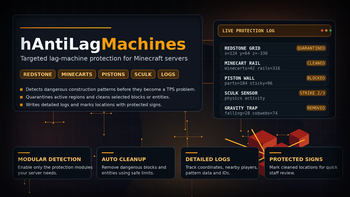

hAntiLagMachines
Targeted lag-machine protection with modular detection, automatic cleanup, quarantine, logs, protected signs and fully configurable thresholds.
📖About hAntiLagMachines
hAntiLagMachines
hAntiLagMachines is a targeted lag-machine protection plugin for Minecraft servers.
Instead of working as a generic anti-lag cleaner, the plugin focuses on specific dangerous construction patterns that are commonly used to overload servers: dense redstone grids, gravity block traps, minecart rail clusters, piston machines with armor stands, large slime or honey piston walls, and sculk sensor activity zones.
The plugin detects suspicious structures, temporarily quarantines dangerous areas, removes selected blocks or entities when needed, writes detailed logs, and places protected signs with a detection ID.
Overview
hAntiLagMachines is built around separate protection modules.
Each module has its own settings, scan radius, trigger thresholds, cleanup limits, cooldowns and quarantine rules. You can enable or disable modules independently and adjust the plugin to your server's gameplay style.
The plugin is designed for servers where players can build freely, but destructive lag-machine patterns must be detected and blocked automatically before they cause serious TPS drops.
Features
- Modular lag-machine detection
- Automatic cleanup of dangerous structures
- Temporary quarantine for active areas
- Detailed logs with coordinates and nearby players
- Protected sign placement after cleanup
- Configurable materials
- Configurable scan radius and thresholds
- Cleanup cooldowns to avoid repeated heavy work
- Expiring internal caches
- Version-safe sculk sensor support
- No external dependencies
- No commands required
Modules
Redstone
Detects dense redstone grids made from redstone wire, repeaters and comparators.
The module can react to:
- Suspicious redstone construction
- Active redstone event spam
- Dense multi-layer redstone structures
- High repeater or comparator density
When a dangerous redstone grid is detected, the plugin can cancel the placement, quarantine the affected region, remove redstone parts and write a detailed log entry.
Gravity
Detects gravity-block and cobweb lag machines.
The module checks patterns involving:
- Sand
- Red sand
- Gravel
- Concrete powder
- Cobwebs
- FallingBlock entity bursts
It can react both when a support block is broken and when many falling blocks are spawned in a short time. The cleanup can remove gravity blocks, cobwebs and nearby falling block entities.
Minecarts
Detects dense minecart and rail lag machines.
The module checks:
- Minecart placement
- Vehicle creation
- Active vehicle update spam
- Rail clusters near minecarts
- High minecart density
When the configured pattern is detected, the plugin can quarantine the region, remove minecarts, remove rails and log the action.
Armor Stands
Detects piston machines that use armor stands.
The module watches:
- Armor stand spawning
- Piston machine construction
- Piston extension and retraction
- Frequent piston activity near armor stands
Cleanup can remove armor stands and machine parts such as pistons, observers, redstone blocks, piston heads and moving pistons.
Slime Walls
Detects large slime or honey piston walls.
The module checks structures made from:
- Slime blocks
- Honey blocks
- Pistons
- Sticky pistons
- Observers
- Redstone blocks
- Piston heads
- Moving pistons
It can detect dangerous patterns during construction, piston movement and repeated active movement.
Sculk Sensors
Detects sculk sensor lag-machine zones on versions where sculk sensor materials are available.
The module can watch:
- Sculk sensor construction
- Redstone activity from sensors
- Physics activity near sensors
- Repeated activity in remembered sensor regions
Sculk sensor zones are quarantined first. After repeated quarantine strikes, the plugin can remove sculk sensors from the configured cleanup radius.
On older server versions where sculk sensor materials are not available, this module is automatically unavailable.
Logs
hAntiLagMachines writes detailed logs to a configurable log file.
By default, logs are stored in:
plugins/hAntiLagMachines/logs.txt
Log entries can include:
- Detection ID
- Detection type
- World name
- Coordinates
- Nearby players
- Removed block count
- Removed entity count
- Pattern details
- Quarantine status
- Sculk sensor strike count
Log text and formatting are configurable in:
plugins/hAntiLagMachines/logs.yml
Signs
After a cleanup, the plugin can place a protected sign near the detected location.
The sign can display:
- Plugin name
- Protection message
- Date
- Log ID
The sign is marked through persistent data and cannot be broken by regular players. Only players with the configured admin permission can break protected signs.
Config
The plugin creates three main configuration files:
plugins/hAntiLagMachines/config.yml
plugins/hAntiLagMachines/materials.yml
plugins/hAntiLagMachines/logs.yml
config.yml controls modules, thresholds, scan radius, cleanup radius, cooldowns and quarantine settings.
materials.yml controls which materials are counted as redstone parts, gravity blocks, rails, minecart items, piston parts, sticky blocks and sculk sensor blocks.
logs.yml controls log messages, sign text, titles, reasons and detail formats.
Commands
This plugin does not register player commands.
Protection works automatically through event listeners and configuration files.
Permissions
| Permission | Description | Default |
|---|---|---|
hantilagmachines.admin |
Allows breaking protected hAntiLagMachines signs | OP |
The permission string can also be changed in the configuration:
settings:
  permissions:
    admin: "hantilagmachines.admin"
Requirements
| Requirement | Status |
|---|---|
| Java 17 or newer | Required |
| Spigot/Paper/Purpur 1.16 or newer | Required |
| External plugins | Not required |
Paper or Purpur is recommended for production servers.
Install
- Place
hAntiLagMachines.jarinto the server'spluginsfolder. - Restart the server.
- Open the plugin folder:
plugins/hAntiLagMachines/
- Configure enabled modules and thresholds in
config.yml. - Configure checked materials in
materials.ymlif needed. - Configure log and sign text in
logs.ymlif needed. - Give staff the admin permission if they should be able to remove protected signs.
Use Cases
hAntiLagMachines is useful for:
- Survival servers with free building
- Anarchy or semi-anarchy servers
- Servers with redstone enabled
- Technical survival servers
- Public servers with grief protection
- Servers where lag machines are a common problem
- Projects that need automatic logging for staff review
Notes
The plugin removes blocks and entities when a configured pattern is detected. Before using it on a live server, review the default thresholds and test the plugin with your own gameplay rules.
For strict servers, lower the thresholds.
For technical survival servers, increase the thresholds to avoid blocking legitimate farms or complex redstone builds.