Logo
MINECRAFTBIBLE
Items
Items

All game items

Blocks
Blocks

Building blocks

Mobs
Mobs

Creatures & monsters

Biomes
Biomes

World biomes

Structures
Structures

Generated structures

Recipes
Recipes

Crafting guides

Advancements
Advancements

Achievements

Loot Tables
Loot Tables

Drop rates

Tags
Tags

Item groupings

All Versions
View all data →
Capes
Cape ArchiveNEW

Browse rare Minecon capes, OptiFine capes, and custom capes from players worldwide

Browse

Player Database
Player DatabasePopular

Search any player

Skin Browser
Skin Browser

Browse & download skins

Cape Gallery
Cape GalleryNEW

Minecon & OptiFine capes

Seed Vault
Seed Vault

Curated seeds

Learn

Guides
GuidesNew

Tutorials & tips

Blog
Blog

News & updates

Community

Community Hub
Community HubHub

Posts, discussions & more

All Versions
View community →
Seed Analyzer
Seed Analyzer

World seed analysis

Loot Explorer
Loot Explorer

Drop rates

Crafting Calculator
Crafting Calculator

Material planning

Enchant Calculator
Enchant Calculator

Probability math

Redstone Lab
Redstone Lab

Signal timing

Trading Profit
Trading Profit

Villager ROI

All Versions
View all tools →
Mods
Mods

Browse all mods

Plugins
Plugins

Server plugins

Resource Packs
Resource Packs

Textures & sounds

Shaders
Shaders

Visual enhancements

Datapacks
Datapacks

World logic

Scanner
Mod Intelligence

Scan & analyze any mod

All Versions
View all mods →
Loading...
IntroductionIntroductionVersion HistoryVersion HistoryGuidesGuidesBlog & NewsBlog & News
ItemsItemsBlocksBlocksMobsMobsRecipesRecipesBiomesBiomesStructuresStructuresAdvancementsAdvancementsLoot TablesLoot TablesTagsTags
ModsModsPluginsPluginsResource PacksResource PacksShadersShadersDatapacksDatapacks

MinecraftBible

The Ultimate Wiki

Logo
MINECRAFTBIBLE

The ultimate Minecraft reference. Every item, block, mob, and recipe documented with precision.

Community

  • Skin Browser
  • Cape Gallery
  • Seed Vault
  • Blog
  • Guides

Database

  • Items
  • Blocks
  • Mobs
  • Recipes
  • Biomes
  • Structures

Tools

  • Seed Analyzer
  • Mod Intelligence
  • Crafting Calculator
  • Enchant Calculator

Mods & Packs

  • Mods
  • Plugins
  • Resource Packs
  • Shaders
  • Datapacks

Site & Legal

  • About
  • Authors
  • Editorial Policy
  • Corrections
  • Contact
  • Privacy Policy
  • Terms of Service
  • DMCA
  • Sitemap

© 2026 MinecraftBible. Not affiliated with Mojang or Microsoft.

PrivacyTermsContact
Global Structure Loot Lite
PluginLicenseRef-All-Rights-Reserved

Global Structure Loot Lite

Edit generated MC structure chest loot on Paper servers without touching vanilla JSON loot tables

43
Downloads
1
Followers
1 months ago
Updated
📦
1
Versions
game-mechanicsmanagementutilitypaperpurpurspigot
Download Latestv1.0.1View on Modrinth

📖About Global Structure Loot Lite

GlobalStructureLoot Lite

Edit Minecraft structure chest loot on Paper servers.

Free • Lightweight • Paper-focused • Structure chest loot editor


What is GlobalStructureLoot Lite?

GlobalStructureLoot Lite is a free Paper plugin that lets server owners add vanilla Minecraft items to generated structure chest loot without editing Minecraft JSON loot table files.

It is made for survival, SMP, adventure, RPG, and progression-based servers that want better exploration rewards in dungeons, villages, mineshafts, temples, bastions, ancient cities, and other vanilla structures.

Instead of modifying the loot table files directly, the plugin modifies the generated loot result when a Minecraft loot table is used.

This makes GlobalStructureLoot Lite useful if you want to improve vanilla structure rewards, add rare items to generated chests, or balance exploration around your server progression.


Main Features

  • Add vanilla Minecraft items to generated structure chest loot
  • Modify generated Minecraft loot table results
  • Structure chest loot editing
  • Loot table filters
  • Biome filters
  • World whitelist and blacklist
  • Config validation command
  • Reload command
  • Debug logs
  • Tab completion
  • Add limit per chest
  • Lightweight and focused on vanilla loot injection

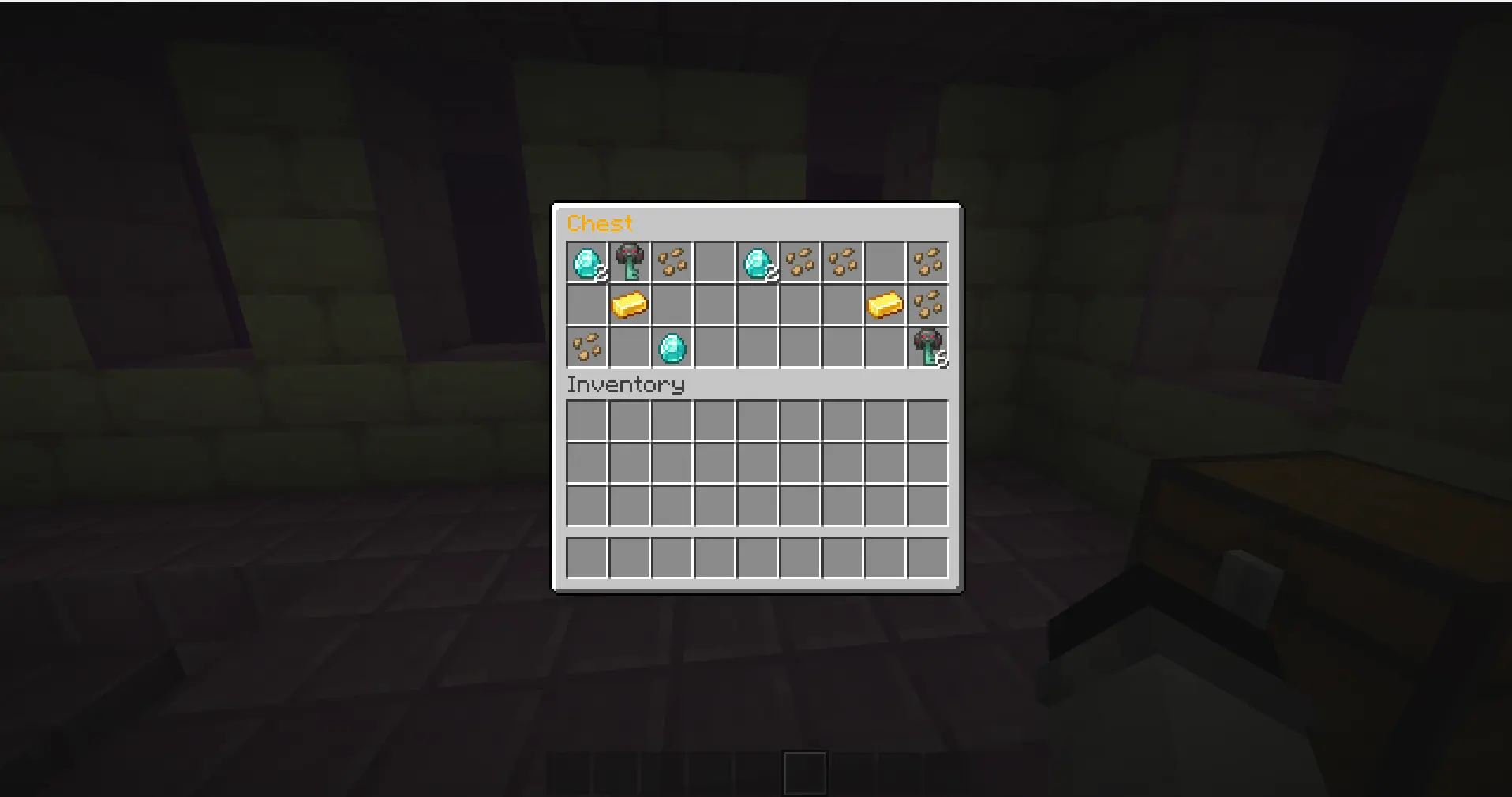
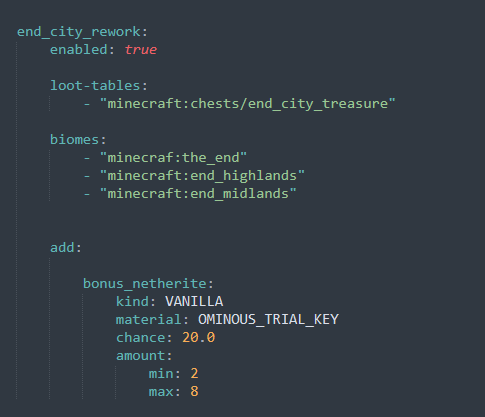
Screenshoot of the config of the plugin

End city Chest with Ominous trial key


What can it be used for?

GlobalStructureLoot Lite can be used to improve exploration rewards on your Minecraft server.

Example use cases:

  • Add rare vanilla materials to structure chests
  • Improve weak vanilla structure rewards
  • Make exploration more useful for survival players
  • Add bonus loot to dungeons, temples, villages, mineshafts, bastions, ancient cities, and more
  • Control which worlds can receive extra loot
  • Apply loot changes only to specific Minecraft loot tables
  • Apply loot rules only in specific biomes
  • Balance structure rewards around your server progression
  • Create better rewards for SMP, RPG, survival, and adventure servers

How is this different from per-player loot plugins?

GlobalStructureLoot Lite is not a per-player loot chest plugin.

Some plugins focus on giving each player their own personal loot inside the same chest.

GlobalStructureLoot Lite focuses on editing what generated Minecraft structure chests can contain.

If you want to change the rewards generated inside vanilla structure chests, this plugin is made for that.


Important Information

  • Already opened chests will not be modified.
  • Already generated loot will not be modified.
  • The plugin only affects loot when it is generated.
  • The plugin does not directly edit Minecraft JSON loot table files.
  • This Lite version is focused on adding vanilla Minecraft items only.

Commands

/globalloot reload

Reloads the config and validates it.

/globalloot validate

Validates the config and reports possible configuration issues.

/gsl reload

Alias for /globalloot reload.

/gsl validate

Alias for /globalloot validate.


Permissions

globalloot.reload

Allows the player to reload the plugin configuration.

globalloot.validate

Allows the player to validate the plugin configuration.

Both permissions are given to operators by default.


Installation

  1. Download the plugin jar.
  2. Place it inside your server's /plugins folder.
  3. Restart your server.
  4. Open the generated configuration file.
  5. Edit your loot rules.
  6. Run the validation command.
  7. Reload the plugin configuration.
  8. Generate or find a new unopened structure chest.

Configuration File

The main configuration file is generated here:

plugins/GlobalStructureLoot/config.yml

After editing the configuration, run:

/globalloot validate

If the configuration is valid, reload it with:

/globalloot reload

Quick Start

  1. Install the plugin.
  2. Restart your Paper server.
  3. Open the config file.
  4. Add your structure loot rule.
  5. Run /gsl validate.
  6. Run /gsl reload.
  7. Test the rule with a newly generated or unopened structure chest.

Example Configuration

debug: false
stop-after-first-matching-rule: false
max-added-items-per-chest: 5

worlds:
  whitelist: []
  blacklist: []

rules:
  global_structures:
    enabled: true
    loot-tables:
      - "minecraft:chests/*"
    biomes: []
    add:
      bonus_diamond:
        kind: VANILLA
        material: DIAMOND
        chance: 2.0
        amount:
          min: 1
          max: 3

This example adds diamonds to vanilla structure chest loot with a 2% chance.


Lite Version Limitations

This is the Lite version of GlobalStructureLoot.

It is focused on simple vanilla loot injection for generated Minecraft structure chests.

The Lite version does not include:

  • MMOItems support
  • Remove actions
  • Replace actions
  • Vanilla item to MMOItems replacement
  • Enchantment preservation when replacing items

Premium Version

A Premium version exists with more advanced features, including MMOItems support, remove actions, replace actions, vanilla to MMOItems replacement, and enchantment preservation.

To avoid confusion, this free Lite version remains focused on vanilla Minecraft item injection and simple structure chest loot editing.

Premium link available on the Discord.


Troubleshooting

If your custom loot does not appear, check the following:

  • Make sure the chest loot has not already been generated.
  • Make sure the target Minecraft loot table is correct.
  • Make sure your biome filter is not blocking the rule.
  • Make sure your world whitelist or blacklist is not blocking the rule.
  • Run /globalloot validate.
  • Enable debug logs if needed.
  • Check the server console for warnings or errors.

Support

If you need help, please provide:

  • Your server software and version
  • Your GlobalStructureLoot Lite version
  • Your config.yml file
  • Any console warning or error
  • A clear explanation of what happened
  • A clear explanation of what you expected

Please do not use reviews to report bugs. Ask for support first so the issue can be checked properly.


Search Keywords

Minecraft structure loot plugin, Minecraft structure chest loot plugin, Paper loot table plugin, Paper structure loot plugin, Minecraft loot table modifier, Minecraft loot table editor, structure chest loot editor, generated chest loot plugin, vanilla structure loot modifier.


Make Minecraft structures worth exploring again.
👥 Team & Contributors

Fauckon
FauckonOwner

⚙️ Compatibility

Environment
🖥️ Server-side
Loaders
paperpurpurspigot
Minecraft Versions
1.211.21.11.21.21.21.31.21.41.21.51.21.61.21.7+4 more

🔗 Links

Modrinth Page