

GiftcodeX
Advanced gift code system with GUI editor and database support
📖About GiftcodeX
GiftcodeX
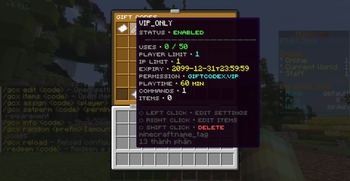
Advanced gift code management plugin for Minecraft servers — GUI editor, PlaceholderAPI support, MySQL/H2 database, Folia compatible.
Table of Contents
Requirements
| Requirement | Version |
|---|---|
| Java | 21+ |
| Paper / Folia | 1.21+ |
| PlaceholderAPI | 2.11+ (optional) |
| ViaVersion | Latest (optional) |
ViaVersion: Optionally install ViaVersion to support players joining on older clients (below 1.21.6). The plugin automatically detects legacy clients and switches from Dialog input to chat input mode.
Installation
- Download the latest
GiftcodeX-x.x.jarfrom Releases. - Place the
.jarfile into your server'splugins/folder. - Start or restart your server.
- Configuration files are generated automatically in
plugins/GiftcodeX/. - (Optional) Edit
config.ymlandmessages.yml, then run/gcx reload.
Commands
All admin commands require the giftcodex.admin permission. Players use /redeem to claim codes.
Admin — /giftcodex (aliases: /gcx, /gc)
| Command | Description |
|---|---|
/gcx help |
Show command help |
/gcx create <code> [-g] |
Create a gift code. Add -g to open the GUI editor immediately |
/gcx delete <code> |
Permanently delete a code and purge all player records |
/gcx enable <code> |
Enable a disabled code |
/gcx disable <code> |
Disable a code without deleting it |
/gcx gui |
List all codes (opens GUI for players, text list for console) |
/gcx edit <code> |
Open the GUI settings editor for a code |
/gcx items <code> |
Open the GUI item reward editor for a code |
/gcx assign <code> <player> |
Give a code's rewards directly to a player |
/gcx setperm <code> <perm|none> |
Set or clear the required permission for a code |
/gcx info <code> |
Print detailed information about a code |
/gcx random <prefix> [amount] [-c <template>] |
Bulk-generate random codes. Use -c <template> to copy settings from an existing code |
/gcx reload |
Reload config.yml, messages.yml, and codes.yml without restarting |
Player
| Command | Description |
|---|---|
/redeem <code> |
Redeem a gift code |
Permissions
| Permission | Default | Description |
|---|---|---|
giftcodex.admin |
OP | Full access to all admin commands |
giftcodex.player |
Everyone | Allows use of /redeem |
giftcodex.vip |
OP | Example custom permission for VIP-restricted codes |
Configuration
config.yml
# Database type: H2 (embedded, no setup needed) or MYSQL
database:
  type: H2
  mysql:
    host: localhost
    port: 3306
    database: giftcodex
    username: root
    password: ""

# Check for new releases on GitHub (notifies OPs on join)
check-update: true

# GUI settings
gui:
  reward-color: "&a"   # Colour prefix applied to reward messages

# Default values applied when creating a new code
defaults:
  expiry: "2099-12-31T23:59:59"   # Leave blank for no expiry
  max-uses: 100                    # Global use limit
  player-max-uses: 1               # Per-player limit (-1 = unlimited)
  max-uses-per-ip: 1               # Per-IP limit (0 = disabled)
  required-playtime: 0             # Minutes of playtime required (0 = none)
messages.yml
All messages support & colour codes. The infinity-symbol field controls what is displayed for unlimited/no-expiry values (default: ∞).
prefix: "&8[&bGiftcodeX&8] "

# Symbol displayed for unlimited or no-expiry values
infinity-symbol: "∞"

redeemed:            "&aCode redeemed successfully!"
invalid-code:        "&cThis gift code does not exist."
code-disabled:       "&cThis gift code is currently disabled."
code-expired:        "&cThis gift code has expired."
max-uses-reached:    "&cThis gift code has reached its global usage limit."
already-redeemed:    "&cYou have already used this code the maximum allowed number of times."
ip-limit-reached:    "&cThis gift code has been used too many times from your IP address."
not-enough-playtime: "&cYou need at least &e{required} &cof playtime to use this code. &7(You have: &e{current}&7)"
no-permission:       "&cYou do not have permission to use this gift code."
Run
/gcx reloadafter editing messages.yml — no restart needed.
codes.yml
Codes are stored and managed automatically. You can also edit this file manually, then run /gcx reload.
SUMMER24:
  commands:
    - "give %player% diamond 3"
    - "give %player% golden_apple 1"
  messages:
    - "&aYou received &e3 Diamonds &aand a &eGolden Apple&a!"
  max-uses: 1000               # Remaining global uses (set to 999999999 for unlimited)
  expiry: "2024-08-31T23:59:59"
  enabled: true
  player-max-uses: 1           # -1 = unlimited per player
  max-uses-per-ip: 2           # 0 = disabled
  required-playtime:           # Full duration model (auto-migrated from plain integer)
    years: 0
    months: 0
    weeks: 0
    days: 0
    hours: 0
    minutes: 0
    seconds: 0
    milliseconds: 0
  permission: ""               # Leave blank for no permission required
  items: []                    # Set item rewards via /gcx items <code>
Field reference:
| Field | Description |
|---|---|
commands |
Console commands run on redemption. Use %player% as the player name placeholder |
messages |
Messages sent to the player. Supports & colour codes |
max-uses |
Remaining global uses. Set to 999999999 for effectively unlimited |
expiry |
ISO-8601 expiry datetime (yyyy-MM-dd'T'HH:mm:ss). Leave empty for no expiry |
enabled |
true / false |
player-max-uses |
Per-player redemption limit. -1 = unlimited |
max-uses-per-ip |
Per-IP redemption limit. 0 = disabled |
required-playtime |
Duration model with fields: years, months, weeks, days, hours, minutes, seconds, milliseconds. Old plain-integer values (minutes) are auto-migrated on reload |
permission |
Required permission node. Leave empty for none |
items |
ItemStack-serialized item rewards — managed via /gcx items <code> |
PlaceholderAPI
Install PlaceholderAPI to use the following placeholders anywhere on your server.
| Placeholder | Description |
|---|---|
%giftcodex_total_codes% |
Total number of registered gift codes |
%giftcodex_player_totalused% |
Number of codes the player has redeemed |
%giftcodex_code_exists_<code>% |
true / false — whether the code exists |
%giftcodex_code_enabled_<code>% |
true / false — whether the code is enabled |
%giftcodex_code_expired_<code>% |
true / false — whether the code has expired |
%giftcodex_code_maxuses_<code>% |
Remaining global uses |
%giftcodex_code_used_<code>% |
Total times the code has been redeemed (all players) |
%giftcodex_code_expiry_<code>% |
Expiry date string, or the configured infinity symbol |
%giftcodex_code_permission_<code>% |
Required permission, or None |
%giftcodex_code_playtime_<code>% |
Required playtime as a human-readable string (e.g. 1d 2h 30m) |
%giftcodex_code_playtime_minutes_<code>% |
Required playtime converted to total minutes |
%giftcodex_code_playtime_ms_<code>% |
Required playtime in milliseconds |
%giftcodex_code_playeruses_<code>% |
Times this player has redeemed the code |
%giftcodex_code_canuseip_<code>% |
true / false — whether the player's IP is still under the limit |
%giftcodex_code_playerlimit_<code>% |
Per-player use limit, or the infinity symbol if unlimited |
%giftcodex_code_iplimit_<code>% |
Per-IP use limit, or the infinity symbol if disabled |
ViaVersion Support
When ViaVersion is installed, GiftcodeX automatically detects each admin's client version:
- 1.21.6+ clients use the native Dialog input (a popup form with labeled fields).
- Legacy clients (below 1.21.6) fall back to chat input mode automatically.
The GUI editor displays a hint in each item's lore indicating which input mode is active for the current viewer (dialog input or chat input). No configuration is required.
Author
| Name | ihqqq |
| facebook.com/ihqqqq |
Support
- Issues & bug reports: GitHub Issues
- Discord server: discord.gg/YQtCC7BV