

PluginMIT
GhostBlocks Remastered
Simple Vanilla+ Plugin, useful for building and map creation!
234
Downloads
2
Followers
4 months ago
Updated
📦
7
Versions
📖About GhostBlocks Remastered
GhostBlocks Plugin
- A Minecraft plugin that creates ghost blocks - blocks that are visible but doesn't have a hitbox.
Features
🎮 Core Functionality
- Ghost Blocks: Create blocks that are visible but have no collision/hitbox
- Categorized GUI: Organized block selection with 4 categories (Building, Nature, Redstone, Decoration)
- Pagination System: Navigate through multiple pages of blocks in each category
- Ghost Block Remover: Special tool to remove ghost blocks by looking at them and right-clicking
- Auto-Save System: Ghost blocks persist across server restarts and reloads
🛠️ Technical Features
- Uses FallingBlock entities with disabled gravity and decay
- Concurrent data structures for thread-safe operations
- YAML-based persistence storage
- Location-based ghost block mapping for efficient lookups
- Improved ghost block removal with line-of-sight detection
- Categorized and paginated GUI system
- Admin commands for maintenance and debugging
Installation
- Download the plugin JAR file
- Place it in your server's
plugins/directory - Restart your server
- The plugin will create a
ghostblocks.ymlconfiguration file automatically
Honorable Mention
Commands
| Command | Description | Permission |
|---|---|---|
/ghostblocks |
Open the ghost blocks GUI | ghostblocks.use |
/ghostblocks help |
Show help information | ghostblocks.use |
/ghostblocks count |
Show number of ghost blocks | ghostblocks.use |
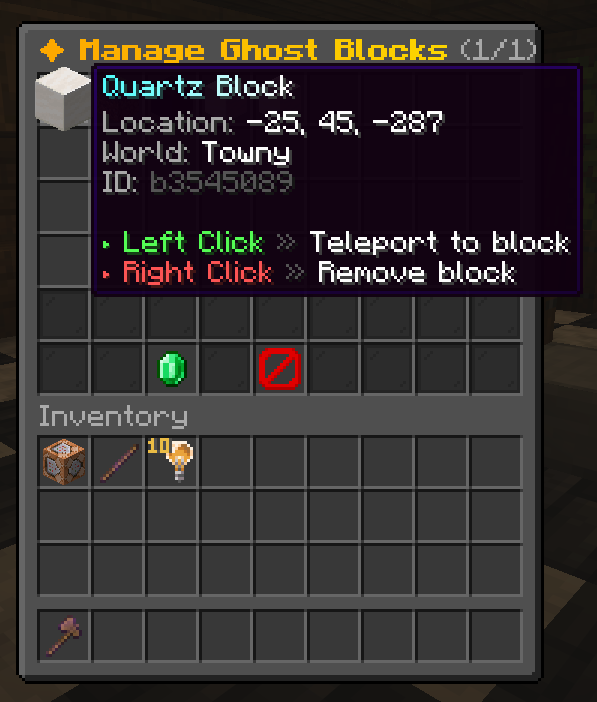
/ghostblocks manage |
Open the ghost block management GUI | ghostblocks.use |
/ghostblocks remover |
Get the ghost block remover tool | ghostblocks.use |
/ghostblocks reload |
Reload the plugin | ghostblocks.admin |
/ghostblocks cleanup |
Clean up invalid ghost blocks | ghostblocks.admin |
Aliases: /gb, /ghost
Permissions
ghostblocks.use- Allows using the plugin (default: true)ghostblocks.admin- Allows administrative functions (default: op)
How to Use
Getting Ghost Blocks:
- Use
/ghostblocksto open the categorized GUI - Click on category buttons (Building, Nature, Redstone, Decoration) to switch categories
- Use Previous/Next Page buttons to navigate through pages
- Click on any block to get it as a ghost block item
- Click on the "Ghost Block Remover" to get the removal tool
- Use
Placing Ghost Blocks:
- Place ghost block items like normal blocks
- They will automatically become ghost blocks (visible but no hitbox)
Removing Ghost Blocks:
- Hold the Ghost Block Remover (stick) and look at a ghost block
- Right-click while looking at the ghost block to remove it
- The tool will find ghost blocks within your line of sight
Block Categories
🏗️ Building Blocks
- Stone variants (Stone, Cobblestone, Stone Bricks, etc.)
- Deepslate variants (Deepslate, Cobbled Deepslate, etc.)
- Sandstone variants (Sandstone, Red Sandstone, etc.)
- Blackstone variants (Blackstone, Polished Blackstone, etc.)
- Prismarine variants and more
🌲 Nature Blocks
- All wood types (Oak, Spruce, Birch, Jungle, Acacia, Dark Oak, Mangrove, Cherry, Bamboo)
- Stripped wood variants
- Ground blocks (Dirt, Grass, Podzol, Mycelium, etc.)
- Ice blocks (Ice, Packed Ice, Blue Ice)
- Natural stone (Calcite, Tuff, Dripstone Block)
⚡ Redstone Blocks
- Redstone components (Redstone Block, Observer, Dispenser, etc.)
- Copper blocks in all oxidation states
- Functional blocks (Furnace, Crafting Table, Smithing Table, etc.)
- Mechanical blocks (Piston, Sticky Piston, etc.)
🎨 Decoration Blocks
- All concrete colors and concrete powder
- All terracotta colors and glazed terracotta
- Nether blocks (Netherrack, Nether Bricks, etc.)
- End blocks (End Stone, Purpur Block, etc.)
- Precious blocks (Diamond Block, Gold Block, etc.)
- Special blocks (Amethyst, Sculk, Ancient Debris, etc.)
Technical Details
Ghost Block Implementation
- Ghost blocks are implemented using FallingBlock entities
- Properties set:
gravity=false,dropItem=false,hurtEntities=false - Positioned at block center with 0.5 offset for perfect alignment
- Persistent across server restarts via YAML storage
Data Storage
- Ghost blocks are saved to
plugins/GhostBlocks/ghostblocks.yml - Automatic save on server shutdown
- Automatic load on server startup
- Includes world name, coordinates, material, and unique ID
Performance Considerations
- Uses ConcurrentHashMap for thread-safe operations
- Location-based indexing for O(1) ghost block lookups
- Cleanup system to remove invalid ghost blocks
- Minimal impact on server performance
Requirements
- Java 17 or higher
- Paper 1.20.6 API or higher
Configuration
The plugin automatically creates a ghostblocks.yml file in the plugin directory. This file stores all ghost block data and should not be manually edited.
Troubleshooting
Common Issues
- Ghost blocks not persisting: Check that the plugin has write permissions to the plugin directory
- Ghost blocks appearing as normal blocks: Ensure you're using Paper 1.20.4 and not Bukkit/Spigot
- Can't remove ghost blocks: Make sure you're looking directly at the ghost block and using the Ghost Block Remover tool
- Build errors: Ensure you have Java 17+ and Maven 3.6+ installed
- GUI not opening: Check that you have the
ghostblocks.usepermission
Debug Commands
- Use
/ghostblocks countto see how many ghost blocks are loaded - Use
/ghostblocks cleanupto remove any invalid ghost blocks - Check the server console for any error messages
Support
For issues, suggestions, or contributions:
- Check the troubleshooting section above
- Review the server console for error messages
- Create an issue with detailed information about the problem
License
This project is released under the MIT License. See the LICENSE file for details.
Version History
v1.0.0
- Initial release
- Core ghost block functionality
- Categorized GUI system with 4 categories (Building, Nature, Redstone, Decoration)
- Pagination system for easy navigation
- Improved ghost block remover with line-of-sight detection
- Auto-save system
- Admin commands
- 200+ block types across all categories
v2.0.0
- GUI Enhancement: GUI now stays open when selecting blocks for improved user experience
- Players can now select multiple blocks without reopening the GUI
- Other GUI interactions (remover tool, navigation) work as before
v3.0.0
- Logic Fix: Ghostblocks no longer glitches or decay over time.
- New Auto-Save system: now, every 10ticks (0.5s) the plugin automatically saves all ghostblocks data into a dedicated file inside the plugin folder.
- Block decay resolved: over time, some blocks vanished for nothing, now it's fixed.
v3.5.0
- GUI management for existed ghostblocks.
- New GUI Improvement.
- New Commands in-game.
- Thread-safe data structures.
- New (APDC) System | Auto Player Data Cleanup.
v4.0.0
- TPS Optimization.
- Multi-Thread System.
- New Blocks addition.
v5.0.0
- TPS Optimization
- Async Saving
- Tiny adjusments | GUI
- New Blocks added
v6.0.0
- GUI Enhancements
- New Blocks added
- RGB Color supported (Minimessage API)
- Bugs fixed:
- Glass Blocks unavailable
- Corrumpted GhostBlocks vanishing randomly
- Manager GUI couldn't remove blocks from the GUI itself