Logo
MINECRAFTBIBLE
Items
Items

All game items

Blocks
Blocks

Building blocks

Mobs
Mobs

Creatures & monsters

Biomes
Biomes

World biomes

Structures
Structures

Generated structures

Recipes
Recipes

Crafting guides

Advancements
Advancements

Achievements

Loot Tables
Loot Tables

Drop rates

Tags
Tags

Item groupings

All Versions
View all data →
Capes
Cape ArchiveNEW

Browse rare Minecon capes, OptiFine capes, and custom capes from players worldwide

Browse

Player Database
Player DatabasePopular

Search any player

Skin Browser
Skin Browser

Browse & download skins

Cape Gallery
Cape GalleryNEW

Minecon & OptiFine capes

Seed Vault
Seed Vault

Curated seeds

Learn

Guides
GuidesNew

Tutorials & tips

Blog
Blog

News & updates

Community

Community Hub
Community HubHub

Posts, discussions & more

All Versions
View community →
Seed Analyzer
Seed Analyzer

World seed analysis

Loot Explorer
Loot Explorer

Drop rates

Crafting Calculator
Crafting Calculator

Material planning

Enchant Calculator
Enchant Calculator

Probability math

Redstone Lab
Redstone Lab

Signal timing

Trading Profit
Trading Profit

Villager ROI

All Versions
View all tools →
Mods
Mods

Browse all mods

Plugins
Plugins

Server plugins

Resource Packs
Resource Packs

Textures & sounds

Shaders
Shaders

Visual enhancements

Datapacks
Datapacks

World logic

Scanner
Mod Intelligence

Scan & analyze any mod

All Versions
View all mods →
Loading...
IntroductionIntroductionVersion HistoryVersion HistoryGuidesGuidesBlog & NewsBlog & News
ItemsItemsBlocksBlocksMobsMobsRecipesRecipesBiomesBiomesStructuresStructuresAdvancementsAdvancementsLoot TablesLoot TablesTagsTags
ModsModsPluginsPluginsResource PacksResource PacksShadersShadersDatapacksDatapacks

MinecraftBible

The Ultimate Wiki

Logo
MINECRAFTBIBLE

The ultimate Minecraft reference. Every item, block, mob, and recipe documented with precision.

Community

  • Player Database
  • Skin Browser
  • Cape Gallery
  • Community Hub
  • Seed Vault

Database

  • Items
  • Blocks
  • Mobs
  • Recipes
  • Biomes
  • Structures

Tools

  • Seed Analyzer
  • Mod Intelligence
  • Crafting Calculator
  • Enchant Calculator

Mods & Packs

  • Mods
  • Plugins
  • Resource Packs
  • Shaders
  • Datapacks

© 2026 MinecraftBible. Not affiliated with Mojang or Microsoft.

PrivacyTermsContact
GainExpDisplay
PluginMIT

GainExpDisplay

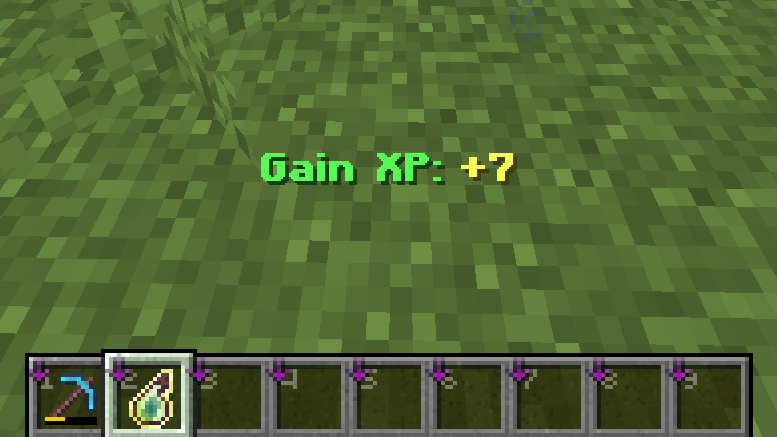
Displays XP gain and Mending repair progress in the action bar with fully configurable messages.

483
Downloads
7
Followers
4 months ago
Updated
📦
4
Versions
utilitypaperpurpur
Download Latestv2.1.0View on Modrinth

📖About GainExpDisplay

GainExpDisplay

paper purpur modrinth spigot hangar github

A lightweight Minecraft plugin that shows useful feedback in the action bar whenever you gain experience or when items are repaired by Mending.

✨ Features

  • Displays XP gained directly in the action bar
  • Shows Mending repair amount and durability progress
  • Fully customizable messages using MiniMessage
  • 7 languages supported
  • Lightweight and performance-friendly
📸 Showcase
  • XP Gained

    Gaining XP

  • Mending Repair

    Mending Repair

⚙️ Configuration

  • Permission requirement and messages toggle are fully configurable in config.yml.
  • All messages are fully customizable in translation files using MiniMessage format.
# Configuration version, DO NOT MODIFY THIS VALUE!
config-version: 3.0.0

######################################################
#                     Language                       #
######################################################

# Language setting (available: en_US, es_ES, de_DE, fr_FR, zh_CN, ja_JP, th_TH)
# If the specified language file is missing, it will fall back to en_US.
lang: en_US

# Adding custom language
# 1. Create a new file in the translations directory
# 2. Use en_US.yml as a template
# 3. Modify the file as needed
# 4. Set language to your custom language file name

######################################################
#                    Permissions                     #
######################################################

# When set to true, players require permissions to see any message.
# This setting applies globally to all message types.
# See below for a list of permissions.
require-permission: false

# Permissions for displaying messages:
#
#  gainexpdisplay.gainexp - Display text when gaining experience
#  gainexpdisplay.mending - Display text when repairing items with Mending

######################################################
#                      Settings                      #
######################################################

# When set to true, players will see text when gaining exp.
gain-xp:
  enabled: true

# When set to true, players will see text when repairing items with Mending.
mending-repair:
  enabled: true

📚 Command & Permissions

  • Command
Command Permission Description
/ged reload gainexpdisplay.reload Reload config file.
  • Permissions
Permission Description Default
gainexpdisplay.gainxp Display text when gaining experience. true
gainexpdisplay.mending Display text when repairing items with Mending. true

👥 Team & Contributors

PunJarrr
PunJarrrOwner

⚙️ Compatibility

Environment
🖥️ Server-side
Loaders
paperpurpur
Minecraft Versions
1.171.17.11.181.18.11.18.21.191.19.11.19.2+24 more

🔗 Links

Modrinth Page