Logo
MINECRAFTBIBLE
Items
Items

All game items

Blocks
Blocks

Building blocks

Mobs
Mobs

Creatures & monsters

Biomes
Biomes

World biomes

Structures
Structures

Generated structures

Recipes
Recipes

Crafting guides

Advancements
Advancements

Achievements

Loot Tables
Loot Tables

Drop rates

Tags
Tags

Item groupings

All Versions
View all data →
Capes
Cape ArchiveNEW

Browse rare Minecon capes, OptiFine capes, and custom capes from players worldwide

Browse

Player Database
Player DatabasePopular

Search any player

Skin Browser
Skin Browser

Browse & download skins

Cape Gallery
Cape GalleryNEW

Minecon & OptiFine capes

Seed Vault
Seed Vault

Curated seeds

Learn

Guides
GuidesNew

Tutorials & tips

Blog
Blog

News & updates

Community

Community Hub
Community HubHub

Posts, discussions & more

All Versions
View community →
Seed Analyzer
Seed Analyzer

World seed analysis

Loot Explorer
Loot Explorer

Drop rates

Crafting Calculator
Crafting Calculator

Material planning

Enchant Calculator
Enchant Calculator

Probability math

Redstone Lab
Redstone Lab

Signal timing

Trading Profit
Trading Profit

Villager ROI

All Versions
View all tools →
Mods
Mods

Browse all mods

Plugins
Plugins

Server plugins

Resource Packs
Resource Packs

Textures & sounds

Shaders
Shaders

Visual enhancements

Datapacks
Datapacks

World logic

Scanner
Mod Intelligence

Scan & analyze any mod

All Versions
View all mods →
Loading...
IntroductionIntroductionVersion HistoryVersion HistoryGuidesGuidesBlog & NewsBlog & News
ItemsItemsBlocksBlocksMobsMobsRecipesRecipesBiomesBiomesStructuresStructuresAdvancementsAdvancementsLoot TablesLoot TablesTagsTags
ModsModsPluginsPluginsResource PacksResource PacksShadersShadersDatapacksDatapacks

MinecraftBible

The Ultimate Wiki

Logo
MINECRAFTBIBLE

The ultimate Minecraft reference. Every item, block, mob, and recipe documented with precision.

Community

  • Skin Browser
  • Cape Gallery
  • Seed Vault
  • Blog
  • Guides

Database

  • Items
  • Blocks
  • Mobs
  • Recipes
  • Biomes
  • Structures

Tools

  • Seed Analyzer
  • Mod Intelligence
  • Crafting Calculator
  • Enchant Calculator

Mods & Packs

  • Mods
  • Plugins
  • Resource Packs
  • Shaders
  • Datapacks

Site & Legal

  • About
  • Authors
  • Editorial Policy
  • Corrections
  • Contact
  • Privacy Policy
  • Terms of Service
  • DMCA
  • Sitemap

© 2026 MinecraftBible. Not affiliated with Mojang or Microsoft.

PrivacyTermsContact
FoShop
PluginLicenseRef-All-Rights-Reserved

FoShop

GUI economy shops with buying, selling, and rotating boosts.
63
Downloads
1
Followers
1 months ago
Updated
📦
2
Versions
economyutilitybukkitpaperpurpurspigot
Download Latestv1.4View on Modrinth

📖About FoShop

FoShop cover image

FoShop gives server owners a clean GUI economy shop with buying, selling, admin editing, and optional rotating sell boosts in one place. Players get simple shop and sell workflows, while admins can manage sections, products, prices, limits, and migrations without turning the page into a config-only project.

Shop Menu

  • Build organized /shop sections with custom icons, descriptions, pages, prices, stock, buy limits, and product types for items, permissions, enchantments, commands, or display-only entries.
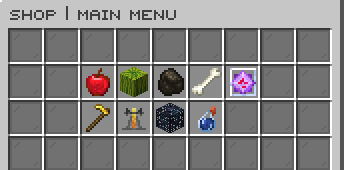
  • Let players buy the exact amount they need through the amount selector or the built-in Buy More stack preset menu.

FoShop main shop menu

Selling

  • Give players fast selling through /sell, /sell all, /sell hand, and /sellgui, with unsellable items returned safely.
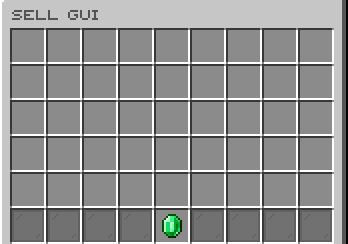
  • Add polished sale feedback with optional hover receipts, titles, action bars, sounds, and SellGUI transaction logs.

FoShop SellGUI

Rotating Sell Boosts

  • Run optional rotating sell boosts through /rotatingshop, with configurable reset timing and editor controls for which sections and items can appear.
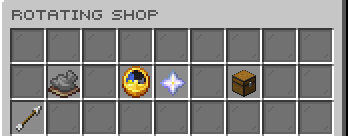
FoShop rotating shop

Admin Tools

  • Manage shop sections, products, settings, rotating-shop pools, reloads, and conversions from /foshopadmin editor.

FoShop admin editor

Dependencies

  • Vault plus an economy plugin - required for buy and sell payments.
  • PlaceholderAPI - optional; parses PlaceholderAPI values in configurable shop and GUI text.

Commands

  • /foshop or /shop - Open the main shop GUI.
  • /sell [all|hand|gui] - Sell inventory items, hand items, or open the SellGUI.
  • /sellall - Sell all sellable inventory items.
  • /sellhand or /sellheld - Sell the item in your main hand.
  • /fosellgui or /sellgui - Open the SellGUI directly.
  • /rotatingshop or /rshop - Open the rotating boosted sell shop when enabled.
  • /foshopadmin editor - Open the in-game admin editor.
  • /foshopadmin reload - Reload config, messages, GUI files, and shops.
  • /foshopadmin rotatingshop reset - Pick a new rotating boosted sell set.
  • /foshopadmin convert <ShopGUIPlus|EconomyShopGUI> [dryrun] - Convert supported shop layouts, with dry-run support.

Permissions

  • foshop.use - Allows using /foshop.
  • foshop.sellgui.use - Allows using /fosellgui and /sell gui.
  • foshop.sellall - Allows using /sellall and /sell all.
  • foshop.sellhand - Allows using /sellhand and /sell hand.
  • foshop.rotatingshop - Allows using /rotatingshop.
  • foshop.admin - Allows using /foshopadmin and receiving admin update notices.

👥 Team & Contributors

Carrotio
CarrotioOwner

⚙️ Compatibility

Environment
🖥️ Server-side
Loaders
bukkitpaperpurpurspigot
Minecraft Versions
1.211.21.11.21.21.21.31.21.41.21.51.21.61.21.7+8 more

🔗 Links

Modrinth Page