Logo
MINECRAFTBIBLE
Items
Items

All game items

Blocks
Blocks

Building blocks

Mobs
Mobs

Creatures & monsters

Biomes
Biomes

World biomes

Structures
Structures

Generated structures

Recipes
Recipes

Crafting guides

Advancements
Advancements

Achievements

Loot Tables
Loot Tables

Drop rates

Tags
Tags

Item groupings

All Versions
View all data →
Capes
Cape ArchiveNEW

Browse rare Minecon capes, OptiFine capes, and custom capes from players worldwide

Browse

Player Database
Player DatabasePopular

Search any player

Skin Browser
Skin Browser

Browse & download skins

Cape Gallery
Cape GalleryNEW

Minecon & OptiFine capes

Seed Vault
Seed Vault

Curated seeds

Learn

Guides
GuidesNew

Tutorials & tips

Blog
Blog

News & updates

Community

Community Hub
Community HubHub

Posts, discussions & more

All Versions
View community →
Seed Analyzer
Seed Analyzer

World seed analysis

Loot Explorer
Loot Explorer

Drop rates

Crafting Calculator
Crafting Calculator

Material planning

Enchant Calculator
Enchant Calculator

Probability math

Redstone Lab
Redstone Lab

Signal timing

Trading Profit
Trading Profit

Villager ROI

All Versions
View all tools →
Mods
Mods

Browse all mods

Plugins
Plugins

Server plugins

Resource Packs
Resource Packs

Textures & sounds

Shaders
Shaders

Visual enhancements

Datapacks
Datapacks

World logic

Scanner
Mod Intelligence

Scan & analyze any mod

All Versions
View all mods →
Loading...
IntroductionIntroductionVersion HistoryVersion HistoryGuidesGuidesBlog & NewsBlog & News
ItemsItemsBlocksBlocksMobsMobsRecipesRecipesBiomesBiomesStructuresStructuresAdvancementsAdvancementsLoot TablesLoot TablesTagsTags
ModsModsPluginsPluginsResource PacksResource PacksShadersShadersDatapacksDatapacks

MinecraftBible

The Ultimate Wiki

Logo
MINECRAFTBIBLE

The ultimate Minecraft reference. Every item, block, mob, and recipe documented with precision.

Community

  • Skin Browser
  • Cape Gallery
  • Seed Vault
  • Blog
  • Guides

Database

  • Items
  • Blocks
  • Mobs
  • Recipes
  • Biomes
  • Structures

Tools

  • Seed Analyzer
  • Mod Intelligence
  • Crafting Calculator
  • Enchant Calculator

Mods & Packs

  • Mods
  • Plugins
  • Resource Packs
  • Shaders
  • Datapacks

Site & Legal

  • About
  • Authors
  • Editorial Policy
  • Corrections
  • Contact
  • Privacy Policy
  • Terms of Service
  • DMCA
  • Sitemap

© 2026 MinecraftBible. Not affiliated with Mojang or Microsoft.

PrivacyTermsContact
FoJumpPads
PluginLicenseRef-All-Rights-Reserved

FoJumpPads

Configurable launch pads with presets, effects, and safe landings.

10
Downloads
1
Followers
1 weeks ago
Updated
📦
2
Versions
game-mechanicsutilitybukkitpaperpurpurspigot
Download Latestv1.1View on Modrinth

📖About FoJumpPads

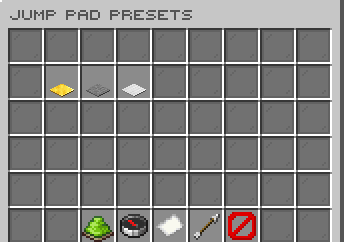
FoJumpPads cover image

FoJumpPads lets admins create polished launch pads for hubs, parkour routes, minigames, and lobby shortcuts without hardcoding each location. Give a preset item, place it in the world, and the saved block becomes a configurable jump pad with its own launch style, cooldown, effects, and item design.

Features

  • Create persistent jump pads by placing preset items; saved pads load again after restarts.
  • Start quickly with ready-made default, high, and forward presets.
  • Tune each preset's horizontal force, vertical force, cooldown, fall-damage immunity, direction mode, sound, and particle.
  • Choose player-facing, fixed north/east/south/west, or upward-only launch behavior.
  • Use optional path lock to keep players moving cleanly along a chosen launch line.
  • Manage pads from chat with list, teleport, and remove tools for quick cleanup.

Admin Editor

  • Open an in-game editor for global settings, disabled worlds, and preset management.
  • Browse, search, add, edit, and delete jump pad presets without hand-editing every value.
  • Copy the block, display name, lore, and custom model data from a held item into a preset.
  • Edit sounds and particles through paged selector menus.
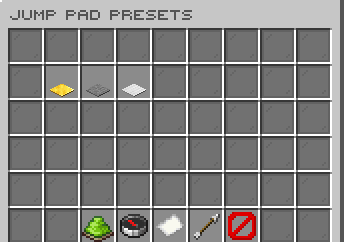
Jump pad preset editor with configured launch pads

Setup

  1. Give an admin a preset item.
  2. Place the item where players should launch.
  3. Adjust presets and world settings from the editor or config files.

Commands

  • /fojumppadsadmin editor - Open the admin editor.
  • /fojumppadsadmin give <player> <preset> [amount] - Give configured jump pad items.
  • /fojumppadsadmin list [page] - List saved jump pads.
  • /fojumppadsadmin teleport <list-index> - Teleport to a saved jump pad.
  • /fojumppadsadmin remove <radius|world|all> [value] - Remove saved jump pads in bulk.
  • /fojumppadsadmin reload - Reload config, messages, GUIs, and dialog text.
  • /fojumppadsadmin version - Check the installed version and update status.

Alias: /jumppadsadmin

Permissions

  • fojumppads.admin - Allows all FoJumpPads admin commands, editor access, and update notices.

👥 Team & Contributors

Carrotio
CarrotioOwner

⚙️ Compatibility

Environment
🖥️ Server-side
Loaders
bukkitpaperpurpurspigot
Minecraft Versions
1.211.21.11.21.21.21.31.21.41.21.51.21.61.21.7+8 more

🔗 Links

Modrinth Page