Logo
MINECRAFTBIBLE
Items
Items

All game items

Blocks
Blocks

Building blocks

Mobs
Mobs

Creatures & monsters

Biomes
Biomes

World biomes

Structures
Structures

Generated structures

Recipes
Recipes

Crafting guides

Advancements
Advancements

Achievements

Loot Tables
Loot Tables

Drop rates

Tags
Tags

Item groupings

All Versions
View all data →
Capes
Cape ArchiveNEW

Browse rare Minecon capes, OptiFine capes, and custom capes from players worldwide

Browse

Player Database
Player DatabasePopular

Search any player

Skin Browser
Skin Browser

Browse & download skins

Cape Gallery
Cape GalleryNEW

Minecon & OptiFine capes

Seed Vault
Seed Vault

Curated seeds

Learn

Guides
GuidesNew

Tutorials & tips

Blog
Blog

News & updates

Community

Community Hub
Community HubHub

Posts, discussions & more

All Versions
View community →
Seed Analyzer
Seed Analyzer

World seed analysis

Loot Explorer
Loot Explorer

Drop rates

Crafting Calculator
Crafting Calculator

Material planning

Enchant Calculator
Enchant Calculator

Probability math

Redstone Lab
Redstone Lab

Signal timing

Trading Profit
Trading Profit

Villager ROI

All Versions
View all tools →
Mods
Mods

Browse all mods

Plugins
Plugins

Server plugins

Resource Packs
Resource Packs

Textures & sounds

Shaders
Shaders

Visual enhancements

Datapacks
Datapacks

World logic

Scanner
Mod Intelligence

Scan & analyze any mod

All Versions
View all mods →
Loading...
IntroductionIntroductionVersion HistoryVersion HistoryGuidesGuidesBlog & NewsBlog & News
ItemsItemsBlocksBlocksMobsMobsRecipesRecipesBiomesBiomesStructuresStructuresAdvancementsAdvancementsLoot TablesLoot TablesTagsTags
ModsModsPluginsPluginsResource PacksResource PacksShadersShadersDatapacksDatapacks

MinecraftBible

The Ultimate Wiki

Logo
MINECRAFTBIBLE

The ultimate Minecraft reference. Every item, block, mob, and recipe documented with precision.

Community

  • Skin Browser
  • Cape Gallery
  • Seed Vault
  • Blog
  • Guides

Database

  • Items
  • Blocks
  • Mobs
  • Recipes
  • Biomes
  • Structures

Tools

  • Seed Analyzer
  • Mod Intelligence
  • Crafting Calculator
  • Enchant Calculator

Mods & Packs

  • Mods
  • Plugins
  • Resource Packs
  • Shaders
  • Datapacks

Site & Legal

  • About
  • Authors
  • Editorial Policy
  • Corrections
  • Contact
  • Privacy Policy
  • Terms of Service
  • DMCA
  • Sitemap

© 2026 MinecraftBible. Not affiliated with Mojang or Microsoft.

PrivacyTermsContact
FoAutoCollect
PluginLicenseRef-All-Rights-Reserved

FoAutoCollect

Automatic player-owned item and XP collection with safe FoDrops support.
31
Downloads
2
Followers
1 months ago
Updated
📦
4
Versions
game-mechanicsstoragetransportationbukkitpaperpurpurspigot
Download Latestv1.4View on Modrinth

📖About FoAutoCollect

Cover Image
Send player-owned drops and XP straight to inventories without messy ground clutter or unsafe reward guessing.

FoAutoCollect gives players a simple toggle for automatic collection while giving server owners precise control over where and how it works. It supports vanilla block, mob, fishing, shearing, and player-sourced explosion rewards, with a direct FoDrops hook for custom rewards when FoDrops is installed.
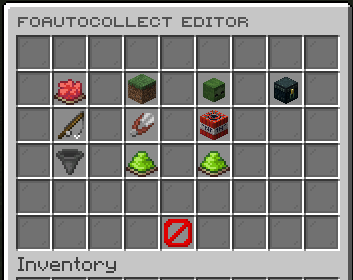
FoAutoCollect editor main menu with collection categories

Features

  • Let players toggle auto collect with /foautocollect, /autocollect, or explicit on, off, and status states.
  • Collect drops and experience from block breaks, mob kills, fishing, shearing, and supported explosions.
  • Integrate with FoDrops through FoDropRewardEvent so custom rewards are collected directly and safely.
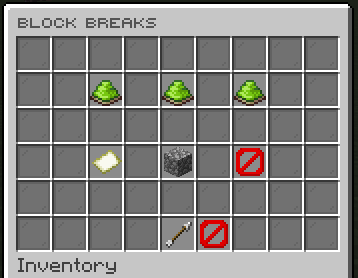
  • Configure enabled worlds, disabled worlds, disabled blocks, and disabled mobs per collection category.
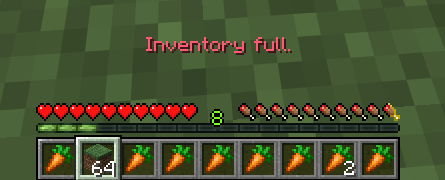
  • Choose how full inventories behave: drop overflow at the source or block collection entirely.
  • Force auto collect on for everyone when the server needs a global collection mode.

Category editor showing world, drop, XP, and blacklist controls

Full inventory behavior warning

Dependencies

  • Optional: FoDrops for direct custom reward collection.
  • Optional: FoDropBoosters for multiplying certain drops.
  • Optional: FoConvertors for converting certain amount of items into something else.
  • Optional: PlaceholderAPI for placeholder support.

Commands

  • /foautocollect - Toggle your current auto collect state.
  • /foautocollect status - Check whether auto collect is enabled.
  • /foautocollect on - Enable auto collect.
  • /foautocollect off - Disable auto collect.
  • /foautocollectadmin version - Show plugin info and check Modrinth for updates.
  • /foautocollectadmin reload - Reload config, messages, and cached settings.
  • /foautocollectadmin editor - Open the GUI editor.
  • /foautocollectadmin set <player> <on|off> - Set an online player's session state.
  • /foautocollectadmin force <on|off|status> - Control forced auto collect.

Permissions

  • foautocollect.use - Use the player toggle command.
  • foautocollect.admin - Access admin commands and the editor.

Placeholders

  • %foautocollect_state% - Returns enabled or disabled for the player's current auto collect state.

👥 Team & Contributors

Carrotio
CarrotioOwner

⚙️ Compatibility

Environment
🖥️ Server-side
Loaders
bukkitpaperpurpurspigot
Minecraft Versions
1.211.21.11.21.21.21.31.21.41.21.51.21.61.21.7+8 more

🔗 Links

Modrinth Page