Logo
MINECRAFTBIBLE
Items
Items

All game items

Blocks
Blocks

Building blocks

Mobs
Mobs

Creatures & monsters

Biomes
Biomes

World biomes

Structures
Structures

Generated structures

Recipes
Recipes

Crafting guides

Advancements
Advancements

Achievements

Loot Tables
Loot Tables

Drop rates

Tags
Tags

Item groupings

All Versions
View all data →
Capes
Cape ArchiveNEW

Browse rare Minecon capes, OptiFine capes, and custom capes from players worldwide

Browse

Player Database
Player DatabasePopular

Search any player

Skin Browser
Skin Browser

Browse & download skins

Cape Gallery
Cape GalleryNEW

Minecon & OptiFine capes

Seed Vault
Seed Vault

Curated seeds

Learn

Guides
GuidesNew

Tutorials & tips

Blog
Blog

News & updates

Community

Community Hub
Community HubHub

Posts, discussions & more

All Versions
View community →
Seed Analyzer
Seed Analyzer

World seed analysis

Loot Explorer
Loot Explorer

Drop rates

Crafting Calculator
Crafting Calculator

Material planning

Enchant Calculator
Enchant Calculator

Probability math

Redstone Lab
Redstone Lab

Signal timing

Trading Profit
Trading Profit

Villager ROI

All Versions
View all tools →
Mods
Mods

Browse all mods

Plugins
Plugins

Server plugins

Resource Packs
Resource Packs

Textures & sounds

Shaders
Shaders

Visual enhancements

Datapacks
Datapacks

World logic

Scanner
Mod Intelligence

Scan & analyze any mod

All Versions
View all mods →
Loading...
IntroductionIntroductionVersion HistoryVersion HistoryGuidesGuidesBlog & NewsBlog & News
ItemsItemsBlocksBlocksMobsMobsRecipesRecipesBiomesBiomesStructuresStructuresAdvancementsAdvancementsLoot TablesLoot TablesTagsTags
ModsModsPluginsPluginsResource PacksResource PacksShadersShadersDatapacksDatapacks

MinecraftBible

The Ultimate Wiki

Logo
MINECRAFTBIBLE

The ultimate Minecraft reference. Every item, block, mob, and recipe documented with precision.

Community

  • Skin Browser
  • Cape Gallery
  • Seed Vault
  • Blog
  • Guides

Database

  • Items
  • Blocks
  • Mobs
  • Recipes
  • Biomes
  • Structures

Tools

  • Seed Analyzer
  • Mod Intelligence
  • Crafting Calculator
  • Enchant Calculator

Mods & Packs

  • Mods
  • Plugins
  • Resource Packs
  • Shaders
  • Datapacks

Site & Legal

  • About
  • Authors
  • Editorial Policy
  • Corrections
  • Contact
  • Privacy Policy
  • Terms of Service
  • DMCA
  • Sitemap

© 2026 MinecraftBible. Not affiliated with Mojang or Microsoft.

PrivacyTermsContact
Fly with nostalgia
PluginLGPL-3.0-only

Fly with nostalgia

Adds a platform flight mode similar to the pre-creative age of Minecraft

1.1K
Downloads
4
Followers
1 years ago
Updated
📦
19
Versions
utilityfabricforgeneoforgesponge
Download Latestv1.1.1View on Modrinth

📖About Fly with nostalgia

Fly with nostalgia

Fly with nostalgia is a mod adding a retro flight mode, similar to the pre-creative days of Minecraft. Players with the retro flight mode active can walk through the air on glass platforms which slowly disappear behind them.
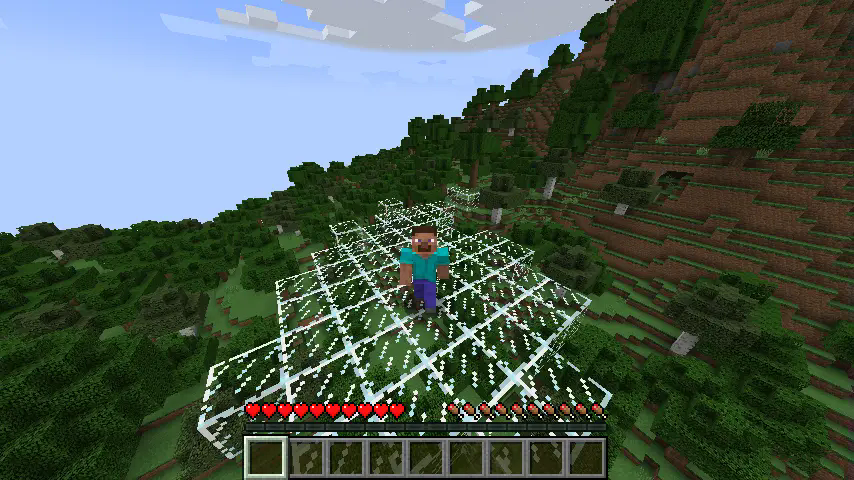
Steve standing on a glass platform above the forest. Screenshot is taken from a third-person camera in front of the player. Programmer's art texture pack is active

Commands

/fly

Enables or disables retro flight mode for the player. All the arguments are optional.

Command format: /fly <targets> <radius> <enable>

targets - choose one or more players for whom the retro flight mode will be toggled.
radius - set how big the platform should be (in blocks around the player). Defaults to 3.
enable - specify if the flight should be enabled (true) or disabled (false).

Permissions

Command responsible for toggling the retro flight mode offers granular permissions for target selection
and platform radius specification as well as a general permission for the base command usage.

fly_with_nostalgia.command.fly - usage of base /fly command (with an optional true/false enable/disable parameter)
fly_with_nostalgia.command.fly.target - selection of a different player to enable flight mode for
using the target parameter
fly_with_nostalgia.command.fly.radius - customization of a platform radius using the radius parameter
All specified permissions are false by default. Server operators with vanilla permission level equal
or above 2 are considered to have all permissions.

Loader-specific information

(Neo)Forge - corresponding loader's native permissions systems are used. External permission management mod
is required for assigning them only.
Sponge - native permission system is used. Permission management plugin is needed for assigning them.
Fabric - this loader does not provide any permission checking out of the box.
Permissions will be checked using fabric-permissions-api mod, if available.
The fabric-permissions-api-v0 library mod for registering the permissions as well as
a compatible permission management mod for assigning the registered permissions need to be installed.
Otherwise, the mod falls back to vanilla permission levels (op).

👥 Team & Contributors

ananasem
ananasemOwner

⚙️ Compatibility

Environment
🖥️ Server-side
Loaders
fabricforgeneoforgesponge
Minecraft Versions
1.211.21.11.21.21.21.31.21.4

🔗 Links

Modrinth Page