

FluxForge
An industrial tech plugin for Minecraft servers. Build power networks, automate your world.
📖About FluxForge
FluxForge
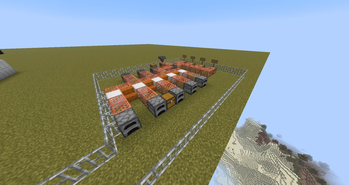
FluxForge is an industrial tech plugin for Paper, Spigot and Purpur servers. Build energy networks using generators, solar panels and batteries connected through copper conduits. Automate your world with machines that mine, smelt, sort items and grind mobs. Craft your way up through a three-tier component system and eventually build a Flux Jetpack to fly around your setup. No mods or resource packs required.
Features
- Energy network system with per-machine buffers, conduit routing, and automatic network split/merge
- 8 machines: Generator, Solar Panel, Battery, Electric Furnace, Miner, Mob Grinder, Item Sorter, Charging Station
- Flux Jetpack worn in the chestplate slot, charged at a Charging Station
- Three-tier crafting progression from vanilla copper plates up to nether star powered components
- In-game recipe viewer via
/ff recipes, available to all players - Flux Wrench to open GUIs for every machine
- Toggleable machines - Miner and Mob Grinder are off by default, toggle with the wrench
- Full localization - English and Czech included, easy to add more languages
- SQLite by default, MySQL and MariaDB supported with a built-in migration command
- Fully configurable energy values, machine costs, fuel rates and more
Showcase Video
Energy System
Every machine has its own FE (Flux Energy) buffer. Generators and solar panels produce energy which flows through copper grate conduits to consumer machines. Batteries store excess power for use when generators cannot keep up. Breaking a conduit splits the network cleanly with no energy lost. The more machines drawing from one generator, the faster it burns through fuel.
Machines
| Machine | Description |
|---|---|
| Generator | Burns coal, charcoal or coal blocks to produce 10 FE/s. Holds 1000 FE. |
| Solar Panel | Produces 3 FE/s during daylight with sky access. Passive, no fuel needed. |
| Battery | Stores up to 5000 FE. Absorbs excess from generators, supplements consumers. |
| Electric Furnace | Smelts items using FE instead of fuel. 50 FE per smelt. |
| Miner | Automatically mines blocks straight down. 100 FE per block. Toggleable. |
| Mob Grinder | Kills hostile mobs within 8 blocks. 75 FE per kill. Toggleable. |
| Item Sorter | Moves items from a source chest to destination chests by material filter. 10 FE per operation. |
| Charging Station | Charges the Flux Jetpack. 10 FE/s charge rate. |
Crafting Progression
FluxForge has a three-tier component system. All recipes are viewable in-game with /ff recipes.
Tier 1 uses only vanilla materials - copper ingots, iron ingots, gold ingots and redstone. Produces Copper Plates, Iron Plates, Gold Plates and Basic Circuits.
Tier 2 requires diamonds and nether stars - produces Advanced Circuits, Machine Frames, Energy Cores and Flux Coils. Most early machines are crafted at this tier.
Tier 3 requires nether stars and blaze rods - produces Flux Crystals, Advanced Machine Frames and Energy Cells. The Miner, Mob Grinder and Jetpack are unlocked here.
Flux Jetpack
Crafted at Tier 3 and worn in the chestplate slot. Charge it at a Charging Station connected to your energy network. Double-tap space to activate flight, double-tap again to deactivate. If charge runs out mid-air, Slow Falling kicks in automatically so you land safely. Current charge is always shown in the item lore.
Commands
| Command | Description | Permission |
|---|---|---|
/ff recipes |
Browse all crafting recipes | All players |
/ff give <machine> [amount] |
Give a machine item | fluxforge.admin |
/ff givecomponent <component> [amount] |
Give a component or jetpack | fluxforge.admin |
/ff givewrench |
Give a Flux Wrench | fluxforge.admin |
/ff setenergy <amount> |
Set energy on the machine you are looking at | fluxforge.admin |
/ff language [lang] |
View or change the active language | fluxforge.admin |
/ff reload |
Reload config and translations | fluxforge.admin |
/ff migratedb confirm |
Migrate SQLite data to MySQL | fluxforge.admin |
The /ff alias and /fluxforge both work for all commands.
Configuration
# FluxForge Configuration
language: en_us

database:
  type: sqlite # Change to 'mysql' for MySQL/MariaDB
  mysql:
    host: localhost
    port: 3306
    database: fluxforge
    username: root
    password: password
    pool-size: 10

machines:
  generator:
    production-per-tick: 10   # FE produced per second
    max-buffer: 1000          # Maximum FE the generator holds
    transfer-rate: 50         # FE pushed to network per tick
    coal-ticks: 80            # Burn time per coal in ticks
  solar-panel:
    production-per-tick: 3
    max-buffer: 300
    transfer-rate: 20
  battery:
    max-buffer: 5000
    transfer-rate: 100
  electric-furnace:
    energy-cost: 50
  miner:
    energy-cost: 100
  mob-grinder:
    energy-cost: 75
    radius: 8
  item-sorter:
    energy-cost: 10
  charging-station:
    charge-rate: 10
Run /ff reload to apply changes without restarting.
Translations
FluxForge ships with English (en_us) and Czech (cs_cz). To add a new language, copy en_us.yml from the translations/ folder, rename it, translate the values and set it as active in config.yml. Switch languages live with /ff language <code>.
Requirements
- Paper, Spigot or Purpur 1.21.1+
- Java 21+