
MINECRAFTBIBLE
Loading...
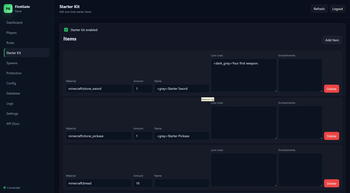

It allow player to read the rules, get a starter kit, get protected and others that are set by the owner or admin.
FirstGate is a first-join onboarding plugin for Minecraft servers. It helps server owners guide new players through a clean welcome flow with rules acceptance, starter kits, tutorial spawn, main spawn teleport, temporary new-player protection, player tracking, database storage, and a built-in web panel.
This release is for Paper, Purpur, Spigot, and Bukkit-compatible servers.
FirstGate detects new players when they join and can guide them through your server before they enter the main world.
FirstGate includes a clean rules system for new players.
/rules commandGive new players a configurable starter kit after they accept the rules.
Protect new players while they are starting out.
FirstGate includes a browser-based web panel for managing the plugin without using only commands.
Default web panel address:
http://127.0.0.1:8087 or http://0.0.0.0:8087 or http://:8087
Important:
127.0.0.1 means the panel is only accessible from the server machine itself.web.yml to your server IP or 0.0.0.0.0.0.0.0, keep your token private and do not expose the panel publicly without protection./fg web token to view your current web panel token.The web panel can manage:
| Command | Description |
|---|---|
/rules |
Opens the server rules GUI. |
/rules accept |
Accepts the rules directly. |
/firstgate rules |
Opens the rules GUI using the main command. |
/firstgate accept |
Accepts the rules using the main command. |
/fg rules |
Short version of /firstgate rules. |
/fg accept |
Short version of /firstgate accept. |
| Command | Description |
|---|---|
/fg help |
Shows the FirstGate help menu. |
/fg reload |
Reloads the plugin configuration. |
/fg version |
Shows plugin and server version information. |
/fg settutorial |
Sets the tutorial spawn to your current location. |
/fg setmainspawn |
Sets the main spawn to your current location. |
/fg status <player> |
Shows onboarding status for a player. |
/fg reset <player> |
Resets a player's onboarding progress. |
/fg complete <player> |
Marks a player as fully onboarded. |
/fg sendrules <player> |
Sends or opens the rules for a player. |
Example setup:
/fg settutorial
/fg setmainspawn
/fg reload
---

### Protection Commands

| Command                          | Description                          |
| -------------------------------- | ------------------------------------ |
| `/fg protect <player> <minutes>` | Gives a player temporary protection. |
| `/fg unprotect <player>`         | Removes protection from a player.    |

Examples:

/fg protect Steve 10
/fg unprotect Steve
Protection behavior can be configured in config.yml.
| Command | Description |
|---|---|
/fg kit give <player> |
Gives the configured starter kit to a player manually. |
Example:
/fg kit give Steve
Starter kits are normally given automatically after a player accepts the rules.

---

### Web Panel Commands

| Command               | Description                              |
| --------------------- | ---------------------------------------- |
| `/fg web status`      | Shows whether the web panel is running.  |
| `/fg web start`       | Starts the web panel.                    |
| `/fg web stop`        | Stops the web panel.                     |
| `/fg web restart`     | Restarts the web panel.                  |
| `/fg web token`       | Shows the current web panel login token. |
| `/fg web reset-token` | Generates a new web panel token.         |
| `/fg web url`         | Shows the current web panel URL.         |

Examples:
/fg web status
/fg web token
/fg web url
Default web panel URL:

http://127.0.0.1:8087
For LAN or remote access, edit web.yml:
web:
  host: "0.0.0.0"
  port: 8087
Then open:
---

### Database Commands

FirstGate uses local database storage by default.

| Command                | Description                                                 |
| ---------------------- | ----------------------------------------------------------- |
| `/fg database status`  | Shows database connection and storage status.               |
| `/fg database migrate` | Migrates old YAML player data to the database if available. |
| `/fg database backup`  | Creates a database backup.                                  |

Examples:
/fg database status
/fg database backup
Default storage:
SQLite
No external database is required for normal use.

---

## Permissions

| Permission                   | Description                                              |
| ---------------------------- | -------------------------------------------------------- |
| `firstgate.admin`            | Gives access to all FirstGate admin features.            |
| `firstgate.reload`           | Allows reloading the plugin.                             |
| `firstgate.setup`            | Allows setting tutorial and main spawn.                  |
| `firstgate.status`           | Allows checking player onboarding status.                |
| `firstgate.reset`            | Allows resetting or completing player onboarding.        |
| `firstgate.protect`          | Allows protect and unprotect commands.                   |
| `firstgate.rules`            | Allows using `/rules`.                                   |
| `firstgate.bypass`           | Allows bypassing onboarding.                             |
| `firstgate.notify`           | Receives admin warnings and notices.                     |
| `firstgate.web`              | Allows web panel management commands.                    |
| `firstgate.web.token`        | Allows viewing or resetting the web token.               |
| `firstgate.web.start`        | Allows starting, stopping, and restarting the web panel. |
| `firstgate.database`         | Allows viewing database status.                          |
| `firstgate.database.migrate` | Allows database migration.                               |
| `firstgate.database.backup`  | Allows database backup.                                  |
| `firstgate.kit.give`         | Allows manually giving starter kits.                     |

Most admin permissions default to operators. Normal players can use `/rules`.

---

## Installation

1. Download the Bukkit/Paper jar.
2. Put the jar into your server’s `plugins` folder.
3. Restart the server.
4. Set the tutorial spawn:
/fg settutorial
5. Set the main spawn:
/fg setmainspawn
6. View the web panel token:
/fg web token
7. Open the web panel:
8.
http://127.0.0.1:8087
config.yml and web.yml if needed./fg reload
---

## Supported Platforms

This release supports:

* Paper
* Purpur
* Spigot
* Bukkit-compatible servers

Paper or Purpur is recommended for the best experience.

---

## Java Requirement

FirstGate requires:

Java 21+
The plugin is designed for modern Minecraft server environments running Java 21 or newer.
Fabric, Forge, and NeoForge builds are not included in this release unless they are fully tested. This Bukkit release is the recommended production version.
FirstGate does not use telemetry and does not require an external database by default.
**Short Modrinth summary:**

First-join onboarding, rules GUI, starter kits, new-player protection, database storage, and a built-in web panel for Paper/Purpur/Spigot/Bukkit servers.