Logo
MINECRAFTBIBLE
Items
Items

All game items

Blocks
Blocks

Building blocks

Mobs
Mobs

Creatures & monsters

Biomes
Biomes

World biomes

Structures
Structures

Generated structures

Recipes
Recipes

Crafting guides

Advancements
Advancements

Achievements

Loot Tables
Loot Tables

Drop rates

Tags
Tags

Item groupings

All Versions
View all data →
Capes
Cape ArchiveNEW

Browse rare Minecon capes, OptiFine capes, and custom capes from players worldwide

Browse

Player Database
Player DatabasePopular

Search any player

Skin Browser
Skin Browser

Browse & download skins

Cape Gallery
Cape GalleryNEW

Minecon & OptiFine capes

Seed Vault
Seed Vault

Curated seeds

Learn

Guides
GuidesNew

Tutorials & tips

Blog
Blog

News & updates

Community

Community Hub
Community HubHub

Posts, discussions & more

All Versions
View community →
Seed Analyzer
Seed Analyzer

World seed analysis

Loot Explorer
Loot Explorer

Drop rates

Crafting Calculator
Crafting Calculator

Material planning

Enchant Calculator
Enchant Calculator

Probability math

Redstone Lab
Redstone Lab

Signal timing

Trading Profit
Trading Profit

Villager ROI

All Versions
View all tools →
Mods
Mods

Browse all mods

Plugins
Plugins

Server plugins

Resource Packs
Resource Packs

Textures & sounds

Shaders
Shaders

Visual enhancements

Datapacks
Datapacks

World logic

Scanner
Mod Intelligence

Scan & analyze any mod

All Versions
View all mods →
Loading...
IntroductionIntroductionVersion HistoryVersion HistoryGuidesGuidesBlog & NewsBlog & News
ItemsItemsBlocksBlocksMobsMobsRecipesRecipesBiomesBiomesStructuresStructuresAdvancementsAdvancementsLoot TablesLoot TablesTagsTags
ModsModsPluginsPluginsResource PacksResource PacksShadersShadersDatapacksDatapacks

MinecraftBible

The Ultimate Wiki

Logo
MINECRAFTBIBLE

The ultimate Minecraft reference. Every item, block, mob, and recipe documented with precision.

Community

  • Skin Browser
  • Cape Gallery
  • Seed Vault
  • Blog
  • Guides

Database

  • Items
  • Blocks
  • Mobs
  • Recipes
  • Biomes
  • Structures

Tools

  • Seed Analyzer
  • Mod Intelligence
  • Crafting Calculator
  • Enchant Calculator

Mods & Packs

  • Mods
  • Plugins
  • Resource Packs
  • Shaders
  • Datapacks

Site & Legal

  • About
  • Authors
  • Editorial Policy
  • Corrections
  • Contact
  • Privacy Policy
  • Terms of Service
  • DMCA
  • Sitemap

© 2026 MinecraftBible. Not affiliated with Mojang or Microsoft.

PrivacyTermsContact
FgAutoMessage
PluginLicenseRef-All-Rights-Reserved

FgAutoMessage

A simple and lightweight automatic announcement plugin

5
Downloads
0
Followers
4 months ago
Updated
📦
1
Versions
decorationsocialbukkitpaperpurpurspigot
Download Latestv1.0.1View on Modrinth

📖About FgAutoMessage

FgAutoMessage

FgAutoMessage is a lightweight, modern, and highly customizable automatic announcement plugin for Minecraft servers. Keep your players informed with stylish messages displayed exactly how you want them.

✨ Features

  • Multiple Display Types: Send announcements to where they matter most:
    • 💬 Chat: Standard chat messages.
    • 🎬 Action Bar: Subtle messages above the hotbar.
    • 📢 Title / Subtitle: Big, attention-grabbing text in the center of the screen.
    • 👾 Boss Bar: persistent messages at the top of the screen.
  • Rich Color Support:
    • Legacy colors (&a, &l, etc.)
    • Hex colors (&#ff00ff)
    • Gradients (<gradient:#ff0000:#00ff00>Text</gradient>)
  • Flexible Scheduling: Set the exact interval (in seconds) between announcements.
  • Smart Ordering: Choose between RANDOM order or SEQUENTIAL loop.
  • Sound Effects: Optionally play a sound (e.g., experience orb pickup) to grab players' attention.
  • Boss Bar Customization: Fully configure the Boss Bar color, style, and duration.
  • In-Game Management: Add, delete, and reload messages directly from the game without touching files.

🛠 Commands

The main command is /am (alias: /automessage).

Command Description Permission
/am help Shows the help menu. am.admin
/am reload Reloads the configuration file. am.admin
/am add <message> Adds a new announcement to the list. am.admin
/am delete <index> Removes an announcement by its number. am.admin

🔐 Permissions

  • am.admin - Grants access to all plugin commands (Default: OP).

⚙️ Configuration

The config.yml is simple and easy to understand. Here is a preview:

# How often to broadcast announcements (in seconds).
interval-seconds: 120

# Announcement mode: RANDOM or SEQUENTIAL
mode: RANDOM

display:
  # Options: CHAT, ACTIONBAR, TITLE, SUBTITLE, BOSSBAR
  type: CHAT
  title:
    fade-in-ticks: 10
    stay-ticks: 60
    fade-out-ticks: 10
  bossbar:
    color: BLUE
    style: SOLID
    duration-ticks: 100

sound:
  enabled: false
  name: "entity.experience_orb.pickup"
  volume: 1.0
  pitch: 1.0

messages:
  - "&aWelcome to the server!"
  - "<gradient:#ff0000:#00ff00>Don't forget to join our Discord!</gradient>"

📦 Installation

  1. Download the FgAutoMessage.jar.
  2. Place it in your server's plugins folder.
  3. Restart your server.
  4. Edit plugins/FgAutoMessage/config.yml to customize your messages!
    发布公告的实际效果图

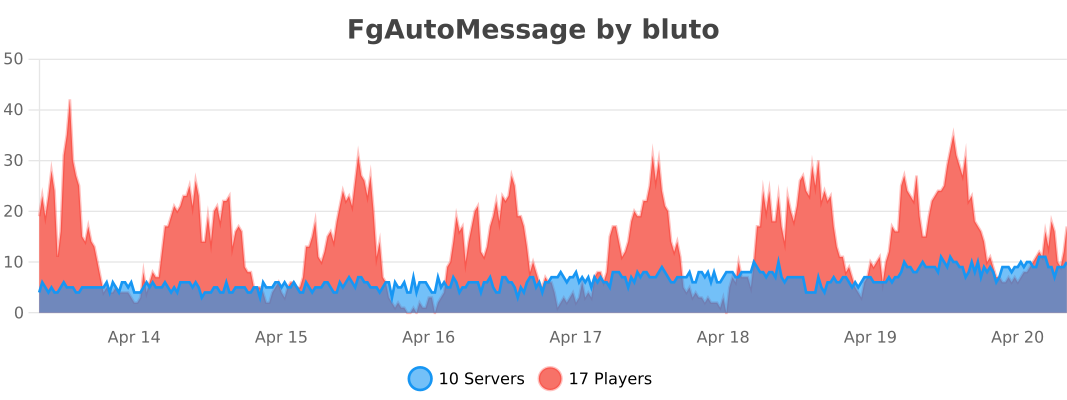
服务器使用情况

👥 Team & Contributors

B
Bluto_MCOwner

⚙️ Compatibility

Environment
🖥️ Server-side
Loaders
bukkitpaperpurpurspigot
Minecraft Versions
1.121.12.11.12.21.131.13.11.13.21.141.14.1+41 more

🔗 Links

Modrinth Page