Logo
MINECRAFTBIBLE
Items
Items

All game items

Blocks
Blocks

Building blocks

Mobs
Mobs

Creatures & monsters

Biomes
Biomes

World biomes

Structures
Structures

Generated structures

Recipes
Recipes

Crafting guides

Advancements
Advancements

Achievements

Loot Tables
Loot Tables

Drop rates

Tags
Tags

Item groupings

All Versions
View all data →
Capes
Cape ArchiveNEW

Browse rare Minecon capes, OptiFine capes, and custom capes from players worldwide

Browse

Player Database
Player DatabasePopular

Search any player

Skin Browser
Skin Browser

Browse & download skins

Cape Gallery
Cape GalleryNEW

Minecon & OptiFine capes

Seed Vault
Seed Vault

Curated seeds

Learn

Guides
GuidesNew

Tutorials & tips

Blog
Blog

News & updates

Community

Community Hub
Community HubHub

Posts, discussions & more

All Versions
View community →
Seed Analyzer
Seed Analyzer

World seed analysis

Loot Explorer
Loot Explorer

Drop rates

Crafting Calculator
Crafting Calculator

Material planning

Enchant Calculator
Enchant Calculator

Probability math

Redstone Lab
Redstone Lab

Signal timing

Trading Profit
Trading Profit

Villager ROI

All Versions
View all tools →
Mods
Mods

Browse all mods

Plugins
Plugins

Server plugins

Resource Packs
Resource Packs

Textures & sounds

Shaders
Shaders

Visual enhancements

Datapacks
Datapacks

World logic

Scanner
Mod Intelligence

Scan & analyze any mod

All Versions
View all mods →
Loading...
IntroductionIntroductionVersion HistoryVersion HistoryGuidesGuidesBlog & NewsBlog & News
ItemsItemsBlocksBlocksMobsMobsRecipesRecipesBiomesBiomesStructuresStructuresAdvancementsAdvancementsLoot TablesLoot TablesTagsTags
ModsModsPluginsPluginsResource PacksResource PacksShadersShadersDatapacksDatapacks

MinecraftBible

The Ultimate Wiki

Logo
MINECRAFTBIBLE

The ultimate Minecraft reference. Every item, block, mob, and recipe documented with precision.

Community

  • Skin Browser
  • Cape Gallery
  • Seed Vault
  • Blog
  • Guides

Database

  • Items
  • Blocks
  • Mobs
  • Recipes
  • Biomes
  • Structures

Tools

  • Seed Analyzer
  • Mod Intelligence
  • Crafting Calculator
  • Enchant Calculator

Mods & Packs

  • Mods
  • Plugins
  • Resource Packs
  • Shaders
  • Datapacks

Site & Legal

  • About
  • Authors
  • Editorial Policy
  • Corrections
  • Contact
  • Privacy Policy
  • Terms of Service
  • DMCA
  • Sitemap

© 2026 MinecraftBible. Not affiliated with Mojang or Microsoft.

PrivacyTermsContact
FancyChat
PluginLicenseRef-All-Rights-Reserved

FancyChat

Simple but hight configurable plugin that helps your players stand out

159
Downloads
3
Followers
1 years ago
Updated
📦
3
Versions
socialutilitybukkitpaperpurpurspigot
Download Latestv1.0.3View on Modrinth

📖About FancyChat

EN

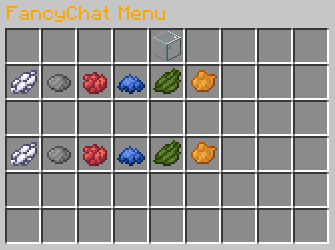
This plugin will allow each player to change the color of their nickname and chat message using a convenient menu.
Using the config, you can add any colors, items, names for this menu.
Added support for prefixes and suffixes in chat!

RU

Этот плагин позволит каждому игроку изменять цвет ника и сообщения в чате с помощью удобного меню.
С помощью конфига вы можете добавить любые цвета, предметы, названия для этого меню.
Добавлена поддержка префиксов и суффиксов в чате!

Example Messages

Message example variants

Example Menu

Color choosing menu

Commands

/fancy-chat - opens menu
/chat - opens menu
/fancy-chat reload - reloads config [fancy-chat.reload]
Config
config-version: 2

menu-name: "&6FancyChat Menu"

#Учитывайте отступ в одну строчку слотов между цветами чата и имени
#Consider the indentation of one line of slots between the chat and name colors
menu-size: 54

current-item-name: "Current colors"
current-item-type: "glass"

color-name-item-name: "Select name color"
color-message-item-name: "Select message color"

sample-message: "Hi everyone! I love this server ♥"

name-message-separator: " > "

#Поддерживает PlaceholderApi
#Supports PlaceholderApi
prefix: "%luckperms_prefix% "
suffix: " %luckperms_suffix%"

message-colors:
  white:
    item: "white_dye"
    color: "#ffffff"
  gray:
    item: "gray_dye"
    color: "#a8a8a8"

name-colors:
  white:
    item: "white_dye"
    color: "#ffffff"
  gray:
    item: "gray_dye"
    color: "#a8a8a8"

👥 Team & Contributors

DrRaiker
DrRaiker
Member

⚙️ Compatibility

Environment
🖥️ Server-side
Loaders
bukkitpaperpurpurspigot
Minecraft Versions
1.201.20.11.20.21.20.31.20.41.20.51.20.6

🔗 Links

Modrinth Page