
MINECRAFTBIBLE
Loading...

The ultimate token-based booster system. Create custom speed, movement, and gameplay buffs for your players.
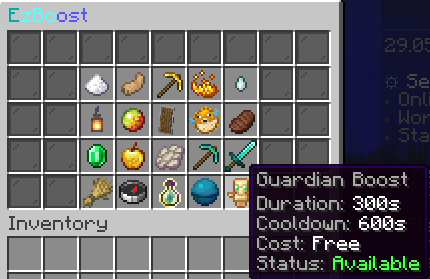
EzBoost is a feature-rich potion boost plugin for Spigot, Paper, Bukkit, and Folia (Minecraft 1.21+). It provides an inventory GUI for boost selection, per-boost cooldowns, Vault economy integration, WorldGuard region overrides, boost token items, PlaceholderAPI support, persistent storage (YAML, SQLite, MySQL, MariaDB, PostgreSQL), and a leaderboard for top boost buyers. Inspired by RedBull.

/boosttop displays the all-time top boost buyers, backed by persistent storage./ezboost give. Players redeem tokens by right-clicking them to activate the boost./ezboost reload.<boost_display>, <boost_cost>, <boost_duration>, etc.) are available directly in messages.yml – no PlaceholderAPI required.
| Command | Description | Permission |
|---|---|---|
/boost |
Open the boosts GUI or show usage. | ezboost.use |
/boost <boostKey> |
Activate a boost directly. | ezboost.use + boost permission |
/boosttop |
View the top boost buyers leaderboard. | ezboost.top |
/ezboost create |
Open the admin GUI to create boosts. | ezboost.admin |
/ezboost reload |
Reload configuration and messages. | ezboost.reload |
/ezboost give <player> <boostKey> [amount] |
Give boost token items. Players redeem by right-clicking. | ezboost.give |
For detailed command and permission documentation, see the Commands and Permissions pages.
ezboost.use – Use boosts (/boost).ezboost.top – View the boost leaderboard (/boosttop).ezboost.admin – Access admin commands.ezboost.reload – Reload configuration.ezboost.give – Give boost tokens.ezboost.cooldown.bypass – Bypass boost cooldowns.ezboost.boost.<key> – Per-boost permissions (example: ezboost.boost.speed).EzBoost.jar in your server’s plugins/ folder.plugins/EzBoost/ (settings.yml, boosts.yml, gui.yml, messages.yml, etc.)./ezboost create to open the admin GUI and create boosts.plugins/EzBoost/boosts.yml, gui.yml, and related config files./boost to open the GUI or /boost <boostKey> for instant activation./ezboost give <player> <boostKey> [amount] to give boost tokens. Players redeem tokens by right-clicking them.ezboost.boost.speed) to control access.boosts.yml with effects, duration, cooldown, cost, and permissions. See the Boosts reference for a full reference.commands.enable, commands.disable, or commands.toggle per boost to run console commands when boosts turn on/off (supports {player}, {displayname}, and {boost} placeholders).gui.yml.limits.yml.worlds.allow-list / worlds.deny-list to control where boosts apply in worlds.yml.storage.yml.boosts.yml to define per-world or per-region settings. If WorldGuard is installed, region overrides are applied automatically using region IDs.settings.yml.economy.enabled and economy.vault in economy.yml.boosts.yml to customize boost behavior per region.Full documentation is available at ez-plugins.github.io/EzBoost.
| Page | What it covers |
|---|---|
| Commands | All /boost and /ezboost commands |
| Permissions | Permissions reference and defaults |
| Configuration | All config files explained |
| Boosts | boosts.yml schema – effects, duration, costs |
| GUI | gui.yml layout and slot configuration |
| Overrides | World and region override syntax |
| PlaceholderAPI | 18+ available placeholders |
Need help or want to chat? Join our Discord:
https://discord.gg/yWP95XfmBS
