Logo
MINECRAFTBIBLE
Items
Items

All game items

Blocks
Blocks

Building blocks

Mobs
Mobs

Creatures & monsters

Biomes
Biomes

World biomes

Structures
Structures

Generated structures

Recipes
Recipes

Crafting guides

Advancements
Advancements

Achievements

Loot Tables
Loot Tables

Drop rates

Tags
Tags

Item groupings

All Versions
View all data →
Capes
Cape ArchiveNEW

Browse rare Minecon capes, OptiFine capes, and custom capes from players worldwide

Browse

Player Database
Player DatabasePopular

Search any player

Skin Browser
Skin Browser

Browse & download skins

Cape Gallery
Cape GalleryNEW

Minecon & OptiFine capes

Seed Vault
Seed Vault

Curated seeds

Learn

Guides
GuidesNew

Tutorials & tips

Blog
Blog

News & updates

Community

Community Hub
Community HubHub

Posts, discussions & more

All Versions
View community →
Seed Analyzer
Seed Analyzer

World seed analysis

Loot Explorer
Loot Explorer

Drop rates

Crafting Calculator
Crafting Calculator

Material planning

Enchant Calculator
Enchant Calculator

Probability math

Redstone Lab
Redstone Lab

Signal timing

Trading Profit
Trading Profit

Villager ROI

All Versions
View all tools →
Mods
Mods

Browse all mods

Plugins
Plugins

Server plugins

Resource Packs
Resource Packs

Textures & sounds

Shaders
Shaders

Visual enhancements

Datapacks
Datapacks

World logic

Scanner
Mod Intelligence

Scan & analyze any mod

All Versions
View all mods →
Loading...
IntroductionIntroductionVersion HistoryVersion HistoryGuidesGuidesBlog & NewsBlog & News
ItemsItemsBlocksBlocksMobsMobsRecipesRecipesBiomesBiomesStructuresStructuresAdvancementsAdvancementsLoot TablesLoot TablesTagsTags
ModsModsPluginsPluginsResource PacksResource PacksShadersShadersDatapacksDatapacks

MinecraftBible

The Ultimate Wiki

Logo
MINECRAFTBIBLE

The ultimate Minecraft reference. Every item, block, mob, and recipe documented with precision.

Community

  • Skin Browser
  • Cape Gallery
  • Seed Vault
  • Blog
  • Guides

Database

  • Items
  • Blocks
  • Mobs
  • Recipes
  • Biomes
  • Structures

Tools

  • Seed Analyzer
  • Mod Intelligence
  • Crafting Calculator
  • Enchant Calculator

Mods & Packs

  • Mods
  • Plugins
  • Resource Packs
  • Shaders
  • Datapacks

Site & Legal

  • About
  • Authors
  • Editorial Policy
  • Corrections
  • Contact
  • Privacy Policy
  • Terms of Service
  • DMCA
  • Sitemap

© 2026 MinecraftBible. Not affiliated with Mojang or Microsoft.

PrivacyTermsContact
EnderStorage
PluginLicenseRef-EnderStorage

EnderStorage

📦 Expand your storage! Link chests via Color Frequencies & Private Networks. Mod-like mechanics without Client Mods. [1.20+]

53
Downloads
0
Followers
3 months ago
Updated
📦
4
Versions
storageutilitypaperpurpurspigot
Download Latestv1.1.1View on Modrinth

📖About EnderStorage

📢 Overview

Expand your storage beyond the limits of a single Ender Chest!

EnderStorage is a powerful, optimized plugin that brings the popular modded storage mechanics to your Paper server. It allows players to create global, shared, or private storage networks using specific color code frequencies.

Instead of having just one private inventory, players can now craft specific chests, tune them to a color frequency (e.g., Red-Red-Red), and access that inventory from anywhere in the world!

✨ Key Features

  • 🎨 Frequency System: Use dyes to set 3 color channels (Left, Middle, Right) on your chest. With 16 colors, that's 4,096 unique public inventories!
  • 🔒 Private Networks: Toggle "Private Mode" (Diamond button) to create a network unique to you. A "White-White-White" chest owned by you is separate from one owned by someone else.
  • 🛡️ Protection System: Toggle "Protect Mode" (Observer button) to prevent other players from changing your chest's frequency settings.
  • 💾 Dual Database Support: Comes with SQLite (zero setup) by default, but supports MySQL for large networks.
  • 🚀 High Performance: Built with Kotlin and HikariCP for asynchronous data saving and connection pooling. Optimized for Paper 1.20.1+.

🎮 How to Use

  1. Craft a Retention Chest (Custom recipe: Wool + Iron + Chest).
  2. Place the chest anywhere in the world.
  3. Right-Click to open the storage inventory.
  4. Shift + Right-Click to open the Settings Menu.
  • Click the Dyes to change the frequency (Color Code).
  • Click the Diamond to toggle Private Mode.
  • Click the Observer to toggle Protect Mode.
  • Click Save & Apply to update the chest.
  1. Place another chest with the same settings anywhere else to access the same items!

strage
settings

📜 Commands & Permissions

Command Description Permission

  • /es reload Reloads the configuration file. enderstorage.admin

Permission Description

  • enderstorage.use Allows crafting and using the chests. (Default: true)
  • enderstorage.admin Allows modifying protected chests and reloading.

Aliases: /enderstorage, /es

⚙️ Configuration

Customize the database type and saving intervals to fit your server's needs.

# =============================================================================
#   EnderStorage - Configuration
# =============================================================================

# -----------------------------------------------------------------------------
# [Database] Storage Settings
# -----------------------------------------------------------------------------
database:
  # Choose where to store the chest data.
  # SQLITE: Local file (storage.db). No setup needed. Best for single servers.
  # MYSQL : External database. Recommended for BungeeCord/Velocity networks.
  type: SQLITE

  # MySQL Settings (Ignored if type is SQLITE)
  mysql:
    host: "localhost"
    port: 3306
    name: "minecraft"
    user: "root"
    pass: "password"

    # Connection Pool Settings
    pool-size: 10
    connection-timeout: 30000
    use-ssl: false

# -----------------------------------------------------------------------------
# [Settings] General Plugin Settings
# -----------------------------------------------------------------------------
settings:
  # How often (in seconds) should the plugin save modified inventories?
  # (300 seconds = 5 minutes)
  auto-save-interval: 300

  # Enable debug logs in console.
  debug: false
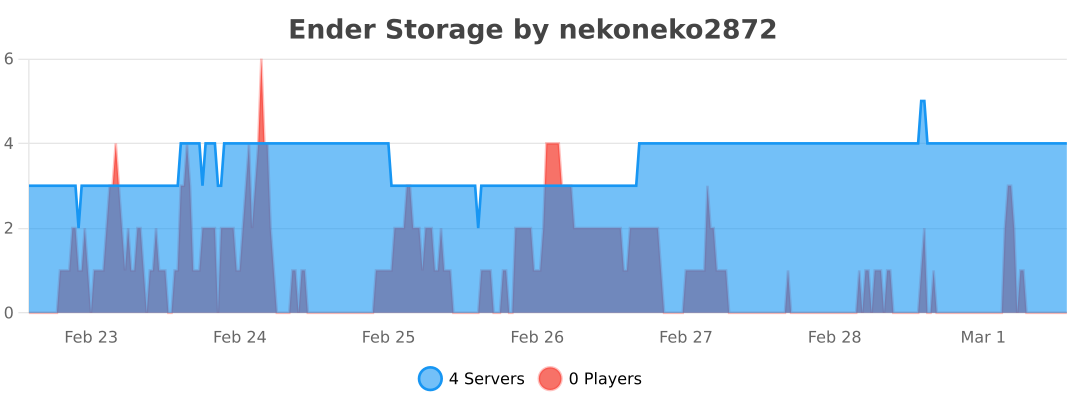
📈 bStats

bstats

❤️ Credits & Inspiration

This plugin implements the functionality of the famous EnderStorage mod (by ChickenBones) for Spigot/Paper servers. A huge thank you to the original mod author for the brilliant concept and inspiration!
If you are looking for the client-side/Forge/Fabric version, please support the original project:
👉 Original Mod: EnderStorage by ChickenBones

👥 Team & Contributors

nekoneko2872
nekoneko2872Owner

⚙️ Compatibility

Environment
🖥️ Server-side
Loaders
paperpurpurspigot
Minecraft Versions
1.201.20.11.20.21.20.31.20.41.20.51.20.61.21+11 more

🔗 Links

Modrinth Page