Logo
MINECRAFTBIBLE
Items
Items

All game items

Blocks
Blocks

Building blocks

Mobs
Mobs

Creatures & monsters

Biomes
Biomes

World biomes

Structures
Structures

Generated structures

Recipes
Recipes

Crafting guides

Advancements
Advancements

Achievements

Loot Tables
Loot Tables

Drop rates

Tags
Tags

Item groupings

All Versions
View all data →
Capes
Cape ArchiveNEW

Browse rare Minecon capes, OptiFine capes, and custom capes from players worldwide

Browse

Player Database
Player DatabasePopular

Search any player

Skin Browser
Skin Browser

Browse & download skins

Cape Gallery
Cape GalleryNEW

Minecon & OptiFine capes

Seed Vault
Seed Vault

Curated seeds

Learn

Guides
GuidesNew

Tutorials & tips

Blog
Blog

News & updates

Community

Community Hub
Community HubHub

Posts, discussions & more

All Versions
View community →
Seed Analyzer
Seed Analyzer

World seed analysis

Loot Explorer
Loot Explorer

Drop rates

Crafting Calculator
Crafting Calculator

Material planning

Enchant Calculator
Enchant Calculator

Probability math

Redstone Lab
Redstone Lab

Signal timing

Trading Profit
Trading Profit

Villager ROI

All Versions
View all tools →
Mods
Mods

Browse all mods

Plugins
Plugins

Server plugins

Resource Packs
Resource Packs

Textures & sounds

Shaders
Shaders

Visual enhancements

Datapacks
Datapacks

World logic

Scanner
Mod Intelligence

Scan & analyze any mod

All Versions
View all mods →
Loading...
IntroductionIntroductionVersion HistoryVersion HistoryGuidesGuidesBlog & NewsBlog & News
ItemsItemsBlocksBlocksMobsMobsRecipesRecipesBiomesBiomesStructuresStructuresAdvancementsAdvancementsLoot TablesLoot TablesTagsTags
ModsModsPluginsPluginsResource PacksResource PacksShadersShadersDatapacksDatapacks

MinecraftBible

The Ultimate Wiki

Logo
MINECRAFTBIBLE

The ultimate Minecraft reference. Every item, block, mob, and recipe documented with precision.

Community

  • Skin Browser
  • Cape Gallery
  • Seed Vault
  • Blog
  • Guides

Database

  • Items
  • Blocks
  • Mobs
  • Recipes
  • Biomes
  • Structures

Tools

  • Seed Analyzer
  • Mod Intelligence
  • Crafting Calculator
  • Enchant Calculator

Mods & Packs

  • Mods
  • Plugins
  • Resource Packs
  • Shaders
  • Datapacks

Site & Legal

  • About
  • Authors
  • Editorial Policy
  • Corrections
  • Contact
  • Privacy Policy
  • Terms of Service
  • DMCA
  • Sitemap

© 2026 MinecraftBible. Not affiliated with Mojang or Microsoft.

PrivacyTermsContact
EnderaLib
PluginMIT

EnderaLib

A library plugin for all other Endera plugins

1.3K
Downloads
3
Followers
6 months ago
Updated
📦
8
Versions
libraryutilityfoliapaperpurpur
Download Latestv1.4.6View on Modrinth

📖About EnderaLib

Create a server on Bisquit Host

EnderaLib: The Foundation for Powerful Paper 1.18+ Plugins

EnderaLib is a lightweight yet comprehensive utility library designed to streamline Paper plugin development in Kotlin. While it doesn't offer any standalone features for players, it provides a powerful toolkit for developers to build upon, allowing them to focus on creating innovative and engaging plugin experiences. It is also required for all other Endera plugins.

Key Features:

  • Simplified Configuration: Manage plugin settings effortlessly with built-in loading, saving, and validation using Kotlin Serialization and an intuitive API.
  • Robust Asynchronous Operations: Handle complex tasks asynchronously using optimized Bukkit dispatchers and simplified database interactions, ensuring smooth performance even with demanding features.
  • Intuitive Menu Creation: Craft dynamic and user-friendly menus with ease. EnderaLib's inventory management system simplifies the process of creating engaging inventory-based interfaces.
  • Adventure-Ready Text Formatting: Seamlessly integrate rich, formatted text into your plugins with built-in support for MiniMessage, making your chat messages and GUIs visually appealing.

Why Choose EnderaLib?

EnderaLib empowers developers to work smarter, not harder. By providing pre-built solutions for common tasks, it reduces boilerplate code and allows for a more efficient development workflow.

Getting Started:

  1. Add the Jitpack repository to your build.gradle.kts:
    repositories {
        maven("https://jitpack.io") 
    }
    
  2. Add the EnderaLib dependency:
    dependencies {
        implementation("com.github.Endera-Org:EnderaLib:1.4.5")
    }
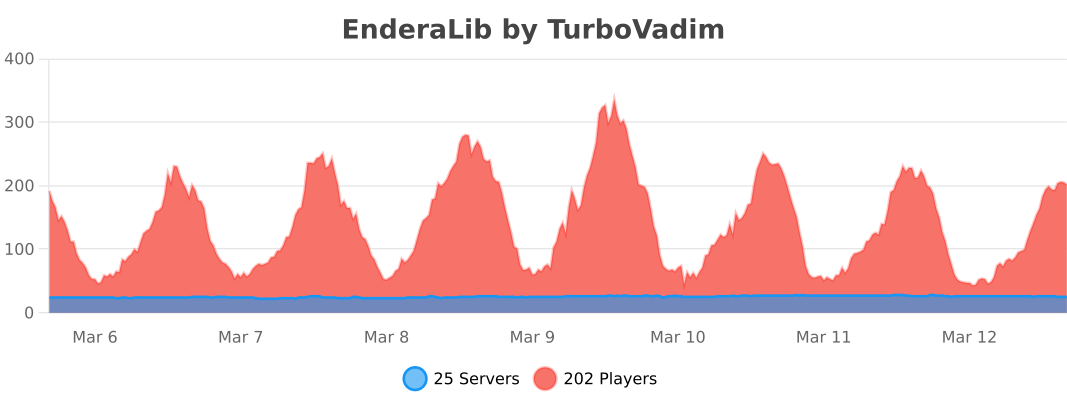
    

BStats

👥 Team & Contributors

No authors recorded.

⚙️ Compatibility

Environment
🖥️ Server-side
Loaders
foliapaperpurpur
Minecraft Versions
1.18.21.191.19.11.19.21.19.31.19.41.201.20.1+16 more

🔗 Links

Modrinth Page