


EmakiCooking | World-Placed Cooking Stations with Persistence
Seven distinct cooking stations placed as real blocks in the world — chopping board, wok, grinder, steamer, oven, juicer and fermentation barrel — each with its own mechanics, coordinate-persistent state, display entities, multi-branch outcomes, chained re
📖About EmakiCooking | World-Placed Cooking Stations with Persistence
EmakiCooking makes cooking a real-world interaction instead of a reskinned crafting menu. Players place station blocks in the world and right-click (or sneak-click) to chop, stir-fry, grind, steam, bake, press and ferment. Each station has its own genuinely different mechanics — heat levels, stir timing, fuel and moisture, fluid capacity, fermentation windows — and every station's state is saved by world coordinates so it survives restarts.
Outcomes are not binary. A wok can produce success, undercooked, overcooked or invalid results; an oven can hit perfect or overbaked; a fermentation barrel can finish early, on time or over-fermented. Station blocks and ingredients can be vanilla or custom (CraftEngine / ItemsAdder / Nexo / Oraxen), display entities show ingredients floating on the block, and every action can be gated by its own permission.
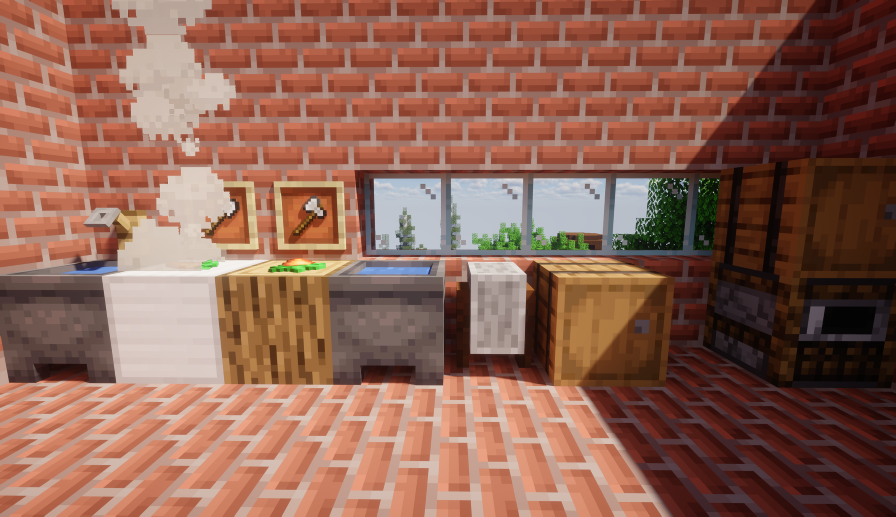
Key Highlights
- Seven genuinely different stations — Not seven skins of one mechanic. The chopping board cuts in batches, the wok is a stir-timing challenge, the grinder runs on a timer, the steamer manages fuel and moisture, the oven controls heat windows, the juicer handles fluid capacity, and the fermentation barrel runs long fermentation cycles.
- Coordinate-persistent state — Ingredients, progress, cut count, steam, heat, burn time, fluid volume and fermentation progress are all saved per world coordinate and restored after a restart.
- Display entities on the block — Ingredients and outputs float on the station via PacketEvents virtual entities, or fall back to Bukkit ItemDisplay when PacketEvents is absent, with configurable offset, rotation (including random ranges) and scale per station and per item.
- Floating text guidance — A text display entity above a running station shows the result, progress or next-step hint, always facing the player, and disappears when the station finishes, clears or breaks.
- Multi-branch outcomes — The wok alone yields success / undercooked / overcooked / invalid; the oven yields success / perfect / overbaked; the fermentation barrel yields success / early / over — each branch with its own outputs and actions.
- Custom block and item sources — Station blocks can be vanilla, CraftEngine, ItemsAdder, Nexo or Oraxen; ingredients, outputs, fuel, containers and tools can reference any ItemSource.
- Chained production lines — A recipe can require the input to carry a previous station's processing history (e.g. chopped carrot → steamed carrot cake), enabling multi-station production chains.
- Per-action permissions — Use, cut, stir, serve, fuel, moisture, press and collect are each their own permission node per station, plus optional per-recipe permissions.
Feature Overview
Chopping board (no GUI, direct interaction)
- Configurable block source (sample oak log) and tool (sample iron axe / kitchen knife).
- Sneak-left-click to place input / process, right-click to return input.
- Accepts a whole main-hand stack at once and accumulates the count in state, while the display still shows a single item.
input.amountis consumed per cut round;cuts_requiredis the clicks needed per round (set to 1 for continuous batch cutting).- Tool durability loss per cut, an optional extra-damage chance, and a config-level chance to hurt the player.
- An interaction cooldown between clicks, with cut / complete / place action hooks.
Wok (no GUI, timing challenge)
- Configurable block (sample iron block) and spatula (sample iron shovel).
- Each ingredient has a stir rule (e.g. add on stir 1–3) and an amount; a required heat level set by the block beneath (campfire = 1, magma = 2, lava = 3).
- A valid stir-total range, a fault tolerance, a minimum delay between stirs and a timeout that treats overcooking.
- Optional bowl-in-hand requirement to serve, a stir animation (the food tosses and rotates 360°), scald damage, and a random failure chance with an invalid-result fallback.
- Four real outcome branches: success / undercooked / overcooked / invalid, with stir / add-ingredient / serve action hooks.
Grinder (no GUI, simplest)
- Configurable block (sample grindstone); sneak-left-click to start.
- Place and it auto-starts — no fuel, moisture or stirring; a grind-time and a background check interval.
- Can output multiple items (sample bone → 3 bone meal), with start / running / complete hooks.
Steamer (GUI, fuel + moisture)
- Configurable block (sample barrel) and a 1-row GUI with five ingredient slots.
- A heat-source block beneath provides ignition; fuels provide burning time; moisture rules add water (e.g. a water bucket returns the empty bucket and adds moisture).
- Fuel burns to convert moisture into steam, and steam drives the progress, with three efficiency parameters and an option to reset progress when steam runs out.
- A recipe's required steam, plus chained recipes that require the input to carry a previous step's processing history.
- Success branch (and chaining), with fuel / moisture action hooks.
Oven (GUI, temperature control)
- Configurable block (sample smoker) and a 1-row GUI with five ingredient slots.
- A heat range that only advances the timer while in range, with per-second heat decay; fuels add both burning time and heat at once.
- A bake time plus a perfect-heat window and required ratio, and an overbake threshold.
- Tracks current heat, remaining burn time, accumulated bake time and bake stage.
- Three outcome branches: success / perfect (perfect-heat ratio met) / overbaked (turns to charcoal), with a fuel action hook.
Juicer (GUI, fluid + capacity)
- Configurable block (sample cauldron) and a 1-row GUI with five ingredient slots.
- Multiple presses required; each press produces a configurable fluid volume; a container (e.g. glass bottle) serves a configurable volume, so several presses may be needed to fill one serving.
- Config-level options for requiring a container, a maximum fluid volume, a default serving size and whether to drop the completed result on break.
- Only one fluid type is stored per station at a time to avoid mixing, with press / complete / serve action hooks.
Fermentation barrel (GUI, long cycle)
- Configurable block (sample barrel) and a 3-row GUI with seven ingredient slots.
- Multiple inputs (sample 3 apples + 1 sugar), a normal fermentation time, an early-collect progress threshold and an over-ferment threshold.
- Config-level options to pause progress while the GUI is open, require sealing before progress, and restrict inputs to recipe items.
- Three outcome branches: success / early (half-finished) / over (over-fermented conversion), with start / collect action hooks; auto-completion and offline conditions are treated as satisfied.
Cross-station systems
- Coordinate persistence: station state is written to a stations data folder and restored on restart (cut count, grind remaining, steam, heat, burn time, fluid volume, fermentation progress).
- Display entities: an auto backend uses PacketEvents virtual entities when available and falls back to Bukkit ItemDisplay, with a view distance and refresh interval, and per-station/per-item display adjustments (offset, rotation with random ranges, scale).
- Floating text entities: result/progress/next-step text above a running station, always facing the player, configurable billboard, line width, background, shadow, see-through, offset and scale.
- Custom block sources: a block source list can mix vanilla, CraftEngine, ItemsAdder, Nexo and Oraxen, matching any of them.
- Recipe completion conditions: an all-of / any-of / none-of / at-least / exactly condition group with expression entries, pass/fail actions and a block-output flag on failure.
- Result branch structure: each branch has an outputs list (always a list) and actions, with the branches each station supports.
- Chained recipes: an input must carry a previous recipe's processing-history PDC marker, enabling multi-station chains.
- Strict input rules: an optional mode that only allows items which can continue matching the current station's recipe to enter, globally or per station.
- Item adjustments: per-item display tweaks (offset / rotation / scale) per station.
- JavaScript scripting: a
cookingmodule with a result rule (registerResultRule, replace/append outputs or actions, cancel, priority-ordered, limited by stations/recipes) and a complete hook (onComplete); a sample script grants a bonus cookie from the oven.
Commands
| Command | Description |
|---|---|
/ec help |
Show help |
/ec reload |
Reload config, language, stations, recipes, GUI and item adjustments |
/ec inspect hand |
Inspect the held item's source and matching |
/ec debug |
Runtime debug |
Main command /ecooking, alias /ec.
Permissions
Base permissions (default: op except use):
emakicooking.use(default: true),emakicooking.reload,emakicooking.inspect,emakicooking.admin,emakicooking.debug
Fine-grained station permissions (all default: true):
- Chopping board:
chopping_board.use,.cut - Wok:
wok.use,.stir,.serve - Grinder:
grinder.use - Steamer:
steamer.use,.fuel,.moisture - Oven:
oven.use,.fuel - Juicer:
juicer.use,.press,.collect - Fermentation barrel:
fermentation_barrel.use,.start,.collect
Plus per-recipe permissions via each recipe's permission field.
PlaceholderAPI
Expansion identifier emakicooking:
%emakicooking_recipe_count%— total loaded recipes%emakicooking_recipe_count_<station>%— loaded recipes per station (chopping_board / wok / grinder / steamer / oven / juicer / fermentation_barrel)
Compatibility & Dependencies
| Item | Details |
|---|---|
| Java | 25 |
| Bukkit API | 1.21 |
| Server | Spigot / Paper and downstream forks |
| Folia | Supported |
| Required | EmakiCoreLib |
| Optional | PlaceholderAPI, CraftEngine, ItemsAdder, Nexo, Oraxen, PacketEvents |
When an optional dependency is missing, the matching custom block / virtual display gracefully degrades and the vanilla path still works.
Installation & Quick Start
- Install
EmakiCoreLib.jarfirst (required dependency). - Place
EmakiCooking.jarintoplugins/. - Start the server to generate the default station configs, recipes, GUIs and item adjustments.
- Configure station blocks / recipes / display settings, then
/ec reloadand place a station to test.
Links
- Documentation: https://jiuwu02.github.io/Emaki_Series/
- Discord: https://discord.gg/FV4GFQbvCM
- QQ Group: https://qm.qq.com/q/GqGrzHp0wU