

EmakiForge | Blueprint Forging & Quality Crafting
A blueprint-and-material forging system: blueprint-gated recipes, seven material effect types, a capacity budget, a six-tier quality system with pity and deterministic results, full result previews, tamper-proof audit signatures and forge history.
📖About EmakiForge | Blueprint Forging & Quality Crafting
EmakiForge turns crafting into a deep, configurable forging system. Players place a target item, the required blueprints and materials into the forge GUI; the module validates the recipe, capacity and conditions, then either rebuilds the forge layer on the player's own item (preserving its strengthen / gem / set state) or produces a brand-new item — writing attributes, skills, name, lore and a tamper-proof audit signature scaled by the rolled quality.
Nothing about the outcome is left vague. The materials a player invests shape the result's stats, quality and capacity; a deterministic quality algorithm makes the GUI preview accurate; and a pity mechanic guarantees a minimum quality after a streak of bad luck. Every recipe, material effect, quality tier and action hook lives in YAML.
Key Highlights
- Blueprint-gated recipes — A recipe can require the player to hold specific blueprint items, which are checked but never consumed, so unlocking a blueprint unlocks the ability to forge that recipe.
- Material contribution, seven effect types — Each material can inject text variables, write real attributes, bind skills, modify the result name or lore, force or floor the quality, or even grant extra capacity. The effect value scales by material amount and quality multiplier.
- Capacity budget — A forge-capacity limit caps the total material weight per craft, an optional-material limit caps optional inputs, and capacity-bonus materials can temporarily expand the budget — the GUI shows current/max/state live.
- Six-tier quality with pity and determinism — The default pool ranges from a reduced-effect tier through to Perfect (x1.2), with a pity guarantee after a configurable streak and a deterministic algorithm so the preview is accurate and re-submitting within a short window yields the same quality.
- Two output modes — Target-input mode rebuilds the forge layer on the player's existing item (keeping strengthen/gem/set state); fixed-output mode produces a new item, EmakiItem or external.
- Tamper-proof audit — Forging writes recipe id, quality, multiplier, timestamp and a material-contribution signature into the item, so admins and trade systems can verify it was not edited by an NBT tool.
- Full result preview — The GUI preview slot shows the possible output, the quality pool and the failure risk before the player commits.
- Forge history — Optional history records who forged what, with which materials, at what quality and time — for tracing high-value gear, settling disputes and tracking recipe popularity.
Feature Overview
Blueprints
- A recipe's blueprint requirement lists item sources and amounts; the player must hold them, but they are not consumed.
- Use it to gate recipes behind quests, shops or drops — discover the blueprint, then forge the recipe.
Material system and contribution
- Each material lists item sources, amount, capacity cost, an optional flag and an effects list.
- Seven material effect types:
- Text variables for name/lore templates (no PDC write).
- Real attribute writes into the EmakiAttribute PDC layer (needs Attribute).
- Skill binding via a skill-id list (needs EmakiSkills).
- Name actions on the result (prefix/suffix, reusing CoreLib's name-operation system).
- Lore actions on the result (anchored insertion, reusing CoreLib's lore-operation system).
- Quality modify (force a tier, or set a minimum).
- Capacity bonus (a material with zero capacity cost that instead grants extra capacity).
- The effect value follows: configured value x material amount x quality multiplier (variables stay text; attributes become real stats).
Capacity system
- A forge-capacity limit caps the total of all materials' capacity costs per craft.
- An optional-material limit caps how many optional materials can be added.
- Capacity-bonus materials can temporarily expand the budget.
- The GUI shows the live capacity (current / max / state: waiting-for-blueprint, normal, near-limit, over-limit).
Quality system
- The quality pool is configured globally and can be overridden per recipe.
- Six default tiers spanning a reduced-effect tier up to Perfect (x1.2), each with a weight and a multiplier that multiplies into material effect values.
- A pity guarantee: after a configurable streak with no high tier, the next craft is floored to a minimum quality, counted per player + recipe.
- A deterministic algorithm: identical inputs (player / recipe / materials / pity counter) produce the same quality within a short window, so the GUI preview is accurate, re-submitting within the window does not change it, and only changing materials or waiting it out re-rolls.
- Quality writes into item meta per tier: a colored name prefix, lore and actions; high tiers can trigger a server-wide broadcast with a hoverable item.
Recipe system
- A recipe defines id, display name, blueprint requirement, materials, capacity, optional-material limit, condition, quality, result, actions and permission.
- Conditions can gate by class, player level, equipment type, world/region or PDC markers, with op-bypass and an invalid-as-failure flag.
Two output modes
- Target-input mode (empty result source): does not create a new item; rebuilds the forge layer on the player's placed item, preserving its other-module state (strengthen / gem / set).
- Fixed-output mode (points to an item): forges a brand-new item, which can be an EmakiItem or an external plugin's item.
Action flow
- A pre-action runs before forging and aborts on failure (with reason/action/line variables).
- A result action runs as the result item is generated/applied.
- Success and failure actions run afterward (titles, sounds, messages).
- Result meta-actions run name/lore operations on the result after success.
Forge history
- Optional, with auto-save: records player UUID/name, recipe id, material list, quality, success/failure, timestamp and a result summary.
- Useful for tracing high-value gear origins, resolving "my materials vanished" disputes, and tracking recipe popularity; seasonal servers can archive it after an event.
Audit and tamper-proof signature
- Forging writes recipe id, quality, multiplier, forge time, a material-contribution signature, the output item and the material list into the item PDC.
- The signature verifies the forge data was not modified by an external NBT editor; admins can inspect it and trade systems can validate it.
GUI system
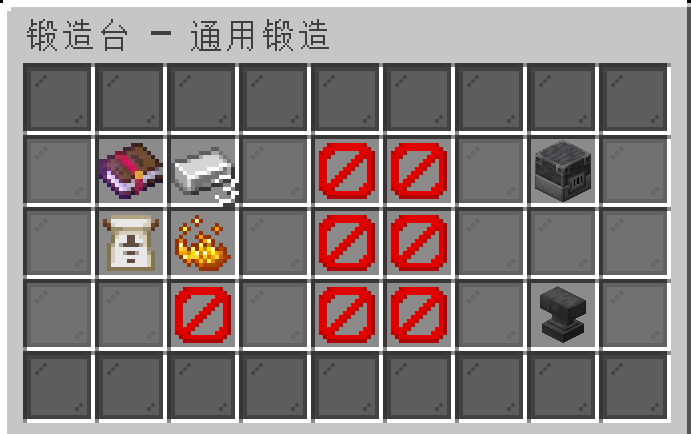
- Forge GUI: blueprint slot, required and optional material slots, a live capacity display, an anvil confirm button and a red over-capacity blocked state, with decorative borders.
- Recipe book: players browse available recipes, filtered by permission, enabled state and conditions.
- Editor GUI: admins edit blueprint/material/recipe resources at runtime.
- The GUI protects input slots, handles clicks, returns items and triggers the forge flow.
JavaScript scripting
- A
forgescript module exposes a forge success-rate rule (registerForgeRule) that can read the original/current rate, player, recipe and prior-rule trace, and return a rate / bonus / multiplier / cancel / message, priority-ordered and clamped 0–100, optionally limited to specific recipe ids. - A result hook (
onResult) runs after completion for rewards, broadcasts or logging. - A sample script ships disabled by default.
Reload and maintenance
- Reload re-reads recipes, GUI, language and runtime resources, with a release-default-data toggle and a configurable number format.
Commands
| Command | Description |
|---|---|
/ef help |
Show help |
/ef forge |
Open the forge GUI |
/ef book |
Open the recipe book |
/ef list recipe |
List loaded recipes |
/ef inspect |
Inspect the held item's forge audit |
/ef reload |
Reload configuration |
/ef debug [player|module|on|off] |
Debug info |
Main command /emakiforge, aliases /eforge, /ef.
Permissions
emakiforge.use— open the forge GUI and basic commands (default: true)emakiforge.book— open the recipe book (default: true)emakiforge.reload— reload configuration (default: op)emakiforge.debug— debug commands (default: op)emakiforge.admin— administrative commands (default: op)
PlaceholderAPI
Expansion identifier emakiforge:
%emakiforge_craft_count_<recipe_id>%— number of times a recipe has been forged%emakiforge_has_crafted_<recipe_id>%— whether the player has forged a recipe%emakiforge_total_crafts%— total forge count%emakiforge_guarantee_<key>%— current pity counter%emakiforge_recipe_count%— number of loaded recipes%emakiforge_last_crafted%— the last forged recipe id
Compatibility & Dependencies
| Item | Details |
|---|---|
| Java | 25 |
| Bukkit API | 1.21 |
| Server | Spigot / Paper and downstream forks |
| Folia | Supported |
| Required | EmakiCoreLib |
| Optional | EmakiAttribute, PlaceholderAPI |
Installation & Quick Start
- Install
EmakiCoreLib.jarfirst (required dependency). - Place
EmakiForge.jarintoplugins/. - Start the server to generate the default recipe, GUI, language and config.
- Configure blueprints / materials / quality / capacity, then
/ef reloadand test a forge.
Links
- Documentation: https://jiuwu02.github.io/Emaki_Series/
- Discord: https://discord.gg/FV4GFQbvCM
- QQ Group: https://qm.qq.com/q/GqGrzHp0wU