
MINECRAFTBIBLE
Loading...
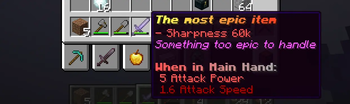

Rename, Items, Lore, Enchant Lore, Attribute Lore and more.
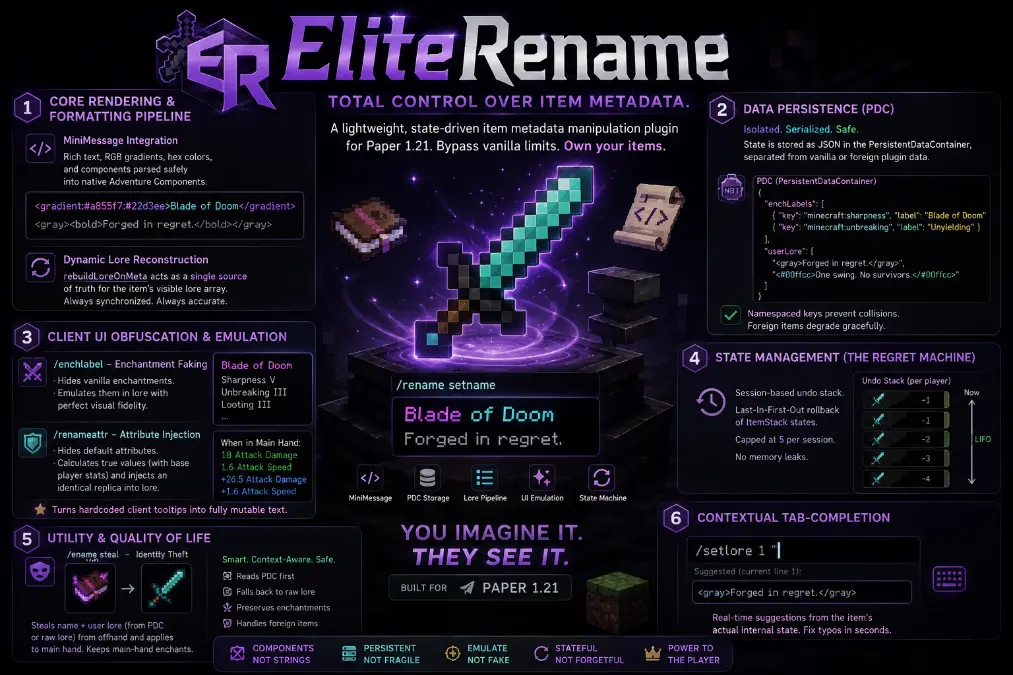
EliteRename is a lightweight, state-driven item metadata manipulation plugin designed for Paper 1.21. It bypasses rigid vanilla client-side rendering by utilizing persistent data storage and strict component recreation, granting users total control over item display names, lore arrays, enchantment displays, and attribute modifiers.
Core Rendering & Formatting Pipeline
MiniMessage Integration: Drops legacy string formatting in favor of the Adventure API’s MiniMessage, allowing for complex RGB gradients, hex colors, and rich text components (<!italic>, ) parsed safely into native Component objects.
Dynamic Lore Reconstruction: Utilizes a pipeline (rebuildLoreOnMeta) that acts as a single source of truth for the item's visible lore array. It concatenates custom enchant labels and user-defined lore on the fly, ensuring that UI updates remain synchronized with underlying data structures.
Data Persistence (PDC)
Isolated Storage: Rather than storing custom data in fragile string-based lore lines, the plugin serializes state into JSON arrays and objects using Gson and stores them directly in the item's PersistentDataContainer (PDC).
Namespaced Keys: Uses dedicated keys (KEY_ENCHANT_LABELS, KEY_USER_LORE) to separate plugin-managed data from vanilla NBT data or foreign plugin modifications, preventing collisions and allowing foreign items to degrade gracefully when edited.
Client UI Obfuscation & Emulation
Enchantment Faking (/enchlabel): Applies ItemFlag.HIDE_ENCHANTS to suppress the hardcoded client tooltip. It then prepends user-defined, non-italic gray text to the lore array, perfectly mimicking the vanilla enchantment display while allowing custom naming (e.g., changing "Sharpness" to "Blade of Doom").
Attribute Injection (/renameattr): Applies ItemFlag.HIDE_ATTRIBUTES to hide default weapon/tool modifiers. It reads the item's AttributeModifiers (or falls back to the material's vanilla defaults), factors in the base player entity stats (e.g., 1.0 base damage, 4.0 base speed), and injects a mathematically accurate, visually identical replica of the vanilla "When in Main Hand:" tooltip directly into the PDC lore array. This transforms hardcoded client attributes into fully mutable text.
State Management (The Regret Machine)
Session-Based Undo Stack: Maintains a transient, per-player Deque mapped by UUID.
LIFO Memory: Captures deep clones of the ItemStack immediately prior to any mutation. The stack is capped at 5 states per session to prevent memory leaks and acts as a Last-In-First-Out rollback mechanism, verifying item types match before restoring ItemMeta.
Utility & Quality of Life
Identity Theft (/rename steal): A context-aware cloning method that reads the ItemMeta of the offhand item, extracts its display name and PDC-stored user lore (falling back to raw lore for foreign items), and overwrites the main-hand item while preserving the main-hand's native enchantments.
Contextual Tab-Completion: The command router features deep tab-completion that queries the item's current internal state in real-time. For example, typing /setlore 1 dynamically serializes and suggests the exact MiniMessage string currently sitting on line 1, allowing for rapid in-place typo corrections.
commands:
  rename:
    description: Rename held item, reset it, undo a change, or steal identity from your offhand.
    usage: /rename [reset | undo | steal | <text...>]
    permission: elr.rename.player
  setlore:
    description: Set or replace a specific lore line.
    usage: /setlore <line> <text...>
    permission: elr.lore
  addlore:
    description: Append a new lore line.
    usage: /addlore <text...>
    permission: elr.lore
  removelore:
    description: Remove a specific lore line by number.
    usage: /removelore <line>
    permission: elr.lore
  clearlore:
    description: Strip all user lore from the held item.
    usage: /clearlore
    permission: elr.lore
  enchlabel:
    description: Apply a custom visual label to a specific enchantment.
    usage: /enchlabel <enchant> [<text...> | reset]
    permission: elr.enchant
  iteminfo:
    description: View metadata details for the held item.
    usage: /iteminfo [field]
    permission: elr.info
  renameattr:
    description: Hides vanilla attributes and converts them into editable lore.
    usage: /renameattr <true|false>
    permission: elr.renameattr

permissions:
  elr.rename.player:
    description: Allows regular players to use the /rename command.
    default: true
  elr.rename:
    description: Explicit admin grant for the /rename command.
    default: op
  elr.lore:
    description: Allows the use of /setlore, /addlore, /removelore, and /clearlore.
    default: op
  elr.enchant:
    description: Allows the use of the /enchlabel command.
    default: op
  elr.info:
    description: Allows reading item metadata using /iteminfo.
    default: true
  elr.renameattr:
    description: Allows Hiding of vanilla attributes and converts them into editable lore using /renameattr.
    default: true
  elr.admin:
    description: Full access to all EliteRename commands and features.
    default: op
Version 1.0 (Steal feature not yet working how I would prefer, it does work it just feels not... intrusive enough due to it looking at matching as needed)