Logo
MINECRAFTBIBLE
Items
Items

All game items

Blocks
Blocks

Building blocks

Mobs
Mobs

Creatures & monsters

Biomes
Biomes

World biomes

Structures
Structures

Generated structures

Recipes
Recipes

Crafting guides

Advancements
Advancements

Achievements

Loot Tables
Loot Tables

Drop rates

Tags
Tags

Item groupings

All Versions
View all data →
Capes
Cape ArchiveNEW

Browse rare Minecon capes, OptiFine capes, and custom capes from players worldwide

Browse

Player Database
Player DatabasePopular

Search any player

Skin Browser
Skin Browser

Browse & download skins

Cape Gallery
Cape GalleryNEW

Minecon & OptiFine capes

Seed Vault
Seed Vault

Curated seeds

Learn

Guides
GuidesNew

Tutorials & tips

Blog
Blog

News & updates

Community

Community Hub
Community HubHub

Posts, discussions & more

All Versions
View community →
Seed Analyzer
Seed Analyzer

World seed analysis

Loot Explorer
Loot Explorer

Drop rates

Crafting Calculator
Crafting Calculator

Material planning

Enchant Calculator
Enchant Calculator

Probability math

Redstone Lab
Redstone Lab

Signal timing

Trading Profit
Trading Profit

Villager ROI

All Versions
View all tools →
Mods
Mods

Browse all mods

Plugins
Plugins

Server plugins

Resource Packs
Resource Packs

Textures & sounds

Shaders
Shaders

Visual enhancements

Datapacks
Datapacks

World logic

Scanner
Mod Intelligence

Scan & analyze any mod

All Versions
View all mods →
Loading...
IntroductionIntroductionVersion HistoryVersion HistoryGuidesGuidesBlog & NewsBlog & News
ItemsItemsBlocksBlocksMobsMobsRecipesRecipesBiomesBiomesStructuresStructuresAdvancementsAdvancementsLoot TablesLoot TablesTagsTags
ModsModsPluginsPluginsResource PacksResource PacksShadersShadersDatapacksDatapacks

MinecraftBible

The Ultimate Wiki

Logo
MINECRAFTBIBLE

The ultimate Minecraft reference. Every item, block, mob, and recipe documented with precision.

Community

  • Skin Browser
  • Cape Gallery
  • Seed Vault
  • Blog
  • Guides

Database

  • Items
  • Blocks
  • Mobs
  • Recipes
  • Biomes
  • Structures

Tools

  • Seed Analyzer
  • Mod Intelligence
  • Crafting Calculator
  • Enchant Calculator

Mods & Packs

  • Mods
  • Plugins
  • Resource Packs
  • Shaders
  • Datapacks

Site & Legal

  • About
  • Authors
  • Editorial Policy
  • Corrections
  • Contact
  • Privacy Policy
  • Terms of Service
  • DMCA
  • Sitemap

© 2026 MinecraftBible. Not affiliated with Mojang or Microsoft.

PrivacyTermsContact
EffectsPLUS
PluginMIT

EffectsPLUS

An SMP Plugin where each player upon joining gets assigned an effect with different rarities. Effects are bound to a player until death or rerolled/withdrawn. Includes a bounty system and a chaos mode adding rewards for combat and adds dynamic gameplay.

49
Downloads
3
Followers
2 months ago
Updated
📦
3
Versions
game-mechanicsbukkitpaperpurpur
Download Latestv1.1-RELEASE-1.4SView on Modrinth

📖About EffectsPLUS

EffectsPLUS Plugin

A plugin made by, well, me.

Features:

Effects system:

  • Upon joining for the first time a player acquires a random vanilla effect from one of the four rarity effect pools (Common, Rare, Cursed, Legendary)

  • Common and Rare share the same pool of effects - all in game effects, wgile Legendary and Cursed follow the same which only includes five effects (Strength, Speed, Invisiblity, Jump Boost, Dolphins Grace)

  • Cursed effects and Legendary effects have the same amplifier boosts, just cursed gives a debuff ontop of it (e.g with Cursed Strength you lose HP every tick and to regenerate you must eliminate mobs regenerating 2 hearts, and legnedary jump boost allows you to deal damage by jumping upon a mob)

Rerolling system:

  • When the player performs /reroll, you must have 10 or more diamonds in your inventory, if so you are able to reroll|

Withdraw system:

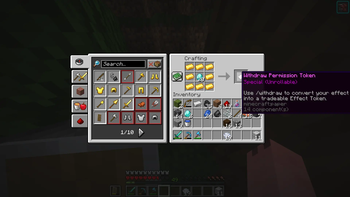
  • To withdraw your effect for reasons such as trading or saving it for later, you must first craft a withdraw token.

  • A withdraw token is crafted with 8 gold ingots surrounding 20 diamonds in the middle of the crafting grid.

  • Perform a /withdraw whilst having the item in your inventory to withdraw your effect in form of an "Effect Paper" which states the effect aswell as its rarity

Bounty and Death punishments:

  • Upon death the player loses their effect as well as all the bounty they had, if killed the person who killed gains the victims bounty.

  • When a player dies to another player they drop their current effect in form of an "Effect Paper", if they die to a natural death then they drop it as a "Crude Effect Paper"

Cruded Effects:

  • When you die to natural death you drop a "Crude Effect Paper" that cannot be used until refined, using the /refine command. You have to craft a refining paper and put your crude effect as well as the refining token/paper into the GUI that appears to process it.

Other commands:

  • Performing /chaos starts a timer that counts down and performs a random event from an event list, such as randomization of everyones effects, mobs becoming significantly stronger, etc

  • Performing a /BH command checks if the player who ran it is an operator, if they are, it swaps their gamemode from survival to creative and vise-versa - providing an easy way to swap gamemodes without the struggle of typing the entire command.

👥 Team & Contributors

ayaan.kothari2004
ayaan.kothari2004Owner

⚙️ Compatibility

Environment
🖥️ Server-side
Loaders
bukkitpaperpurpur
Minecraft Versions
1.211.21.11.21.21.21.31.21.41.21.51.21.61.21.7+4 more

🔗 Links

Modrinth Page