

EasyTrade
The better player-to-player trade plugin with vault compatibility. Shared live-synced GUI, visual countdown, Vault money support, trade history all in one small jar.
📖About EasyTrade
EasyTrade v2.2 - Available from 26.1.2 to 1.8.X
Scam-proof trading, lightweight, fast, customizable
Stop risky trades and clunky plugins.
EasyTrade delivers a clean, secure and modern trading system with shared GUI, countdown confirmation, Vault support and optional SQL, all in a lightweight jar.
🚀 Why EasyTrade?
- ✅ Scam-proof (double validation + countdown)
- 🔄 Real-time shared GUI (no desync, no confusion)
- ⚡ Lightweight (<110KB, no bloat)
- 💰 Vault money support (with tax)
- 🗄️ Optional MySQL (not required)
- 🎨 Fully customizable GUI (items + slots)
- 🔒 World restrictions
- 🙈 Privacy options (hide distance and world)
- 📜 Trade history
- 🌍 Multi-version support (1.8 to latest)
✨ Core Features
- Secure trading system where items only transfer after both players confirm and countdown ends
- Shared inventory GUI where both players interact with the same interface in real-time
- Money exchange with Vault integration and configurable tax system
- Trade history with
/tradehistory - DND mode with
/tradetoggle - Cooldown system to prevent spam
- Item limit per trade
- Optional proximity check
- Auto-cancel if a player leaves or closes GUI
🆕 What's new in v2.2
🗄️ SQL / MySQL support (optional)
- Store trade logs in a database instead of flat files
- Works without SQL by default
- Enable in config, reload, done
/tradesqlto check connection status- Automatic fallback if connection fails
🙈 Privacy controls
- Hide player distance with
show-distance - Hide player world with
show-world - Independent toggles for full control
- Perfect for PvP and privacy-focused servers
🔒 World restrictions
- Enable trading only in selected worlds with
enabled-worlds - Empty list means enabled everywhere
- Commands blocked in restricted worlds
- GUI shows players in disabled worlds
- Clicking them sends an info message instead of a request
🎨 GUI customization
- Customize materials and slot positions
- Full control over GUI layout
- Built-in validation with startup checks
🔔 Update checker
- Checks for updates on startup and every hour
- Notifies admins in-game and console
- Direct link to Modrinth page
- Can be disabled in config
⚙ Configuration
- Single clean
config.yml - Fully commented in English and French
Auto-migration system
- Keeps your values when updating
- Adds new options automatically
- Restores missing sections if needed
Config sections
- SQL / Database
- GUI customization
- World restrictions
Apply changes instantly with /tradereload
🔧 How it works
/tradeand select a player- Add items in your side of the GUI
- Optional money with Vault
- Click the emerald block to confirm
- Both players confirm and countdown starts
- Trade completes safely
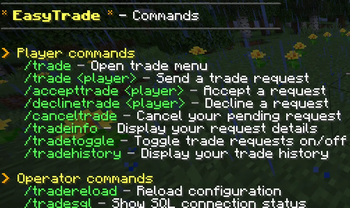
⌨ Commands
| Command | Description | Permission |
|---|---|---|
/trade |
Open menu | — |
/trade <player> |
Send request | — |
/accepttrade <player> |
Accept | — |
/declinetrade <player> |
Decline | — |
/canceltrade |
Cancel request | — |
/tradeinfo |
Request info | — |
/tradetoggle |
Toggle DND | — |
/tradehistory [n] |
History | — |
/tradehelp |
Help | — |
/tradereload |
Reload config | tradeplugin.reload |
/tradesql |
Check SQL status | — |
💡 Notes
SQL requirement
The MySQL driver is NOT included in the plugin to keep it lightweight.
You must download mysql-connector-java-8.0.28.jar HERE :
https://repo1.maven.org/maven2/mysql/mysql-connector-java/8.0.28/mysql-connector-java-8.0.28.jar
And place it in :plugins/EasyTrade/libs/mysql-connector-java-5.1.49.jar
Supported versions
- 1.8.x
- 1.9 to 1.12.x
- 1.13+
⭐ Support
Discord: https://discord.gg/7hMnjzZkYQ
Web contact : https://oriax.fr/