Logo
MINECRAFTBIBLE
Items
Items

All game items

Blocks
Blocks

Building blocks

Mobs
Mobs

Creatures & monsters

Biomes
Biomes

World biomes

Structures
Structures

Generated structures

Recipes
Recipes

Crafting guides

Advancements
Advancements

Achievements

Loot Tables
Loot Tables

Drop rates

Tags
Tags

Item groupings

All Versions
View all data →
Capes
Cape ArchiveNEW

Browse rare Minecon capes, OptiFine capes, and custom capes from players worldwide

Browse

Player Database
Player DatabasePopular

Search any player

Skin Browser
Skin Browser

Browse & download skins

Cape Gallery
Cape GalleryNEW

Minecon & OptiFine capes

Seed Vault
Seed Vault

Curated seeds

Learn

Guides
GuidesNew

Tutorials & tips

Blog
Blog

News & updates

Community

Community Hub
Community HubHub

Posts, discussions & more

All Versions
View community →
Seed Analyzer
Seed Analyzer

World seed analysis

Loot Explorer
Loot Explorer

Drop rates

Crafting Calculator
Crafting Calculator

Material planning

Enchant Calculator
Enchant Calculator

Probability math

Redstone Lab
Redstone Lab

Signal timing

Trading Profit
Trading Profit

Villager ROI

All Versions
View all tools →
Mods
Mods

Browse all mods

Plugins
Plugins

Server plugins

Resource Packs
Resource Packs

Textures & sounds

Shaders
Shaders

Visual enhancements

Datapacks
Datapacks

World logic

Scanner
Mod Intelligence

Scan & analyze any mod

All Versions
View all mods →
Loading...
IntroductionIntroductionVersion HistoryVersion HistoryGuidesGuidesBlog & NewsBlog & News
ItemsItemsBlocksBlocksMobsMobsRecipesRecipesBiomesBiomesStructuresStructuresAdvancementsAdvancementsLoot TablesLoot TablesTagsTags
ModsModsPluginsPluginsResource PacksResource PacksShadersShadersDatapacksDatapacks

MinecraftBible

The Ultimate Wiki

Logo
MINECRAFTBIBLE

The ultimate Minecraft reference. Every item, block, mob, and recipe documented with precision.

Community

  • Skin Browser
  • Cape Gallery
  • Seed Vault
  • Blog
  • Guides

Database

  • Items
  • Blocks
  • Mobs
  • Recipes
  • Biomes
  • Structures

Tools

  • Seed Analyzer
  • Mod Intelligence
  • Crafting Calculator
  • Enchant Calculator

Mods & Packs

  • Mods
  • Plugins
  • Resource Packs
  • Shaders
  • Datapacks

Site & Legal

  • About
  • Authors
  • Editorial Policy
  • Corrections
  • Contact
  • Privacy Policy
  • Terms of Service
  • DMCA
  • Sitemap

© 2026 MinecraftBible. Not affiliated with Mojang or Microsoft.

PrivacyTermsContact
EasyRadio
PluginMIT

EasyRadio

Minimalistik Radio Plugin, that have, waves, speak support, and more!

37
Downloads
2
Followers
2 months ago
Updated
📦
1
Versions
decorationgame-mechanicssocialspigot
Download Latestv0.9View on Modrinth

📖About EasyRadio

EasyRadio

What does the plugin do?
So the plugin adds a radio that really works, and looks vanilla.

How to build a radio
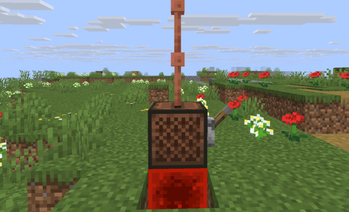
To build a radio player should build Redstone block, on redstone block set a Jukebox and on Jukebox set so much Lightning Rods that which Wave do player want to have, for example when player set only 1 Lightning Rod then the radio will be at 1st wave, when the player want to only hear radio this is enough, but when player also want to make sound to the radio, player should set a Lever on any side of Jukebox, so to finish the radio player should sit down and click with right click on the Jukebox, this is it, the radio is made, the player can hear all that is at the wave which he placed. So when player want to speak to the radio, player should pull the Lever on and speak with voice chat, all who have the same wave that this player will hear the player.
So when someone speaks on the Wave, no one more can speak at this wave until someone end speak. (When the Lever pulled on then This radio is speaking, this mean when player ended speak he should set Lever off)
How should the Radio look like

Commands:

(the /er and /easyradio command is the same )

  1. /er wave (wave number) set sound (sound) = Set the sound at wave that you want.
  2. /er wave (wave number) deletesound = Delete sound (When he was set) at wave that you want.
  3. /er reload = reload the config

Config:

# ==========================================
# EasyRadio Configuration
# ==========================================

messages:
  prefix: "&8[&bEasyRadio&8] &r"
  no_permission: "&cNo permission to use this command."
  config_reloaded: "&aEasyRadio configuration reloaded successfully."
  invalid_wave: "&cInvalid wave number. Please enter a valid number."
  sound_set: "&aServer sound &e%sound% &ais now playing on wave &b%wave%&a."
  sound_removed: "&aServer sound removed from wave &b%wave%&a."
  usage: "&eUsage: /er reload | /er wave <num> set sound <sound> | /er wave <num> deletesound"
  radio_created: "&aRadio successfully created! Tuned to wave: &b%wave%"
  radio_failed_reqs: "&cTo create a radio, you need a Redstone Block below, a Jukebox, and at least 1 Lightning Rod above!"
  radio_destroyed: "&cRadio destroyed!"
  rods_changed: "&eLightning rods changed. Shift+RightClick the radio to update the wave!"

settings:
  max_waves: 5
  max_server_radios: 50
  max_player_radios: 10

Config Explain

"max_waves: " = How much waves do all radios have.
"max_player_radios: " = How much Radios can make 1 player.
"max_server_radios: " = How much Radios can be at the full server.

Important:

  1. Dependencies: Simple Voice Chat
  2. Tested Version: 1.21.11

👥 Team & Contributors

VovchikCraft
VovchikCraftOwner

⚙️ Compatibility

Environment
🖥️ Server-side
Loaders
spigot
Minecraft Versions
1.211.21.11.21.21.21.31.21.41.21.51.21.61.21.7+7 more

🔗 Links

Modrinth Page